Recently I did a ConfigMgr Current Branch upgrade. To import driver packages easily I like to use additional Dell and/or HP tools to import driver packages. This time however the HP tool has some new functionality. Let's have a look at this first.
The HP Client Integration Kit for ConfigMgr has an update on 03/31/2016 with the following changes:
- Provides the Client Integration plug-in for ConfigMgr 1511 or 2012 R2 SP1 CU1 or later or 2012 SP2 CU1 or later.
- Adds the ability to create and import custom driver pack or import drivers only.
- Adds the ability to enter the keyword to search for HP product name when creating and importing driver pack.
- Adds the ability to sort the category such as driver name, version, SoftPaq number when selecting driver to import
- Adds the ability to choose the type of download file such as FTP or HTTP. By default, CIK uses HTTP.
- Adds BitLocker to CIK task sequence examples
- Revises the pop up messages when the server does not meet the requirement.
- Updates the CIK installer to fix the copyright string.
- Updates the CIK User Guide and ConfigMgr & CIK support matrix.
Let's have a look in the ConfigMgr console now:
There are 3 buttons in the ribbon now, one for 'Create and Import Driver Pack' one for 'Download and Import Driver Packs' and one for 'Import Downloaded Driver Pack'.
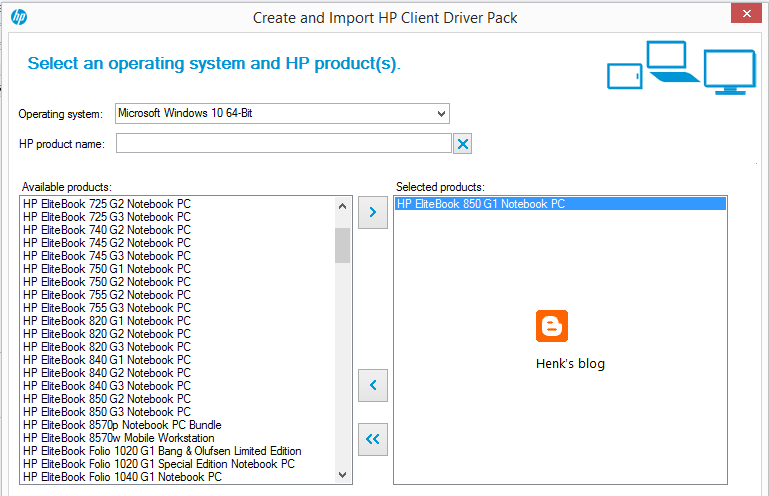
When choosing 'Create and Import Driver Pack' you can search on types/models and select which driver(s) must be part of it. This is the latest add-on available! That way you can create driver packages yourself, and decide which driver must be part of it. Therefore searching on the HP website yourself isn't needed anymore. Just great that a new feature is part of this ConfigMgr integration.
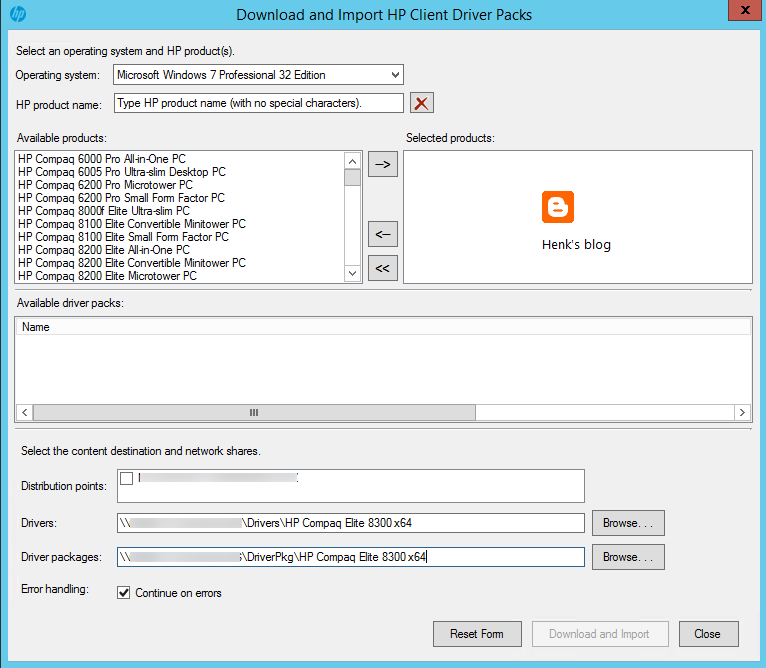
When choosing 'Download and Import Driver Pack' you can search on types/models and download/import driver packs, but no selection on drivers is possible. When choosing 'Import downloaded driver packs' you must download them manually and import them afterwards (as usual).
Download HP CIK right away!
More blogposts about importing driver packs:
HP Client Integration Kit for ConfigMgr 2012 R2 (update)
HP Client Integration Kit for ConfigMgr 2012 R2
Download Driver packages for Dell, HP and Lenovo systems
To import driver packages easily I like to use additional Dell and/or HP tools to import driver packages. This time the HP Client Integration Kit for ConfigMgr 2012 R2 has another update on 9/8/2015 with the following changes:
- Added support of Windows 10 working with ConfigMgr 2012 SP2 and R2 SP1.
- Implemented new signed version of BCU 4.0.13.1 that fixes the TPM issue.
- Updated CIK installer to comply with HP name change.
- Picked up HPQPswd 1.1.19.1.
- Improved the download and import driver process.
Strange this is that after installing the update, no downloads for Windows 10 are available. When looking on HP driver packs (32-bit/64-bit) no Windows 10 packages are available either. Seems that HP is a little late with creating the packs. Download additional drivers (one-by-one) for specific types/models is the only option available. Seems that Dell did a better job this time :)
Download HP CIK right away!
More blogposts about importing driver packs:
HP Client Integration Kit for ConfigMgr 2012 R2 (update)
Download Driver packages for Dell, HP and Lenovo systems HP Client Integration Kit for ConfigMgr 2012 R2
Recently I did another ConfigMgr 2012 implementation. To import driver packages easily I like to use additional Dell and/or HP tools to import driver packages. This time however the HP tool has some new functionality. Let's have a look at this first.
The HP Client Integration Kit for ConfigMgr 2012 R2 has an update on 05/15/2015 with the following changes:
- New feature: Software Library > Overview > Operating Systems > Driver Packages > Download and Import HP Client Driver Packs - The ability to select products to download and import HP built driver packs in ConfigMgr.
- The ability to select distribution points in the following operations:
+ Download and Import HP Client Driver Packs
+ Import Downloaded HP Client Driver Packs
+ Create HP Client Boot Image
- Software Library > Overview > Application Management > Packages > HP Client Support Packages > HP Client BIOS Configuration Utility includes the new versions of BCU 4.0.11.1 and HPQPswd 1.1.18.1.
- The Windows XP task sequence example is removed.
Let's have a look in the ConfigMgr console now:
There are 2 buttons in the ribbon now, one for 'Download and import driver packs' and one to 'Import downloaded driver packs'.
When choosing 'Download and import driver packs' you can search on types/models and download/import driver packs right away! Just a great improvement on this ConfigMgr add-on!
When choosing 'Import downloaded driver packs' you must download them manually and import them afterwards (as usual).
Download HP CIK right away!
More blogposts about importing driver packs:
Download Driver packages for Dell, HP and Lenovo systems
HP Client Integration Kit for ConfigMgr 2012 R2
Today I installed the HP Client Integration Kit for ConfigMgr 2012 R2. The HP Client Integration Kit (HP CIK) is a plug-in for ConfigMgr that improves the customer experience in deploying Windows XP and Windows 7 images to HP-managed clients. The same is seen in Dell Client Integration Pack.
This is achieved through the following custom features:
-Importing WinPE and HP platform driver packs
-Integration of the BIOS Configuration utility, which allows the customer to configure BIOS settings during deployment
-Basic OS task sequences highlighting HP’s custom steps
The HP CIK is installed on the same server as ConfigMgr, and can be accessed through the System Center console on the server. Read the Release Notes and download the HP CIK.
Just great that HP offers same functionality as Dell now!