Sponsor post
It’s here! Veeam Availability Suite v9 delivers Availability for the Always-On Enterprise by providing recovery time and point objectives (RTPO) of less than 15 minutes for ALL applications and data.
Watch the webinar to see what’s new in Veeam Availability Suite v9. We’ll show you how v9 helps you leverage modern storage and the cloud, and we’ll explore v9’s top features, including the following:
-EMC VNX and VNXe hybrid storage array integration
-Veeam Cloud Connect with replication
-Veeam Explorer for Oracle
-Unlimited Scale-out Backup Repository
-On-Demand Sandbox for Storage Snapshots
Duration: 53:59 / View slides
Sponsor post
Veeam is happy to announce that Veeam Availability Suite v9 is now generally available (GA) and ready for download! This latest version is packed with so many new features that it's difficult to talk about them all on this blog, but I highly recommend you check out the What's New in Veeam Backup & Replication v9 document because it's packed with details about all the new things we've up into v9 (read also What's New in Veeam ONE v9).
Veeam Availability Suite delivers something fundamentally different — Availability for the Always-On Enterprise — leveraging IT investments in server virtualization, modern storage and the cloud.
Veeam Availability Suite combines the industry-leading backup, restore and replication capabilities of Veeam Backup & Replication with the advanced monitoring, reporting and capacity planning functionality of Veeam ONE. It delivers everything you need to reliably ensure and manage your VMware vSphere and Microsoft Hyper-V environments, providing you with a high Availability data center.
For more have a look at there posts:
Veeam products: Availability for the Always-On Enterprise
Veeam Backup & Replication. What’s New in v9? (PDF)
Veeam Availability Suite blog: v9 is HERE!
Happy reading!
From Henk's blog (and sponsors) we wish you all a Happy New Year! Thanks for visiting my blog, and hope you liked all information last year about Microsoft System Center and Microsoft Intune.
Expect more to come in 2016 again!
#HappyHolidays
Sponsor post
Driving sales and exceeding goals are easy when you’re selling a solution that drives better IT decision making for your customer’s Always-On Business.
Veeam Management Pack (MP) v8 for System Center provides data-driven insights into business-critical applications, allowing your customers to track performance trends, analyze operational metrics and ensure the delivery of predictable SLAs.
Veeam MP v8 makes selling effortless by providing your customers with:
-Complete visibility into their Hyper-V, vSphere and Veeam backup infrastructures
-Leveraged data through real-time, in-context dashboards and heatmaps with drill-down capabilities to proactively resolve problems and meet SLAs
-Cloud capacity planning with hybrid cloud forecasting reports to analyze onsite workloads and IaaS requirements to migrate those workloads to the cloud
Sponsor post
LEARN POWERSHELL - From Basics To A Coding Star
With the release of Windows 2012, Microsoft's PowerShell has moved toward automation. Our courses are designed to help you become familiar with the powerful PS scripts. And it’s FREE!
Kickstart your PowerShell experience
The first episode we will focus on taking your first steps into the PowerShell world (Understanding CMDlets, Storing Values, Looping, The Pipeline)
Getting stuff done with PowerShell
The second episode we will focus on some simple scripts and useful available options unique to PowerShell (Reporting, Job Scheduler, Creating your Own Scripts, Remote Execution)
Automate your Veeam Experience
The last episode we will focus on Veeam integration with PowerShell (Custom Reporting, Creating Jobs, Mass Job Updates, Custom Scheduling)
Join the FREE courses now!
From Henk's blog (and sponsors) we wish you all a Happy New Year! Thanks for visiting my blog, and hope you liked all information last year about Microsoft System Center and Microsoft Intune.
Expect more to come in 2015 again!
#HappyHolidays
Sponsor post
Veeam Special Offers until the end of December: Take on the NEW v8
There are only 2 weeks left to save with these special offers before the price increase! Improve your modern data center with 200+ new features and improvements of the NEW Veeam Availability Suite v8, including Veeam Backup & Replication v8:
Save up to 10% + upgrade to v8 for free
Offer ends December 31st
Veeam Special Offers
Or have a look at Full list of Veeam's special offers and promos
Happy holidays!
Sponsor post
Veeam Availability Suite v8 is NOW AVAILABLE for VMware vSphere and Microsoft Hyper-V!
Veeam Availability Suite v8 delivers Availability for the Modern Data Center to enable the Always-On Business. This new suite provides recovery time and point objectives (RTPO) of < 15 minutes for ALL applications and data through:
High-speed recovery: Rapid recovery of what you want, the way you want it
Data loss avoidance: Near-continuous data protection (near-CDP) and streamlined disaster recovery
Verified protection: Guaranteed recovery of every file, application or virtual server, every time
Leveraged data: Using backup data to create an exact copy of your production environment
Complete visibility: Proactive monitoring and alerting of issues before they result in operational impact
Sponsor post
New: Veeam Task Manager for Hyper-V
Free tool for real-time Hyper-V performance monitoring
Improve troubleshooting in your Hyper-V environment by seeing what Windows Task Manager doesn’t show you. Veeam Task Manager for Hyper-V displays a real-time view of CPU and memory at the individual VM level so you can identify which VMs are using the host resources.
This lightweight tool is portable so you can run it from any USB device for emergency troubleshooting. No installation or integration needed!
Get the critical visibility you need.
Download the FREE Veeam Task Manager today
Sponsor post
Patch 4 for Veeam Backup & Replication v7 is now available and contains a host of resolved issues as well as new features and enhancements, including:
- VMware Virtual SAN (VSAN) support: Added full VSAN support and enhanced the intelligent load-balancing engine to account for VSAN specifics, minimizing backup traffic on a VSAN cluster network, and thus reducing impact from backup activities on the production environment.
- Microsoft SQL Server 2014 support: Added support for SQL Server 2014 as the protected guest workload and the back-end database for backup and Enterprise Manager servers.
- License key auto update: Added an automated license key update option to the license Information dialog. When enabled, backup server will start checking the Veeam licensing server for an updated license key periodically. Once the new key is available, it will be downloaded and installed automatically, eliminating the need for manual import.
For a complete list of new features and resolved issues, and to download Patch 4, check out the following Veeam KB article: KB1891.
Sponsor post
Join us this Friday, June 27th for our Quick- Xian SNMP Device Simulator demo at 9 AM EST (New York)/ 15:00 PM CET (Zurich/Amsterdam) / 18:30 AM IST (New Dehli).
Prize: Participants can join our raffle to win a small bundle license. This license allows you to simulate up to 50 devices!
What you’ll learn in this demo:
- Add several IP addresses for simulation automatically with our IP Manager.
- Capture the exact same behavior of a real device with our Device Recorder and test systems without any risks.
- Learn the basic procedure to simulate SNMP based devices.
- Simulate changes on different device components and understand how systems interacting with these components react.
- Learn how to simulate a specific dynamic behavior over and over again with the Historical simulation feature.
- Learn how to export/import devices configurations and information for backup purposes or to reuse them later on.
- Perform several operations like simulating devices and importing configurations through the command prompt or a script.
Sponsor post
The Soccer World Cup emotion got to us! Just for its duration enjoy a 30% discount on our products:
Offer does not include software maintenance renewals!
Place your order on or before Sunday, July 13th and score with a top solution!
Sponsor post
Today I received a message from Veeam that a Free Study Guide for the Microsoft 74-409 exam on Server Virtualization with Windows Server Hyper-V and System Center is available!
With this new study guide you can learn how to create and configure virtual machine settings, virtual machine storage and virtual networks. This guide covers each of the Microsoft exam objectives.
Just great if you ask me so use it to your advantage!
Sponsor post
A long time ago in a galaxy far, far away...
It is a period of data recovery wars. Join us in May for three episodes of epic Whiteboard Fridays: Recovery Wars saga and become true Virtualization Jedi!
Master your skills during these episodes:
- May 13. Episode IV - A New Host: learn how to prepare for disaster, document your environment, ensure your backups and configure backup
- May 20. Episode V - The Admin Strikes Back: be prepared for recover process of the datacenter and primary VM’s, learn how to rebuild your environment effectively
- May 27. Episode VI - Return of the Admin: deep dive into restoring services, best practices around restores, focus on the getting services up and running for the end-users.
Register for a chance to win new Google Glass! Also, we’ll be giving away 15 pizza coupons at every show!
Sponsor post
Veeam is launching the World’s Premiere Data Protection Conference with the chance to dive deep into valuable data protection techniques and solutions. There's no better place and time to connect with the Veeam community, meet friends, establish new relationships and build buzz!
Join us at VeeamON 2014 to discover a new level of availability for your Modern Data Center. Pre-register today to qualify for introductory pricing. VeeamON 2014 is scheduled on October 6-9 2014.
Sponsor post
Veeam is glad to announce their first new feature in the upcoming Veeam Backup & Replication v8 release - NetApp Snapshot Support! With this release their will be better NetApp integration.
Integration of NetApp and Veeam allows you to achieve:
-Fast backups: back up VMware VMs from NetApp storage snapshots up to 20 times faster
-Quick recovery: easily recover individual items from NetApp Snapshot, SnapMirror and SnapVault
-Improved protection: improve DR protection by creating instant, secondary backups from NetApp snapshots
You can learn more here or read Luca Dell'Oca’s postTheir is also a webinar on April 17th
NetApp integration will be included in Veeam Backup & Replication v8, which will be generally available in the second half of 2014.
Sponsor post
Today I want to share some big news from Veeam!
Veeam is about to get its 100,000th customer and is launching an interactive contest for a chance to win a trip around the world and other prizes (Google Glass, iPad and Microsoft Surface).
To participate, you need to register and predict the location of Veeam’s 100,000th customer on the interactive map. The closer you are to the right spot, the better chance you have to win the trip around the world and other prizes.
We currently have a live pre-registration page. The main contest will start next week. Join in on the fun!
Guess the location here: http://world.veeam.com/
For more information: http://world.veeam.com/veeam_tc_2014.pdf
I registered already. You too?
Update: Please follow the link below to get access to the contest page: http://world.veeam.com/map/
1. Click the link to login
2. See where Veeam customers are and what other players choose
3. Place your marker!
From Henk's blog (and sponsors) we wish you all Merry Christmas and a Happy New Year!! Hope you liked all information last year about Microsoft System Center and Windows Intune.
 |
| Jalasoft |
 |
| Veeam |
Expect more to come in 2014 again!
#HappyHolidays
Sponsor post
5 Winners to Get a New Gear with Veeam!
Exclusively for the virtualization community, Veeam raffles great prizes that will improve IT Pros daily working experience!
Join the raffle and be fully equipped for 2014!
Register now to get one of the following prizes:
-Tablet of your choice: Android, iPad or Surface
-Class of your choice: Microsoft Training or VMware Education Services course
-Event of your choice: TechEd or VMworld in your geography (pass, no travel)
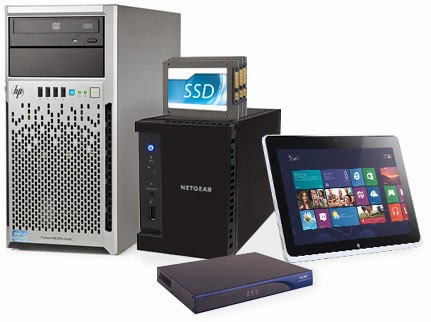
-Home lab with HP and Netgear products: one mega server, ReadyNAS Pro, SSDs and amazing WiFi router
-Software kit: MSDN subscription, Veeam NFR licenses and VMware vSphere
Make sure to register before Dec. 24 to enter raffle!