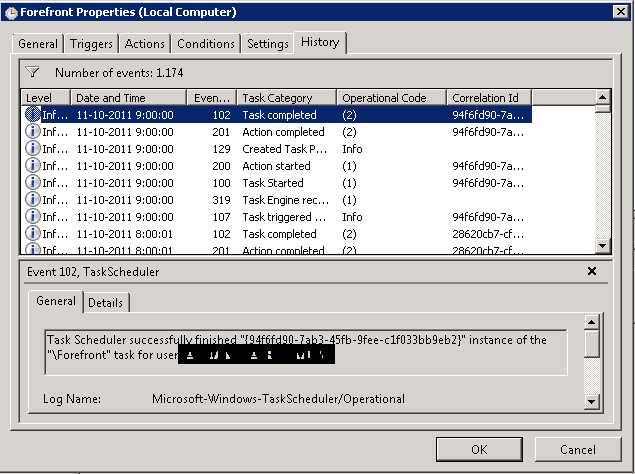
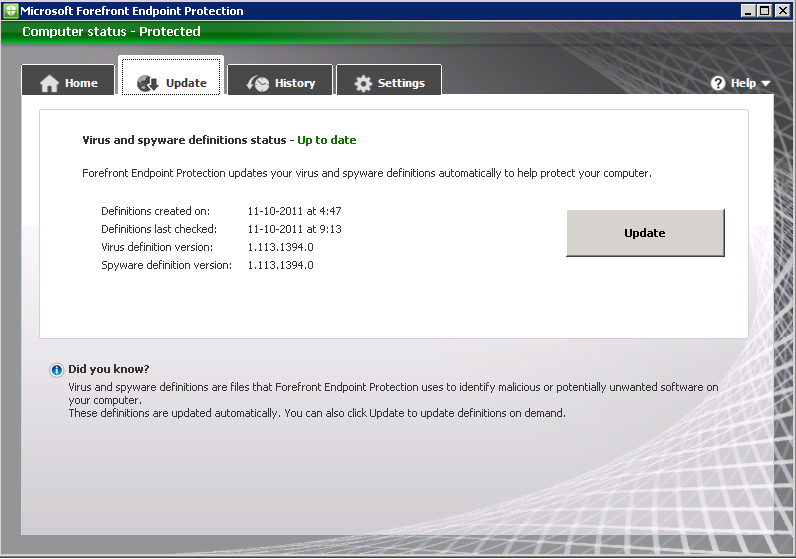
Yesterday I posted a blog because the "Definition Update Automation Tool for Forefront Endpoint Protection 2010" wasn't working in my environment. Have a look at Definition Update Automation with Configuration Manager for that one. Today I succeeded to automatically receive new definitions and publish them. In this blog I will post my results and a few good tips and tricks also.
I configured a scheduled task with the following settings:
Run the task with the SYSTEM account and with highest privileges. Configure it for Windows 7 (when needed).
Run the task every hour a day so updates will be downloaded and publish almost immediately when released.
Start a program with the default settings described in "Definition Update Automation with Configuration Manager" http://technet.microsoft.com/en-us/library/hh297450.aspx
The task will run fine after that. Just make sure the tool is placed in the right folder and user account choosen has enough rights.
Existing Forefront clients will be automatically updated to the new definition version. This when deploying a new Forefront client also.
It's possible to consult reports for actual information. There are a few reports beneath the Forefront pane and more eventually beneath reporting services.
My personal favorite is report 389 "FEP information for a specific computer". That way it's possible to see Forefront install, policy and update information in one overview.
When adding the Forefront client in a task sequence this tick must be cleared. Otherwise it's not possible to select the program in a task sequence.
After that, the program is selectable but will not install during a task sequence. This because the script cannot be used during a task sequence install.
Just create a new package and program for that with the following settings: "FEPinstall.exe /q /s /policy <path>\<policy-export>.xml". Be sure that the Network access account AND client computers has access to the source folder. That way Forefront client install by task sequence is possible with the exported policy added.
A few sites with good information on Forefront deployment and troubleshooting issues:
Errors When Using the FEP 2010 Definition Update Automation Tool
http://blogs.technet.com/b/clientsecurity/archive/2011/07/18/errors-when-using-the-fep-2010-definition-update-automation-tool.aspx
Installing the Forefront Endpoint Protection 2010 client and OSD
http://ccmexec.com/2011/02/installing-the-forefront-endpoint-protection-2010-client-and-osd/
Invalid argument format (index 7) "AND", arguments are supposed to start with a / (SoftwareUpdateAutomation.exe)
http://social.technet.microsoft.com/Forums/en-US/FCSNext/thread/ca500b36-c667-4030-85f9-ebd0defbdaf7/
Definition update automation tool
http://social.technet.microsoft.com/Forums/en-US/FCSNext/thread/9105024f-3a61-4fe0-bc88-803b502881a8/
With System Center Configuration Manager (ConfigMgr) it's possible to install and use Forefront Endpoint Protection (FEP) 2010 also. Both products can be integrated so ConfigMgr will also handle Forefront Antivirus and Definition updates. Microsoft released some Forefront Endpoint Protection (FEP) 2010 Update Rollup 1 Tools also. These free downloads make it easier for Forefront Endpoint Protection 2010 Update Rollup 1 customers to use Group Policy for centralized management, provide optimized settings for various server roles, and diagnose and troubleshoot support issues. It can be downloaded here: http://www.microsoft.com/download/en/details.aspx?id=26613
The one I'm using is "Definition Update Automation Tool for Forefront Endpoint Protection 2010". This tool enables you to automate downloading and publication of FEP definition updates using the Configuration Manager 2007 Software Update feature. This is a command line tool that uses the Configuration Manager API to download new definitions from Microsoft Update, distribute them to the software update point, and publish the definitions to the endpoints. To automate the tool, you must add a Windows task to run it automatically at a scheduled interval. More information about "Definition Update Automation with Configuration Manager" can be found here: http://technet.microsoft.com/en-us/library/hh297450.aspx
Point is, it isn't working in my environment. It's true that new definitions are downloaded automatically in Deployment Packages. But distribute them and publish the definitions isn't working yet. This because Distribution Points are not updated after running the tool and new definitions are not added to Deployment Management. The command I'm using is: SoftwareUpdateAutomation.exe
- /AssignmentName <AssignmentName>
- /PackageName <PackageName>
- /RefreshDP
- /UpdateFilter "ArticleID=2461484 AND IsSuperseded=0 AND IsEnabled=1 AND IsExpired=0"
Anyone else has the same behaviour seen? I will post the results when it's working properly in my environment. To be continued till then..
With System Center Configuration Manager (ConfigMgr) it's possible to install and use Forefront Endpoint Protection (FEP) 2010 also. Both products can be integrated so ConfigMgr will also handle Forefront Antivirus and Definition updates. In this blog I will describe the installation of Forefront and configuring policies.
Before FEP 2010 can be installed some prerequisites are needed on the ConfigMgr server. These are:
When installing choose the following options:
- Select "FEP 2010 Update Rollup 1"
- Welcome to FEP 2010 Server Setup Wizard: Fill in name and organization
- MS Software License Terms: "I accept the software license terms"
Based on type of installation there's the choice between Basic topology (with remote reporting database), Advanced topology & ConfigMgr console extension.
- Installation Options: Advanced topology (Select All)
- FEP 2010 Server Database Configuration: FEPDB_<sitecode>
- Reporting Configuration: MS FEP 2010 Reporting Database settings: FEPDW_<sitecode>
- Reporting Configuration: SQL Reporting Services execution account (domain user account)
- Updates and Customer Experience Options (enable/disable)
- Microsoft SpyNet Policy Configuration (enable/disable)
- Specifify Installation Location
- Prerequisites Verification: All verifications passed
- Setup Summary and Complete
After that an Forefront Endpoint Protection pane is visible in the ConfigMgr console.
The following functionality is added in the ConfigMgr console now:
- Collections > FEP Collections
- Definition Status
- Deployment Status
- Operations
- Policy Distribution Status
- Protection Status
- Security Status
- Software Distribution > Packages
- FEP – Deployment
- FEP – Operations
- FEP – Policies
- Software Distribution > Advertisements
- FEP Operations
- FEP Policies
- Software Updates > Update Repository
- Definition Updates > Microsoft > FEP 2010
- Reporting > Reports/Reporting Services
- FEP: FEP information for a specific computer
- FEP – Deployment: Computers with a specific deployment state
- FEP – Deployment: Deployment for a specific collection
- FEP – Deployment: Deployment Overview
- FEP – Policy: Policy Distribution for a specific collection
- FEP – Policy: Computers with a specific policy distribution state
- FEP – Policy: Policy Distribution Overview
- Desired Configuration Management
- Configuration Baselines
- Configuration Items
- Forefront Endpoint Protection node
- Policies > Default Server Policy
- Policies > Default Desktop Policy
- Alerts > Malware Detection Alerts
- Alerts > Malware Outbreak Alert
- Alerts > Repeated Malware Detection Alerts
- Alerts > Multiple Malware Detection Alerts
- Reports > Antimalware Activity Report
- Reports > Antimalware Protection Summary Report
- Reports > Computer List Reports
Microsoft Forefront Endpoint Protection 2010 Update Rollup 1 includes the Definition Update Automation tool. This tool enables you to use System Center Configuration Manager 2007 software update points to distribute FEP definition updates to your client computers.
To configure your environment to use the Definition Update Automation tool, you must first download the tool (fepsuasetup.cab) and copy it to the appropriate location on your Configuration Manager site server. It can be download here: http://technet.microsoft.com/en-us/library/hh297450.aspx
There are also Microsoft Forefront Endpoint Protection (FEP) 2010 Update Rollup 1 Tools available. These free downloads make it easier for Forefront Endpoint Protection 2010 Update Rollup 1 customers to use Group Policy for centralized management, provide optimized settings for various server roles, and diagnose and troubleshoot support issues. They can be download here: http://www.microsoft.com/download/en/details.aspx?id=26613
As you can see many new functionality comes available in ConfigMgr. Now it's time to configure policies and create update packages. More about that in the next blogpost.