Today the following ConfigMgr update is released: Update Rollup 1 for ConfigMgr Current Branch, version 1606. It fixes 16 issues and 1 additional change is included. It sounds like a cumulative update with many improvements to me :) Let's have a look at the fixes.
This update includes the following improvements:
-Administrator Console (1 fix)
-Updates and servicing (1 fix)
-Client (4 fixes)
-Software Updates (2 fixes)
-Site Systems (1 fix)
-Operating System Deployment (1 fix)
-Windows Store for Business (4 fixes)
-Software distribution and content management (1 fix)
-Endpoint Protection (1 fix)
Additional changes included in this update:
-Windows Server 2016 is now available in the supported platform list for Content Distribution, Software Update Management, and Settings Management.
This update is available for installation in the Updates and Servicing node of the ConfigMgr console. If the service connection point is in offline mode, you have to re-import the update so that it is listed in the ConfigMgr console. Refer to Install Updates for System Center Configuration Manager for details.
For more details and to view the full list of new features in this update check out our documentation on TechNet.

Showing posts with label Update 1606. Show all posts
Showing posts with label Update 1606. Show all posts
Wednesday, September 7, 2016

Tuesday, July 26, 2016
Now Available: Update 1606 for ConfigMgr Current Branch
Last week (July 22th) the following ConfigMgr version is released: Update 1606 for ConfigMgr Current Branch. With this update new update functionality in ConfigMgr Current Branch can be used finally. No need to install servicepacks or cumulative updates anymore. Just make sure there's a recent back-up and install this version.
This update includes the following improvements:
-Windows Information Protection (formerly EDP)
-Windows Defender Advanced Threat Protection
-Windows Store for Business Integration
-Windows Hello for Business
We’ve also added a number of popular User Voice items, including:
-The addition of content status links in the admin console
-The option of list view for applications in the Software Center
-The ability to select multiple updates and simultaneously install them with the new Install Selected Updates button in the Software Center
For more details and to view the full list of new features in this update check out our documentation on TechNet.
Just great a new version is available now!
Source: ConfigMgr Team Blog
This update includes the following improvements:
-Windows Information Protection (formerly EDP)
-Windows Defender Advanced Threat Protection
-Windows Store for Business Integration
-Windows Hello for Business
We’ve also added a number of popular User Voice items, including:
-The addition of content status links in the admin console
-The option of list view for applications in the Software Center
-The ability to select multiple updates and simultaneously install them with the new Install Selected Updates button in the Software Center
For more details and to view the full list of new features in this update check out our documentation on TechNet.
Just great a new version is available now!
Source: ConfigMgr Team Blog
Tuesday, June 21, 2016
Now Available: Update 1606 for ConfigMgr Technical Preview
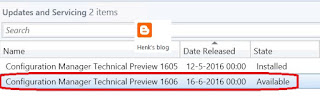
Today (June 21th) the latest ConfigMgr (preview) version is released: Update 1606 for ConfigMgr Technical Preview. Update 1606 for Technical Preview is available directly in the ConfigMgr console. If you want to install ConfigMgr Technical Preview for the first time, the installation bits (currently based on Technical Preview 1603) are available on TechNet Evaluation Center.
This update includes the following improvements:
-ConfigMgr as a managed installer with Device Guard (ConfigMgr-deployed software is automatically trusted)
-Cloud Proxy Service (manage ConfigMgr clients on the Internet, with an Azure subscription)
-Grace period for application and software update deployments (give users a grace period to install required applications or software updates)
-Multiple device management points for Windows 10 Anniversary Edition devices (automatically configures an enrolled device to have more than one device management point available for use)
This update also includes new features for customers using ConfigMgr integrated with Intune (hybrid scenario):
-Device categories (automatically place devices in device collections when used in hybrid environments)
Hope that nested task sequences will be available soon too!
Just great a new (preview) version is available now!
Source: Enterprise Mobility and Security Blog

This update includes the following improvements:
-ConfigMgr as a managed installer with Device Guard (ConfigMgr-deployed software is automatically trusted)
-Cloud Proxy Service (manage ConfigMgr clients on the Internet, with an Azure subscription)
-Grace period for application and software update deployments (give users a grace period to install required applications or software updates)
-Multiple device management points for Windows 10 Anniversary Edition devices (automatically configures an enrolled device to have more than one device management point available for use)
This update also includes new features for customers using ConfigMgr integrated with Intune (hybrid scenario):
-Device categories (automatically place devices in device collections when used in hybrid environments)
Hope that nested task sequences will be available soon too!
Just great a new (preview) version is available now!
Source: Enterprise Mobility and Security Blog
Subscribe to:
Posts (Atom)