Yesterday a new announcement has been done. There is a new servicing branch called: Long-Term Servicing Branch (LTSB) of Configuration Manager. Where ConfigMgr Current Branch offers new functionality and support for Windows 10 and Windows Server 2016, LTSB of Configuration Manager is not. When Software Assurance (SA) or equivalent subscription rights became expired, customers, per product terms, would have to move back to ConfigMgr 2012 (R2). Besides of support for an fixed 10-year lifecycle (and equivalent subscription rights as mentioned), I guess there is no need to use the LTSB version of Configuration Manager.
While the LTSB is derived from the current branch of Configuration Manager (version 1606), it is scaled back and reduced in functionality to permit the extended support model. LTSB of Configuration Manager will not receive new functionality or support for new Windows 10 and Windows Server 2016. It will continue to receive security updates only. By design, LTSB of Configuration Manager is intended to be fixed in functionality and very infrequently updated, so any features or components that require continuous updating or are tied to a cloud service have been removed. What's left is ConfigMgr 2012 (R2) with less features and no Hybrid MDM.
These removed features include:
-Support for Windows 10 Current Branch (CB) and Current Branch for Business (CBB)
-Support for the future releases of Windows 10 LTSB and Windows Server
-Windows 10 Servicing Dashboard and Servicing Plans
-The ability to add a Microsoft Intune Subscription, which prevents the use of Hybrid MDM and on-premises MDM
-Asset Intelligence
-Cloud-based Distribution Point
-Support for Exchange Online as an Exchange Connector
-Any pre-release features available in the current branch of Configuration Manager
Not my cup of tea :-)
Source: Enterprise Mobility and Security Blog

Showing posts with label ConfigMgr 1606. Show all posts
Showing posts with label ConfigMgr 1606. Show all posts
Thursday, October 13, 2016

System Center 2016 and Windows Server 2016 available for download now!
As for today System Center 2016 and Windows Server 2016 bits are available for download. Strange that Microsoft decided to announce General Availability (GA) during Microsoft Ignite, and publish bits two weeks later for download?

Within System Center 2016, the 1606 version of Configuration Manager is included. Customers still on ConfigMgr 2012 (R2) can upgrade directly to 1606 now. No need to upgrade to 1511 (RTM) first and upgrade to 1606 afterwards.
Just download the bits and happy upgrade! :-)
Microsoft Hybrid Cloud (12-10):
Another big step in Hybrid Cloud – Windows Server 2016 general availability
Managing the software-defined datacenter with System Center 2016

Within System Center 2016, the 1606 version of Configuration Manager is included. Customers still on ConfigMgr 2012 (R2) can upgrade directly to 1606 now. No need to upgrade to 1511 (RTM) first and upgrade to 1606 afterwards.
 |
| System Center 2016 |
 |
| Windows Server 2016 |

Just download the bits and happy upgrade! :-)
Microsoft Hybrid Cloud (12-10):
Another big step in Hybrid Cloud – Windows Server 2016 general availability
Managing the software-defined datacenter with System Center 2016
Monday, September 12, 2016
Unable to promote pre-production client in ConfigMgr Current Branch
Today I did an upgrade on ConfigMgr Current Branch from version 1602 to 1606. During the upgrade I choose to validate the client package in pre-production first. After the upgrade however, there was no possiblity to promote the ConfigMgr client to the latest version. I restarted the ConfigMgr server and console, but without any luck. After that I decided to install Update Rollup 1, which was successful again, but still the same behaviour. No possibility to promote the ConfigMgr client to the latest version again.
 Lucky me I found the following thread: Microsoft TechNet
It mentioned: I solved my problem. It seems to be a RBAC problem. The user I used in ConfigMgr was "Full Administrator" but assigned though an AD group and not directly assigned. When I added my user directly as a user account in the ConfigMgr console and gave him "Full Administrator" rights then I could promote the client to production.
 In my case (customer location) this was the same situation. The user which did the upgrade and was logged on is part of an security group. That's a nasty situation for sure! Long story short: I added the user directly as Full Administrator in the console, and the "Promote Pre-production Client" button became available again. Hope that Microsoft will fix this for future builds, because adding users instead of groups is not the way to go. Hope it helps!

It mentioned: I solved my problem. It seems to be a RBAC problem. The user I used in ConfigMgr was "Full Administrator" but assigned though an AD group and not directly assigned. When I added my user directly as a user account in the ConfigMgr console and gave him "Full Administrator" rights then I could promote the client to production.

Wednesday, September 7, 2016
Update Rollup 1 for ConfigMgr Current Branch, version 1606 available now!
Today the following ConfigMgr update is released: Update Rollup 1 for ConfigMgr Current Branch, version 1606. It fixes 16 issues and 1 additional change is included. It sounds like a cumulative update with many improvements to me :) Let's have a look at the fixes.
This update includes the following improvements:
-Administrator Console (1 fix)
-Updates and servicing (1 fix)
-Client (4 fixes)
-Software Updates (2 fixes)
-Site Systems (1 fix)
-Operating System Deployment (1 fix)
-Windows Store for Business (4 fixes)
-Software distribution and content management (1 fix)
-Endpoint Protection (1 fix)
Additional changes included in this update:
-Windows Server 2016 is now available in the supported platform list for Content Distribution, Software Update Management, and Settings Management.
This update is available for installation in the Updates and Servicing node of the ConfigMgr console. If the service connection point is in offline mode, you have to re-import the update so that it is listed in the ConfigMgr console. Refer to Install Updates for System Center Configuration Manager for details.
For more details and to view the full list of new features in this update check out our documentation on TechNet.
This update includes the following improvements:
-Administrator Console (1 fix)
-Updates and servicing (1 fix)
-Client (4 fixes)
-Software Updates (2 fixes)
-Site Systems (1 fix)
-Operating System Deployment (1 fix)
-Windows Store for Business (4 fixes)
-Software distribution and content management (1 fix)
-Endpoint Protection (1 fix)
Additional changes included in this update:
-Windows Server 2016 is now available in the supported platform list for Content Distribution, Software Update Management, and Settings Management.
This update is available for installation in the Updates and Servicing node of the ConfigMgr console. If the service connection point is in offline mode, you have to re-import the update so that it is listed in the ConfigMgr console. Refer to Install Updates for System Center Configuration Manager for details.
For more details and to view the full list of new features in this update check out our documentation on TechNet.
Tuesday, July 26, 2016
Now Available: Update 1606 for ConfigMgr Current Branch
Last week (July 22th) the following ConfigMgr version is released: Update 1606 for ConfigMgr Current Branch. With this update new update functionality in ConfigMgr Current Branch can be used finally. No need to install servicepacks or cumulative updates anymore. Just make sure there's a recent back-up and install this version.
This update includes the following improvements:
-Windows Information Protection (formerly EDP)
-Windows Defender Advanced Threat Protection
-Windows Store for Business Integration
-Windows Hello for Business
We’ve also added a number of popular User Voice items, including:
-The addition of content status links in the admin console
-The option of list view for applications in the Software Center
-The ability to select multiple updates and simultaneously install them with the new Install Selected Updates button in the Software Center
For more details and to view the full list of new features in this update check out our documentation on TechNet.
Just great a new version is available now!
Source: ConfigMgr Team Blog
This update includes the following improvements:
-Windows Information Protection (formerly EDP)
-Windows Defender Advanced Threat Protection
-Windows Store for Business Integration
-Windows Hello for Business
We’ve also added a number of popular User Voice items, including:
-The addition of content status links in the admin console
-The option of list view for applications in the Software Center
-The ability to select multiple updates and simultaneously install them with the new Install Selected Updates button in the Software Center
For more details and to view the full list of new features in this update check out our documentation on TechNet.
Just great a new version is available now!
Source: ConfigMgr Team Blog
Tuesday, June 21, 2016
Now Available: Update 1606 for ConfigMgr Technical Preview
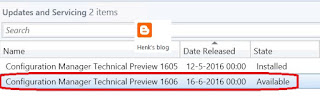
Today (June 21th) the latest ConfigMgr (preview) version is released: Update 1606 for ConfigMgr Technical Preview. Update 1606 for Technical Preview is available directly in the ConfigMgr console. If you want to install ConfigMgr Technical Preview for the first time, the installation bits (currently based on Technical Preview 1603) are available on TechNet Evaluation Center.
This update includes the following improvements:
-ConfigMgr as a managed installer with Device Guard (ConfigMgr-deployed software is automatically trusted)
-Cloud Proxy Service (manage ConfigMgr clients on the Internet, with an Azure subscription)
-Grace period for application and software update deployments (give users a grace period to install required applications or software updates)
-Multiple device management points for Windows 10 Anniversary Edition devices (automatically configures an enrolled device to have more than one device management point available for use)
This update also includes new features for customers using ConfigMgr integrated with Intune (hybrid scenario):
-Device categories (automatically place devices in device collections when used in hybrid environments)
Hope that nested task sequences will be available soon too!
Just great a new (preview) version is available now!
Source: Enterprise Mobility and Security Blog

This update includes the following improvements:
-ConfigMgr as a managed installer with Device Guard (ConfigMgr-deployed software is automatically trusted)
-Cloud Proxy Service (manage ConfigMgr clients on the Internet, with an Azure subscription)
-Grace period for application and software update deployments (give users a grace period to install required applications or software updates)
-Multiple device management points for Windows 10 Anniversary Edition devices (automatically configures an enrolled device to have more than one device management point available for use)
This update also includes new features for customers using ConfigMgr integrated with Intune (hybrid scenario):
-Device categories (automatically place devices in device collections when used in hybrid environments)
Hope that nested task sequences will be available soon too!
Just great a new (preview) version is available now!
Source: Enterprise Mobility and Security Blog
Subscribe to:
Posts (Atom)