Showing posts with label Windows 10. Show all posts

Friday, October 28, 2016

Highlights from the Microsoft Windows 10 devices event (2016)

This week (October 26th) the second Windows 10 devices event is shown. Last year it was all about Xbox, Hololens, Band 2, Lumia 950 (XL) and Surface. Where both Surface Pro 4 and Surface Book where shown. Pity Surface Book still isn't available everywhere yet, but hope the product will become at later time (in The Netherlands).

Let's have a look at #Windows10 and #Windows10devices again!


Windows 10
-Windows 10 Creators Update (coming early 2017)
-This week early build release for all Windows insiders
-Coming to more then 400M Windows 10 devices
-Bringing 3D for everyone & 4K gaming

-Paint 3D (Within Windows 10 Creators Update)
-3D animations brings MS PowerPoint to life
-Connect and share easily with people who matter most

Xbox One S
-Game broadcasting for Windows 10
-Creating custom tournaments yourself
-Dolby Atmos on Xbox One with Windows 10 Creators Update

-4K gaming and watching movies (Netflix?)


Surface Book
-Has the highest user satisfaction among any current Windows 10 machine out there or any MacBook, all of them.
-The ultimate laptop, but people want even more...
-New Surface Book i7 with more power on CPU/GPU and 30% more battery life (16 hours in total)
-Available in November for $2,399


Surface Studio
-Thinnest LCD monitor ever built (12.5mm thin touch screen)
-28" PixelSense Display, 13.5 million pixels, TrueColor, DCI-P3, 3:2 aspect ratio, 192 PPI, True Scale

-i5/i7 Intel CPU, Up to 4GB NVIDIA GeForce GPU, Up to 32GB RAM
-Mic array, Cortana, HD camera, Windows Hello
-Pre-order today $2,999


Surface Dial
-A new tool for the creative process

-Available for Surface Pro 3/4 & Surface Book
-Not included with Surface Studio (additional $100)

So yes, Windows 10 Creators Update on Surface Book and Surface Studio looks great, but no surprises like last year. No news on Band and Lumia at all, where customers are not sure what Microsoft is doing here. Microsoft will probably pull the plug and ending sales by the end of this year. Instead of Lumia devices, Microsoft will announce Surface Phone for business purpose (expected late 2017).

No Surface Phone, no Surface Book 2, no Band 3, or anything else. It's a pity :-)

Highlights from last year (2015)

Thursday, October 13, 2016

New servicing branch: Long-Term Servicing Branch (LTSB) of Configuration Manager

Yesterday a new announcement has been done. There is a new servicing branch called: Long-Term Servicing Branch (LTSB) of Configuration Manager. Where ConfigMgr Current Branch offers new functionality and support for Windows 10 and Windows Server 2016, LTSB of Configuration Manager is not. When Software Assurance (SA) or equivalent subscription rights became expired, customers, per product terms, would have to move back to ConfigMgr 2012 (R2). Besides of support for an fixed 10-year lifecycle (and equivalent subscription rights as mentioned), I guess there is no need to use the LTSB version of Configuration Manager.

While the LTSB is derived from the current branch of Configuration Manager (version 1606), it is scaled back and reduced in functionality to permit the extended support model. LTSB of Configuration Manager will not receive new functionality or support for new Windows 10 and Windows Server 2016. It will continue to receive security updates only. By design, LTSB of Configuration Manager is intended to be fixed in functionality and very infrequently updated, so any features or components that require continuous updating or are tied to a cloud service have been removed. What's left is ConfigMgr 2012 (R2) with less features and no Hybrid MDM.

These removed features include:
-Support for Windows 10 Current Branch (CB) and Current Branch for Business (CBB)
-Support for the future releases of Windows 10 LTSB and Windows Server
-Windows 10 Servicing Dashboard and Servicing Plans
-The ability to add a Microsoft Intune Subscription, which prevents the use of Hybrid MDM and on-premises MDM
-Asset Intelligence
-Cloud-based Distribution Point
-Support for Exchange Online as an Exchange Connector
-Any pre-release features available in the current branch of Configuration Manager


Not my cup of tea :-)
Source: Enterprise Mobility and Security Blog

Thursday, August 25, 2016

New Windows 10 LTSB release planned for October 1st!

Last year with the Windows 10 release, a Long-Term Servicing Branch (LTSB) release was offered too. Currently, Windows 10 LTSB is essentially the Windows 10 RTM (1507) release with certain features such as the Edge browser and Windows Store permanently removed. On October 1 however, a new Windows 10 LTSB build will be released, starting another 10-year support window. This build is called Windows 10 Enterprise LTSB 2016.

Windows 10 Enterprise 2016 LTSB builds on Windows 10 Pro, version 1607 adding premium features designed to address the needs of large and mid-size organizations (including large academic institutions), such as advanced protection against modern security threats, full flexibility of OS deployment, updating and support options; as well as comprehensive device and app management and control capabilities.

The LTSB edition provides customers with access to the Long-Term Servicing Branch as a deployment option for their mission critical devices and environments. It can be used also when yearly Current Branch updates are not desirable. By contrast, LTSB is only due to receive revisions every two or three years, where two major Windows 10 updates are planned for Current Branch next year. A mix of both LTSB and CB/B may be realistic also, when modern features are not needed on all systems.


LTSB can only be purchased with a volume license agreement or MSDN subscription, but for presentation Microsoft allows you to download a fully functional free 90-day trial.

Sources:
Two major Windows 10 updates planned for next year
Windows 10 Enterprise LTSB 2016 will be released on October 1

Wednesday, August 24, 2016

Doing an in-place upgrade from Windows 10 Build 1511 to 1607

This month Windows 10 Build 1607 (Anniversary update) is released. This is the third Windows 10 Build, next to 1507 (RTM) and 1511 (November update). Where servicing within ConfigMgr wasn't possible from 1507 to 1511, this is possible now. Expect some notes from the field soon, where systems in my company will be updated from 1511 to 1607. Hope to have some good results again :)

From a customer I got some update cons already. Let's have a look at few disappointments so far:
-Drivers working in 1511 doesn't have to be working in 1607. Maybe some hardware must be replaced, because it's not supported anymore. Think about some VGA or NIC drivers;
-Universal apps removed in the Operating System before, will be back after an in-place upgrade. They must be removed in the image before upgrading or removed again after the upgrade;
-Default apps set for Webbrowser, Email or PDF (for example) will be reset after an in-place upgrade. They must be configured again after the upgrade or set by an User Environment solution;

But the hardest thing: some Group Policy set in Pro edition earlier, is available for Enterprise edition only now.
-Configure Spotlight on lock screen
-Turn off all Windows Spotlight features
-Turn off Microsoft Consumer features
-Do not display the lock screen
-Do not require CTRL+ALT+DELETE & Turn off app notifications on the lock screen
-Do not show Windows Tips
-Force a specific default lock screen image
-Start Menu layout
-Turn off the Store application
-Only display private store within the Windows Store app
-Don't search the web or display web results

So when using Pro 1511 already, and you want to manage some features above, you need Enterprise 1607 in future. That's the biggest disappointment for some companies I guess.

Hope to experience the in-place upgrade myself soon. On two home systems I did an rollback earlier because of driver malfunction. There will be some benefits added later too I guess :)

Sources:
Group Policies that apply only to Windows 10 Enterprise and Education Editions

Update 25-8: Windows 10 users moving from version 1511 to version 1607, dubbed the "anniversary update," may find applications installed on their systems that they'd previously removed.
Windows 10 Anniversary Update Restores Deleted Apps
Windows 10 1607: Keeping apps from coming back when deploying the feature update

Thursday, April 14, 2016

Enroll in to device management in Windows 10 not possible

In Windows 10 operating system (on both Mobile and full OS) the following can be done: Enroll in to device management. This on both domain-joined and non-domain-joined devices, where no ConfigMgr agent is present. When trying to enroll a new Windows 10 device however, the following message is displayed: System policies prevent you from connecting to a work or school account. Contact your support person for more information.

This because the account logged on has not enough permissions. Trick is you need local or domain admin permissions for it.

When logged in with local or domain admin permissions, enrollment is available as expected. When enrollment is done the following message is displayed: Well done! You're connected to work or school.

When logged in with user permissions again, enrollment is still not available. This because the following message is displayed: Another user on the system is already connected to a work or school. Please remove that work or school connection and try again.

If you ask me, I find all those messages bit of misleading. Why not mentioning you need special permissions for enrollment, instead of showing that system policies prevent you from connecting to a work or school account? That will help for sure!

Hope this will be more clear in a future release.

Source which points me to the solution: Kevin Kaminski's Virtual World

Tuesday, February 9, 2016

Remove default Apps from Windows 10 during deployment

After a clean Windows 10 deployment, the image contains a lot of default apps. Within the Enterprise edition you can think about Solitaire, Candy Crush and Minecraft. You can remove them (per user) when combining them in a PowerShell script and execute it during user logon. The following cmdlets can be used to remove them:

Get-AppxPackage | select packagefullname (This will generate a list of all apps installed)

Get-AppxPackage *<APPX package name>* | Remove-AppxPackage (This will remove apps installed for the current user)

Get-AppxPackage -User <user> *<APPX package name>* | Remove-AppxPackage (This will remove apps installed for a specific user)

Get-AppxPackage -AllUsers <user> *<APPX package name>* | Remove-AppxPackage (This will remove apps installed for all users)

Create a PowerShell script with all lines needed and put it in Group Policy. Then default apps will be removed when the user logons. Nice too see that Windows 10 can be fully managed this way.

There's a PowerShell script available too, which can remove default apps from the WIM image, instead of using it during a task sequence. You can find it in the Microsoft TechNet Gallery.

Friday, January 22, 2016

Managing Group Policy for Windows 10

With every new Operating System, there will be new policy definitions available. With Windows 10 however, there may be new policies coming with a new build too. For example, when looking at Administrative Templates (.admx) for Windows 10, you can download the RTM version and 1511 version as well. There is a Windows 10 ADMX spreadsheet available too.

Just download the new ADMX files, install them on a server and copy the files (including language files) to your local or central Sysvol - PolicyDefinitions location. All existing files may be overwritten, older files will still be available. For more details on central store: Have a look at this post.

Just be aware of the following issue: Namespace is already defined error when you edit a policy in Windows.

This issue occurs because the LocationProviderADM.admx file was renamed as Microsoft-Windows-Geolocation-WLPAdm.admx in Windows 10. After you copy the .admx files from Windows 10 to a central store that contains a LocationProviderADM.ADMX file that is from an earlier release of Windows, there are two .admx files that contain the same settings but have different names. Therefore, the "namespace is already defined" error is received.

The solution for this is really easy:
1. Delete (or rename!) the LocationProviderADM.admx and LocationProviderADM.adml files from the central store.
2. Rename Microsoft-Windows-Geolocation-WLPAdm.admx to LocationProviderADM.admx
3. Rename Microsoft-Windows-Geolocation-WLPAdm.adml to LocationProviderADM.adml


After implementing new policy definitions, and using above solution, everything works fine! Just remember: With every new Windows 10 build, there may be new policies as well.

Happy configuring!

Monday, January 11, 2016

New projects coming with lots off cool stuff

Next coming months I will do several new projects with lots of cool stuff. Most projects will be around the products: ConfigMgr 1511, Windows 10, ADFS and Enterprise Mobility Suite (Azure AD Premium, Rights Management, Intune in hybrid mode).

Expect multiple blogposts about my experiences soon. Azure cloud and Enterprise mobility Suite is the way to go! Microsoft is bringing cool features here :) #lovemyjob

Tuesday, November 10, 2015

Deploy a customized Windows 10 start menu during deployment

Did you know that when deploying Windows 10, it's possible to copy a default start menu too? When using a Windows 10 image from media, the start menu is filled with apps you never use :) Therefore remove (almost) all apps, and fill it with apps you want to use!

The command used to export the start menu is: Powershell export-startlayout –path "<path>\LayoutModification.xml"

An example looks like this:
<LayoutModificationTemplate Version="1" xmlns="http://schemas.microsoft.com/Start/2014/LayoutModification">
  <DefaultLayoutOverride>
    <StartLayoutCollection>
      <defaultlayout:StartLayout GroupCellWidth="6" xmlns:defaultlayout="http://schemas.microsoft.com/Start/2014/FullDefaultLayout">
        <start:Group Name="Office 2013" xmlns:start="http://schemas.microsoft.com/Start/2014/StartLayout">
          <start:DesktopApplicationTile Size="2x2" Column="0" Row="2" DesktopApplicationID="{7C5A40EF-A0FB-4BFC-874A-C0F2E0B9FA8E}\Microsoft Office\Office15\WINWORD.EXE" />
          <start:DesktopApplicationTile Size="2x2" Column="0" Row="0" DesktopApplicationID="{7C5A40EF-A0FB-4BFC-874A-C0F2E0B9FA8E}\Microsoft Office\Office15\EXCEL.EXE" />
          <start:DesktopApplicationTile Size="2x2" Column="2" Row="0" DesktopApplicationID="Microsoft.Office.OUTLOOK.EXE.15" />
          <start:DesktopApplicationTile Size="2x2" Column="4" Row="0" DesktopApplicationID="{7C5A40EF-A0FB-4BFC-874A-C0F2E0B9FA8E}\Microsoft Office\Office15\POWERPNT.EXE" />
        </start:Group>
        <start:Group Name="Applications" xmlns:start="http://schemas.microsoft.com/Start/2014/StartLayout">
          <start:DesktopApplicationTile Size="2x2" Column="4" Row="0" DesktopApplicationID="{7C5A40EF-A0FB-4BFC-874A-C0F2E0B9FA8E}\FastStone Capture\FSCapture.exe" />
          <start:Tile Size="2x2" Column="0" Row="0" AppUserModelID="Microsoft.WindowsCalculator_8wekyb3d8bbwe!App" />
          <start:DesktopApplicationTile Size="2x2" Column="0" Row="2" DesktopApplicationID="Microsoft.InternetExplorer.Default" />
          <start:DesktopApplicationTile Size="2x2" Column="2" Row="0"
DesktopApplicationID="{6D809377-6AF0-444B-8957-A3773F02200E}\CCleaner\CCleaner64.exe" />
        </start:Group>
      </defaultlayout:StartLayout>
    </StartLayoutCollection>
  </DefaultLayoutOverride>
</LayoutModificationTemplate>


During deployment copy the LayoutModification.xml with the following command to make it available for all users:
copy /y LayoutModification.xml "C:\Users\Default\AppData\Local\Microsoft\Windows\Shell"


With that the start menu is active when logon after deployment. Very nice if you ask me! :) Only thing so far is Internet Explorer is missing from the start menu. Is there a way to place that in the xml file too? Hope to find a solution for that as well, because all other apps are added as expected!

Update: On Microsoft Community and ccmexec.com the answer is found. Just create a "Internet Explorer.lnk" and copy the file:
copy /y "Internet Explorer.lnk" "C:\ProgramData\Microsoft\Windows\Start Menu\Programs\Accessories"
A PowerShell script is available there too, which do the same thing! Just remember the script looks for StartMenu.xml

Within LayoutModification.xml change DesktopApplicationID="Microsoft.InternetExplorer.Default" to DesktopApplicationLinkPath="%ALLUSERSPROFILE%\Microsoft\Windows\Start Menu\Programs\Accessories\Internet Explorer.lnk"
After that Internet Explorer will shown up in the start menu!


Keep up the good work :)

Tuesday, November 3, 2015

Doing a Windows 10 upgrade with ConfigMgr 2012 R2 SP1

Recently I did a Windows 10 upgrade with ConfigMgr 2012 R2. I used the new Windows 10 upgrade task sequence in ConfigMgr Technical Preview 3 before, but this one was new for me. Looking at Microsoft Technet there is a task sequence and multiple scripts available to do the job. With these components you can start an in-place Windows 10 upgrade right away, without the need to wait several weeks (or months) before ConfigMgr vNext is released.

On Microsoft TechNet the following posts are found:
How to upgrade to Windows 10 using the task sequence in System Center 2012 R2 Configuration Manager
and
Revised content for the Windows 10 in-place upgrade via task sequence for Configuration Manager
Within these posts the upgrade path can be found with the files (task sequence and scripts) needed.

Just create a deployment on the task sequence, and choose Install. In this case I choose an available deployment, so users can start the deployment when needed.

Before Windows 10 installation a Presetup takes place. This runs a corresponding Windows PowerShell script (PreSetup.ps1) to perform a variety of necessary actions prior to running Windows Setup.

This is where setup is actually run from the media package to automatically upgrade Windows. Both Windows media and scripts will be downloaded in the _SMSTaskSequence folder.

Windows restarts into a low-level mode to perform the upgrade and there are two possible outcomes: Upgrade completes successfully or Upgrade encounters a problem and rolls back the system to the down-level operating system.

In my case the Upgrade completes successfully. It was done in around 50 minutes. Additional steps can be added to this group as needed, such as Install Applications or Run PowerShell Script. The Install Software Updates step is provided as an example. The Cleanup step just removes the local staging directory.

Just great to have this functionality in ConfigMgr 2012 R2 too!

Thursday, October 29, 2015

Introducing Configuration Manager (ConfigMgr) as a service

As for today (27-1) there is a new update on the Configuration Manager Team blog. Let's have a look at the news mentioned:
 
The Future of Configuration Manager:
-During this time, we have completed the work necessary to deliver ConfigMgr more as an “as-a-Service” product.
-In terms of taxonomy for these updates, we’ll simply be referring to the ConfigMgr product as System Center Configuration Manager + year and month.
-The combination of ConfigMgr and Intune is the only solution that provides the full solution for managing all the versions of Windows, as well as all mobile devices.
-Our goals with ConfigMgr in this release cycle are all centered around finishing the work we started back in 2010 (when we were building ConfigMgr 2012) to deliver ConfigMgr as a service.
-With this work now completed, and with ConfigMgr/Intune being delivered as services, here is what we are able to do for you:
--Deliver the single-pane-of-glass for managing all devices – with immediate support across Windows, iOS and Android without you have to go through complex individual upgrades. We’ll do the work for you.


Support for Windows 10 and Microsoft Intune:
-As we announced at Microsoft Ignite with our first technical preview, we will release a new version of Configuration Manager by the end of this calendar year.
-The new System Center Configuration Manager, as it will simply be called, is designed to support the much faster pace of updates for Windows 10 and Microsoft Intune.
-System Center Configuration Manager will support Windows 10 in any flavor: Current Branch, Current Branch for Business, and Long-Term Servicing Branch.
-The fact that we are not including a calendar year in the name is a reflection of the fact that the new System Center Configuration Manager will be updated frequently.
-We plan to support each version/update for 12 months before we require that customers upgrade to the latest one to continue support.
 -If you want to deploy Windows 10 in your environment today, you should have already upgraded ConfigMgr 2012 to the latest service pack and cumulative update as many of our customers already have.

Just great we have both Windows and ConfigMgr as a service from now on. ConfigMgr is the way to go for managing all versions of Windows! Hope to implement Microsoft Intune more as well. #loveit
 
More blogposts on ConfigMgr 2016 TP3:
My experience with ConfigMgr 2016 (Technical Preview 3) so far
October Update for ConfigMgr 2016 (Technical Preview 3) available  

Friday, October 23, 2015

Microsoft Lumia 950 vs 950XL comparison

Recently on the Microsoft Windows 10 devices event new Lumia phones are announced. Last year the last Nokia phone (930) was released, which is still loved by many people. Microsoft skipped the 940 version, and is using the 950 and 950XL version now. Devices are called Microsoft Lumia now, with Windows 10 Mobile onboard. With this release, Microsoft wants to make sure this is a major release, kind of new generation. Same thing as for Windows 10 for desktops.

Let's have a look at the 950 and 950XL specs so far:
When looking for a comparison with the 930 have a look here:

Because of new functionality (Continuum, Windows Hello, Wireless charging, Cortana, Adaptive antenna technology, Octacore & Hexacore processors and Liquid cooling technology) this must be my next phone! Therefore I ordered the Lumia 950 today, which will be my next device in around 6 weeks. Hope to share my personal experience within a few months. Just click on the pictures for a better view :)
 

Source and photos: OneTechStop.net

Thursday, October 15, 2015

October Update for ConfigMgr 2016 (Technical Preview 3) available

Yesterday another update on ConfigMgr 2016 TP3 (Technical Preview 3) is done. This new update brings with it an early view of the new Windows 10 Servicing node, which enables you to view the state of Windows as a service in your environment, create flexible servicing plans to form deployment rings, and view alerts when Windows 10 clients are near end of support for their build of Current Branch or Current Branch for Business.

To read more about the new Windows 10 servicing dashboard, please refer to the TechNet documentation.

The Windows 10 Servicing dashboard is the latest addition to ConfigMgr’s rich support for Windows 10, including client deployment, upgrade, and management. You can find additional guidance for Windows 10 servicing and deployment on the Windows for IT Pros blog.

This update also introduces the ability to natively manage Office 365 desktop client updates using the Configuration Manager Software Update Management (SUM) workflow. You can now manage Office 365 desktop client updates just like you manage any other Microsoft Update.

In order to enable update 1510 for TP3, have a look here: System Center Configuration Manager Team Blog

Just great to have "ConfigMgr as a service" from now on!

More blogposts on ConfigMgr 2016 TP3:
Installing ConfigMgr 2016 Technical Preview 3
My experience with ConfigMgr 2016 (Technical Preview 3) so far

Wednesday, October 7, 2015

Highlights from the Microsoft Windows 10 devices event

During the Microsoft October 2015 event today (October 6th) Microsoft made the following announcements. It's full of great hardware and even greater functionality running on Windows 10. Microsoft is back in business again with both great hardware AND software. Microsoft will be loved again, that's for sure :)

It's all about #Windows10 and #Windows10devices now!

Windows 10
-Running on 110 million devices worldwide within eight weeks
-1.25 billion store visits worldwide within 10 weeks
-Running on Xbox One and mobile devices soon


Xbox One
-This holiday a great line-up games running on Xbox One and Pc

-New games are: Rise of the Tomb Raider, Halo 5, Gears of War 4, Forza Motorsport 6, and many more
-New Xbox One Limited Edition consoles with 1TB storage (multiple editions) with a new game enclosed


Hololens
-With Project X-ray you can play games in your own environment (mixed reality)
-The Hololens development edition kit will be available Q1 2016 for $3,000

-Expect more holographic games soon!

Band 2
-Has a rounder design and offers more functionality. It has a Barometer, Gorilla Glass 3 and Cortana build-in
-Has all known features from the first Band: Built-in GPS, UV monitoring, Guided workouts, Sleep & Calorie tracking and Smart notifications
-Note: Still no Endomondo support, which I'm using for running :(
-Pre-order today and available October 30th for $249


Lumia 950 and 950XL
-Best mobile phone ever. It has Adaptive antenna technology, Octacore & Hexacore processors and Liquid cooling technology
-Lumia 950 specs: Hexacore-chip, 5,2 inch OLED screen, 564 PPI, 20MP sensor, Triple LED, and many more
-Lumia 950XL specs: Octacore-chip, 5,7 inch OLED screen, 518 PPI, 20MP sensor, Triple LED, and many more
-4k video with hardware button, saving on Cloud-storage, 32GB local storage and 2TB (maximum) on SD-cards
-Support for Continuum (with Microsoft Display Dock) and Windows Hello (works with iris scanners) on both phones
-Multitasking on multiple screens possible, keyboard/mouse and USB-drive support (Full Pc experience)
-Available November for $549 (Lumia 950) and $649 (Lumia 950XL) and
Lumia 550 (budget-phone) available December for $139

Surface Pro 4
-Note: 98% of people using Surface Pro 3 recommend it, I too :)
-Bigger screen, using 12,3 inch now (no 14 inch as rumoured) and thinner/lighter (from 9.1 to 8.4 mm)
-The screen has 267 PPI and 5 million pixels,
which is 20% more then Surface Pro 3
-Maximum configuration available is 1TB local storage, 16GB memory (finally) and Gorilla Glass 4
-Pen storage when/where you need it (magnetic) in multiple colors available (better then Surface Pro 3)
-Surface Pro 4 is 30% faster then Surface Pro 3 and 50% faster then MacBook Air :)
-New type cover with fingerprint reader, better keyset (scissor design) and precision glass trackpad in multiple colors available
-New docking station with 4x USB 3.0 ports, 2x 4k display ports, Gigabit Ethernet and more (for Surface Pro 3 also)
-Pre-order October 7th and available October 26th for $899 (at minimum)


Surface Book
-The 14 inch Surface (as mentioned earlier) has become a 13,5 inch laptop called Surface Book :)
-This is the first laptop ever made by Microsoft, and the fastest laptop anywhere on any planet ever (!)
-The screen has 267 PPI and 6 million pixels, it has touch and pen support same as Surface
-Has a perfect typing experience (quiet, stable and comfortable) a precision glass and 5-point multi-touch trackpad
-Onboard are a new Intel Skylake CPU, nVidia Geforce GPU and high-speed GDDR5 memory
-Surface Book is 50% faster then MacBook Pro, has 12 hour battery life and works with new docking station also
-Has a screen which can be detached from the keyboard, it's a laptop and a clipboard in one (!)
-It's the most powerful and ultimate laptop on the planet :)

-Pre-order October 7th and available October 26th for $1,499 (at minimum)

I'm really thrilled and excited about all the new stuff coming. Hope to have a Band 2, Lumia 950 and Surface Book soon :)

Watch the recorded session on: http://www.microsoft.com/october2015event/en-us/live-event

Tuesday, October 6, 2015

My experience with ConfigMgr 2016 (Technical Preview 3) so far

Last weeks I did a lot on ConfigMgr 2016 (Technical Preview 3). When installing the product (I used SQL 2014 and ADK 10 for this) and starting the console, no changes seems to be made. Thing is, most changes are not visible right away. You must use the product to see changes between the 2012 and 2016 release. The biggest one is under the hood. Let's have a look at my experience so far.

Because ConfigMgr 2016 is another x64 release, an in-place migration is possible from 2012 (when the product is final!). Only thing is, you need to update ADK (remove ADK 8.x and install ADK 10). It's possible to update SQL as well, but that's not a required thing. ConfigMgr 2016 can be installed as a servicepack (maybe it is off the record). You feel comfortable with it right away, which is quite nice. Just great to have a new release for the next coming years :)

Most important changes are:

Service connection point (connects ConfigMgr to Microsoft cloud services, it is used for Microsoft Intune subscription, and to update and service your ConfigMgr installation). You can choose between Online (persistent connection), which is recommended, and Offline (on-demand connection). Beneath Cloud Services (Administration tab) "Updates and Servicing" is added. Beneath that Features can be added by Microsoft dynamically. I installed "(Pre-Release) Version 1509 for Technical Preview" myself that way. With that you have "ConfigMgr as a service" from now on.

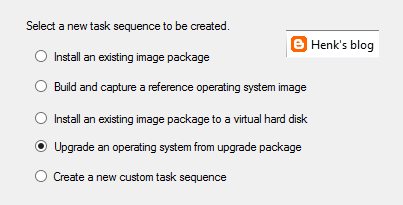
New task sequence: "Upgrade an operating system from upgrade package". This task sequence is used specially for Windows 10 upgrades. It contains a few steps only, but it does what it says: upgrade to Windows 10 in-place in just a few clicks. I did a Windows 8.1 to 10 upgrade within an hour with it.

Automatic Deployment Rules (ADR) can be connected to multiple collections now, without the need to set whole configuration again. Just click on the ADR and select "Add Deployment" to connect an existing ADR to another collection. When choosing properties on an existing ADR there is more overview, because of less tabs showing. Very nice there is improvement here!

Software Center and Application Catalog are (almost) merged now. Applications are showed in Software Center by default now, but approval still needs to be done in Application Catalog. Hope it will be merged totally in future soon. Software Center has a new look and feel, and can be used for (un)installing applications, software packages, and task sequence too. I use my for showing the Windows 10 upgrade task sequences available. Pity is still no e-mail notification is there by default. Other minus is that after approval the end user doesn't get an message that the application can be installed. Still some space for improvement if you ask me!

There will be full compatibility with existing features for Windows 10 (Windows as a service) in this release. And there will be a new hybrid option to manage Windows 10 devices via MDM with on-premises infrastructure. For this no ConfigMgr client is needed on the device. A workplace join (and company portal) is enough to show the device in ConfigMgr and push applications and policies. Just great isn't it?!

Hope to have my first ConfigMgr 2016 implementation and/or migration soon. This in combination with Microsoft Intune and Windows 10 for modern management. Microsoft is (still) the way to go! :) I'm very happy with the new possibilities till now.

More posts about ConfigMgr 2016:
New Microsoft System Center and Windows versions coming!
Installing ConfigMgr 2016 Technical Preview 3

Tuesday, September 15, 2015

Update ConfigMgr 2012 R2 SP1 with Windows 10 boot images

When installing ConfigMgr 2012 R2 SP1, Windows 8.1 ADK is needed as a prerequisite. You can however upgrade to Windows 10 ADK after installation. Let's have a look. Let's download Windows 10 ADK first on Download kits and tools for Windows 10. At the bottom of the page you will find the Download button. When using ConfigMgr 2016 (Technical Preview), Windows 10 ADK can be used at start already.

Before this can be installed, it's needed to uninstall Windows 8.1 ADK first. After that start adksetup.exe for Windows 10. During setup multiple components must be selected, three of them are the same as in Windows 8.1 ADK. Imaging and Configuration Designer (ICD) is a new one, which is needed to configure Windows 10 settings.

Just select this four items and choose to install them. After installation however, boot images are still on Windows 6.3 (which is Windows 8.1). This because it's needed to update boot images manually. You can choose to change existing boot images or create new ones.

Here are the paths to both boot images:
-x86: C:\Program Files (x86)\Windows Kits\10\Assessment and Deployment Kit\Windows Preinstallation Environment\x86\en-us\winpe.wim
-x64: C:\Program Files (x86)\Windows Kits\10\Assessment and Deployment Kit\Windows Preinstallation Environment\amd64\en-us\winpe.wim


Just copy (and rename) them to the <ConfigMgr folder>\OSD\Boot\i386 and x64 folders. Within the Boot images properties change the Data source location for both files or create new Boot images to the location. Just make sure to select -Distribute Content- and -Deploy this boot image from the PXE-enabled distribution point- (properties) as well. After that both boot images will be on v10.0.10240.16384 which is fine.

Note: As mentioned on TechNet Blogs, don't forget to reboot after ADK installation. Otherwise boot images won't get updated on the DP.

Source: How to switch to Windows 10 ADK on ConfigMgr 2012 R2 SP1

Hope it helps!

Monday, August 24, 2015

What’s new in ConfigMgr and SCEP Technical Preview 3

Last week, ConfigMgr and SCEP Technical Preview 3 became available. Technical Preview 3 provides you with an early glimpse of the functionality that is planned for Q4 2015 (close to Windows 10), bringing with it full support for client deployment, upgrade, and management of Windows 10.

New features available in Technical Preview 3 include:
-Deployment of required applications to Windows 10 devices managed via on-premises mobile device management (MDM) – You now have the ability to deploy required applications to Windows 10 PCs and mobile devices managed via MDM with on-premises ConfigMgr infrastructure. (Intune subscription required)
-Cluster-aware settings – Servicing a cluster just became easier! With this third technical preview, you can deploy an update to a cluster while controlling the percent of servers that are online at any given time, and specify actions to run pre- and post-deployment. > Cluster-Aware Updating Overview
-High availability support with SQL Server 2014 AlwaysOn – Using SQL Server 2014 AlwaysOn Availability Groups, you now have improved support for both high availability and disaster recovery for the ConfigMgr database.
-Ability to run software update cleanup tasks – You can now schedule and run WSUS cleanup tasks from the ConfigMgr console. > Great feature!

Also included in this technical preview are features that were previously released in the first and second Technical Previews for ConfigMgr.

For more information and download have a look on:

Also, if you have a feature request, make sure to share your ideas on the new ConfigMgr UserVoice site.

Just download and enjoy this third Technical Preview!

Wednesday, July 29, 2015

Download Windows 10 (Multiple Editions) ISO's now!

Finally Windows 10 is there! I'm running it on Surface Pro 3 for a while and don't want to go back to Windows 8.1 anymore :) Microsoft has released Windows 10 for all customers worldwide now, using Windows Update or the ISO's available. Next wait is for Windows 10 Mobile which is expected somewhere in October this year.


Before you begin, make sure you have:
-An internet connection (internet service provider fees may apply).
-Sufficient data storage available on a computer, USB or external drive for the download.
-A blank USB or DVD (and DVD burner) with at least 4 GB of space if you want to create media.
-If you will be installing the operating system for the first time, you will need your Windows product key.

Download Windows 10 Home and Pro ISO's: Software Download
For Enterprise editions visit the Volume Licensing Service Center
For MSDN subscriptions visit the website: Subscriber Downloads
Download Windows 10 Enterprise 90-day evaluation: Windows Evaluations

Just enjoy the new Windows 10 experience!

Thursday, July 9, 2015

What’s new in ConfigMgr and SCEP Technical Preview 2

Today, ConfigMgr and SCEP Technical Preview 2 became available. Technical Preview 2 provides you with an early glimpse of the functionality that is planned for Q4 2015 (close to Windows 10), bringing with it full support for client deployment, upgrade, and management of Windows 10.

New features available in Technical Preview 2 include: 
-Universal Windows apps support for Windows 10 – Side-load internally developed Universal Windows apps to Windows 10 devices.
-Peer cache support for Windows PE – Includes OS deployment scenarios for Windows PE, extending our existing Configuration Manager peer cache content management.
-Ability to manage Windows 10 PCs and mobile devices via MDM with on-premises ConfigMgr infrastructure – Manage Windows 10 devices using ConfigMgr integrated with Microsoft Intune (hybrid) without the need to store your data in the cloud. This is especially helpful for managing devices that are unable to connect to the Internet such as Windows IoT/Embedded devices. (Intune subscription required)


Also included are features that were previously released in the first Technical Preview in May:
-Support for Windows 10 upgrade with OS deployment task sequence – In addition to providing support for existing wipe-and-load (refresh) scenarios, the ConfigMgr Technical Preview includes enhanced upgrade support with in-place upgrade to Windows 10.
-Support for installing ConfigMgr on Azure Virtual Machines – Similar to how you can install ConfigMgr on Hyper-V today, you can now run ConfigMgr in Azure VMs. This provides flexibility to move some or all of your datacenter server workloads to the cloud with Azure.


For more information and download have a look on:
TechNet Evaluation Center


Also, if you have a feature request, make sure to share your ideas on the new ConfigMgr UserVoice site.

Just download and enjoy this second Technical Preview!

Monday, July 6, 2015

Microsoft Surface Pro 3 experience after Windows 10 Build 10159 installation

Recently I upgraded my Surface Pro 3 to Windows 10 Build 10159. With Windows 8.1 Update 1 (which is default installed) the device was making a lot of noise when plugged in. Also with multiple programs open (most of time Internet Explorer and/or Adobe Reader) it was making a lot of noise too. After many firmware updates the issues was still not gone. In March this year, I wrote the following about this behavior:

As mentioned in the links below, this is being caused by the Windows Installer Module and the Windows Installer Module Worker, which start in the background at random times and cause the CPU to work at higher speeds. This causes the heat and the fans to kick into overdrive. When stopping these processes in Task Manager, my Surface is as quiet as on battery in seconds! Hope that this issue is fixed when moving to Windows 10 in a few months. Otherwise a hardware replacement may be needed to resolve this.

Last week I updated my device to Windows 10 Build 10159. After the update the issue is gone indeed. Even during a stress test (screenshot) at almost 100% CPU the fan makes less noise than before. Happy that this issue seems to be gone now! :-)

Downside is, Out of sleep (when in sleep mode, it will wake up. for it seems because of the keyboard?) is back again. This issue was solved on Windows 8.1 after installing a system firmware update.
Sometimes my device will go out-of-sleep, which is annoying because all open programs will be gone afterwards. Strange thing that no hibernation is used for this? For it seems the device stays on, till battery power is reached a critical state. After that the device turns down. Lucky me this happens around rarely and not always.


Furthermore I really like Windows 10, and hope to implement it many times this year already! Windows 10 (a.k.a. Windows as a service) is the new generation of Windows. No specials (issues or other things) to mention on Surface Pro 3.

Update 7-7: Still during installing updates (Windows 10 Build 10159 to 10162) my device makes a lot of noise. Next device will be a fanless one :-)

More information about the fan blowing:
Fix found for Microsoft's Surface 3 overheating issues
Excessively loud fan, constant overheating during idle and light tasks
Tools To Simulate CPU / Memory / Disk Load (for testing purpose)

More blogposts on this topic:

Microsoft Surface Pro 3 first experience
Microsoft Surface Pro 3 second experience
Microsoft Surface Pro 3 experience after 5 months