Showing posts with label SCCM Technical Preview 3. Show all posts

Wednesday, September 9, 2015

Installing ConfigMgr 2016 Technical Preview 3

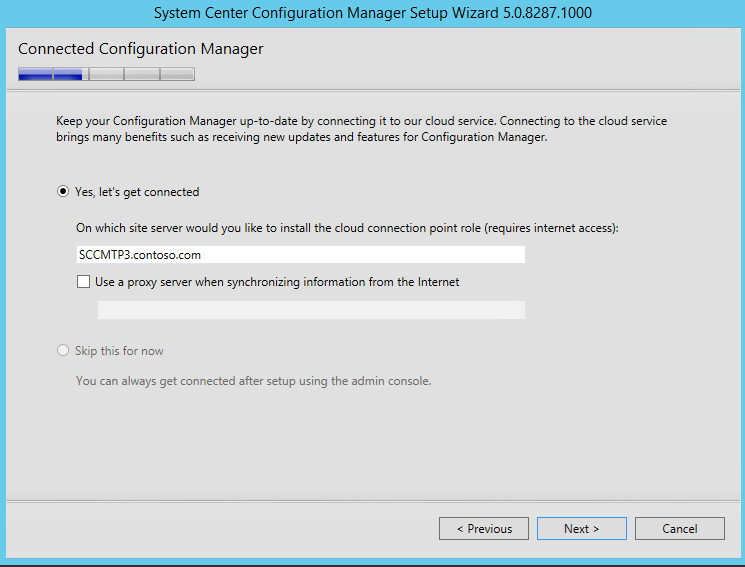
On August 19th ConfigMgr Technical Preview 3 has become available. This is the third ConfigMgr 2016 preview, which is expected in Q4 this year. With every preview new functionality and features is added. More about this can be found on System Center Configuration Manager Team Blog. During installation a new feature is displayed; it's called Connected Configuration Manager or Cloud service if you wish. It mentions: Keep your ConfigMgr up-to-date by connecting to our cloud service. Connecting to the cloud service brings many benefits such as receiving new updates and features for ConfigMgr.

After installation a Cloud connection point is installed on the site server. This can be set Online or Offline for the moment. Let's have a look at the possibilities.
-Online mode creates a persistent connection to the ConfigMgr cloud service and proactively notifies you of updates.
-Offline mode requires you to run the Cloud Connection tool to set the initial configuration of the role and configure notifications.

When looking on TechNet Library it mentions:
When you install the Technical Preview 3 it automatically installs and configures a new site system role on the site server, the cloud connection point. When this role installs it defaults to:
-Online mode
-A data collection level of Enhanced

When this role is online, it enables Microsoft to automatically collect diagnostics and usage data over the Internet. Information that is collected helps us identify and troubleshoot problems as well as improve our products and services.
 
The three levels of data collection that are planned for future releases include:
-Basic includes data about setup and upgrade like the number of sites and which Configuration Manager features are enabled. No personally indefinable information will be transmitted.
-Enhanced includes the data in the Basic setting plus transmits data about the hierarchy, how each feature is used (frequency and duration), and enhanced diagnostic information like the memory state of your server when a system or app crash occurs. No personally identifiable data will be transmitted.
-Full includes the data in the Basic and Enhanced settings and also sends advanced diagnostic information like system files and memory snapshots. This option may include personally identifiably information, but we won’t use that information to identify or contact you, or target advertising to you.

For it seems the Cloud connection point is not used for updates only, it collect diagnostics and usage data (over the Internet) as well. Probably you cannot choose if you want to receive updates only. Microsoft wants to collect diagnostics and usage data as well, and as a benefit you will receive updates in return. With this feature ConfigMgr-as-a-service is born! Hope it will be more detailed in a next release :-)

When starting the new ConfigMgr console (look and feel) there are no much changes in this release. But with the Cloud connection point in-place, anything is possible!

Monday, August 24, 2015

What’s new in ConfigMgr and SCEP Technical Preview 3

Last week, ConfigMgr and SCEP Technical Preview 3 became available. Technical Preview 3 provides you with an early glimpse of the functionality that is planned for Q4 2015 (close to Windows 10), bringing with it full support for client deployment, upgrade, and management of Windows 10.

New features available in Technical Preview 3 include:
-Deployment of required applications to Windows 10 devices managed via on-premises mobile device management (MDM) – You now have the ability to deploy required applications to Windows 10 PCs and mobile devices managed via MDM with on-premises ConfigMgr infrastructure. (Intune subscription required)
-Cluster-aware settings – Servicing a cluster just became easier! With this third technical preview, you can deploy an update to a cluster while controlling the percent of servers that are online at any given time, and specify actions to run pre- and post-deployment. > Cluster-Aware Updating Overview
-High availability support with SQL Server 2014 AlwaysOn – Using SQL Server 2014 AlwaysOn Availability Groups, you now have improved support for both high availability and disaster recovery for the ConfigMgr database.
-Ability to run software update cleanup tasks – You can now schedule and run WSUS cleanup tasks from the ConfigMgr console. > Great feature!

Also included in this technical preview are features that were previously released in the first and second Technical Previews for ConfigMgr.

For more information and download have a look on:

Also, if you have a feature request, make sure to share your ideas on the new ConfigMgr UserVoice site.

Just download and enjoy this third Technical Preview!