Showing posts with label ConfigMgr 2016. Show all posts

Wednesday, February 3, 2016

Doing a ConfigMgr 1511 upgrade (Notes from the field)

Recently I did an ConfigMgr 1511 upgrade, where earlier upgrades and clean installs went fine. But this one was a bit different; more like the ConfigMgr 2012 R2 SP1 upgrade before. Before you begin just make sure you have a good backup! Most of time I start with a ConfigMgr backup and snapshot of ConfigMgr and SQL VM's. Better safe then sorry :-)

Then start the 1511 media, it will be finished in around 30 minutes. The crazy part is starting after that. ConfigMgr isn't done with the upgrade (like the 2012 R2 SP1 upgrade before), but running tasks in the background. Strange enough it's hard to see what's the status of that, and sometime it's stuck too and a reboot (or multiple reboots) are needed. Let's have a look again.

When the upgrade wizard is finished and you start the ConfigMgr console, have a look at Site & System status. The MP will be down for almost one hour. When looking at Software Library the ConfigMgr client package and boot images are not updated yet. Because of that OS deployment isn't possible too. Sometimes it will be started automatically within one hour, sometimes a reboot is needed to start processing again. A nasty situation for sure.

Installation progress in short:


Management point in critical state
 

No Site Components available
  

SMS Replication Configuration Monitor
 
As I sayed earlier, it can take on hour before the Management point is healthy again and Site Components are back in business. It may help to reboot the Primary server once (or twice), when there's no progress seen (recommended only when nothing changed after one hour). After the reboot you will see that functionality is restored soon! When looking at Software Library the ConfigMgr client package and boot images will be updated now. Still it's a nasty upgrade, because you think it's done in 30 minutes, and not one hour after that.


Management Point installed after reboot

Have a look in mpsetup.log for successful status:
-Installing the SMSMP
-Passed OS version check.
-IIS Service is installed.
-SMSMP already installed (Product Code: {861C35CB-8117-469B-A847-D948AEE1F507}).  Upgrading/Reinstalling SMSMP
-New SMSMP is a new product code {{2627B2A8-5D52-4AE0-87D1-0CCF0145FB3F}}.  This is a major upgrade.
-Enabling MSI logging.  mp.msi will log to D:\Program Files\Microsoft Configuration Manager\logs\mpMSI.log
-Installing D:\Program Files\Microsoft Configuration Manager\bin\x64\mp.msi <parameters>
-mp.msi exited with return code: 0
-Installation was successful.
-~RoleSetup().


Site Components back again


CM Client package cannot be updated

After successful management point setup, the client package couldn't be updated: No action specified for the package <?>, however there may be package server changes for this package.


CM Client package updated manually

Therefore I did another update on the package as well. This time it went fine: Successfully created/updated the package server in the data source. After that deployment is possible again.

Why not mention in the wizard, installation is not finished and will take another hour? Or count another hour on the wizard and finish it in 60-90 minutes, instead of running tasks in the background? I guess this can be better with future releases. Hope it helps!

Update 11-2: As Torsten mentioned in comments: This has always been the case: "ConfigMgr isn't done with the upgrade ... but running tasks in the background" - even for CUs or SPs. Just monitor sitecomp.log instead of rebooting the server.

Once the UI is done, in the background the Site Component Manager is kicking off and re-installing all components, and Site systems needs to be re-installed. This can take multiple hours, so prepare for that. Check sitecomp.log for progress on this.

It's preferred to Check the database before doing a ConfigMgr upgrade as well. Happy upgrading! :-)

Wednesday, December 23, 2015

Doing a ConfigMgr 2012 R2 to 1511 migration on another server

Recently I did a ConfigMgr 2012 R2 to 1511 migration. Case is, it was needed to be installed on a new server. This new server has a different computername and IP-address and different partitions as well. When you want to recover an existing ConfigMgr installation, you need to have a server with the same computername, IP-address and partitions too. Therefore I have choosen not to re-use the ConfigMgr back-up, but using migrations tools.

Let's have a look at current situation first. The existing server is build on Windows Server 2008 R2, SQL Server 2008 R2 and ConfigMgr 2012 R2, where the Primary server installation is separated from SQL installation. You may upgrade SQL Server in-place with Microsoft support, but an in-place Windows Server upgrade is not supported. Therefore a new server with a current (2012 R2) server installation is needed. When using Windows Server 2012 an in-place upgrade to 2012 R2 is supported. Otherwise not!

When building a new server, and there's a need to use the existing ConfigMgr database, the computername, IP-address and partitions must be same. Because I want to change the name and partition both, recovery is not possible. Therefore I used a new server build on Windows Server 2012 R2, SQL Server 2014 SP1 and and ConfigMgr 1511. During installation a new Site code and name is requested. The existing name cannot be re-used.

After installation start the migration tools, and migrate all objects needed to the new server. Remember you cannot migrate collections when coming from ConfigMgr 2012. For some reason that is possible only from ConfigMgr 2007 environments. Other objects migrate fine indeed. After migration remember to update ConfigMgr client too, so management can be done from the new server.

All went fine during this migration. Hope it helps!

Update 28-12-2015: Within the Object migration task, collections can be selected as well. As asked by Conor O'Farrell within the comments, both deployments and collections can be migrated successfully. On my software package however the program was disabled after migration, without the possibility to enable it during migration. So yes, you can migrate all stuff needed from ConfigMgr 2012 R2 to 1511. Just great!

Sources used:
Backup and Recovery in Configuration Manager
How to move the ConfigMgr 2012 site database to a new SQL server
Supported configurations for System Center Configuration Manager
Planning a Migration Job Strategy in System Center 2012 Configuration Manager

Tuesday, December 15, 2015

Issue with Windows ADK for Windows 10 (Version 1511) in ConfigMgr

When using ConfigMgr 2012 SP2 or R2 SP1, and Windows 10 needs to be deployed, Windows 10 ADK is needed as well. This because the deployment tools are not forward-compatible; you need to use a Windows 10 boot image to deploy a Windows 10 OS image. When searching for the Windows 10 ADK however, it's possible you download the wrong one! Within Version 1511 (Build 10.1.10586.0) there's an serious issue that blocks a specific ConfigMgr OS deployment scenario from Software Center.

Therefore it's needed to use Version RTM (Build 10.0.26624.0). You should continue to use the original release of the Windows 10 ADK, which is supported for OS deployments including Windows 10, version 1511. When downloading adksetup.exe, just check the version before installing deployment tools! (details tab)

Version RTM
 
Version 1511

As mentioned on the Configuration Manager Team Blog, the new Configuration Manager 1511 is also affected by the ADK issue. Please check that post. We will update it when we have further information. You should continue to use the original release of the Windows 10 ADK, which is supported for OS deployments including Windows 10, version 1511. This older version of the Windows 10 ADK can still be downloaded directly from the Microsoft Download Center

Have a look on Microsoft Technet for more information:
Issue with the Windows ADK for Windows 10, version 1511

More blogposts about Windows ADK:
Update ConfigMgr 2012 R2 SP1 with Windows 10 boot images

Thursday, December 10, 2015

Installing ConfigMgr as a service (version 1511) first experience

Since ConfigMgr as a service (version 1511) is released, installation and upgrade can be done. I did a installation in my environment already, to see the difference with ConfigMgr 2012. Let's have a look at my experiences so far:

Splash.hta hasn't been changed, but Version 1511 is visible now! Installation (in my case) is done in 27 minutes, which is quite normal.

During installation 'Usage Data' is showed. It enables Microsoft to automatically collect diagnostics and usage information over the Internet. Enhanced mode is the default data collection level, but Basic and Full membership is possible too.

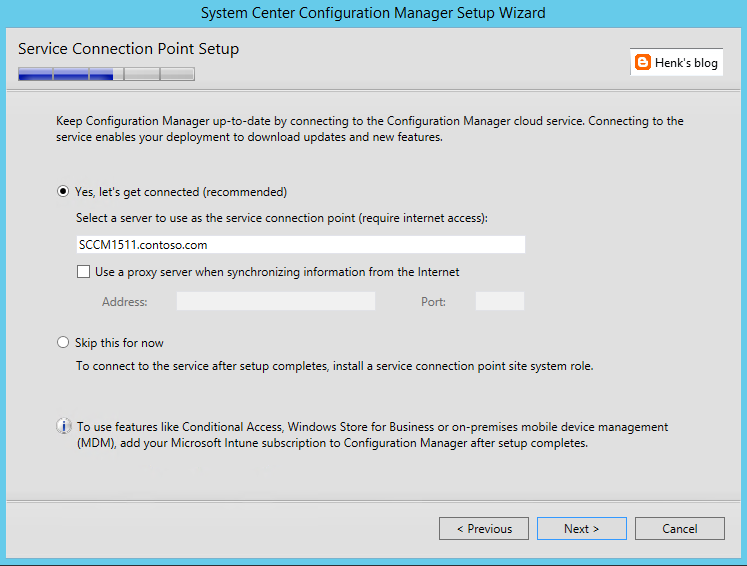
The new Service Connection point brings monthly updates in ConfigMgr and Intune more easily then before. When Online, new updates are applied and Usage Data (as mentioned before) is collected.

After installation Version 1511 is showed, which is the new ConfigMgr. Have a look at my other blogposts the new ConfigMgr also:
- What to expect from ConfigMgr as a service (version 1511)
- ConfigMgr and SCEP (version 1511) Generally Available now!
- My experience with ConfigMgr 2016 (Technical Preview 3) so far

For more information on 'Usage Data' have a look here:
Reference for System Center Configuration Manager Setup

Wednesday, December 9, 2015

What to expect from ConfigMgr as a service (version 1511) and new features

ConfigMgr 1511 (better known as ConfigMgr as a service) is released yesterday. Have a look on my earlier blogpost for that. Let's have a look at some new features known so far:

-ConfigMgr is a 'as-a-service' solution from now on!
-ConfigMgr is called 1511 because of versioning, which is YYMM
-Microsoft has the ability to update ConfigMgr when needed
-With a Maintenance Window you can choose when the update is done!
-No complex individual upgrades are needed anymore


Windows 10 support
-It has full support for Windows 10 (provisioning, servicing, imaging)
-An in-place upgrade task sequence is available by default
-Windows 10 on-premises MDM possible, but Intune subscription is still needed
-Windows 10 servicing possible and dashboard integrated
-Both Endpoint Protection and Windows Defender management

Updates and servicing:
-No servicepacks, CU's and hotfixes needs to be installed anymore
-Client deployment monitoring in the console (cool feature)
-No reboots are needed when update ConfigMgr with new functionality
-Preferred management points in ConfigMgr possible (new feature)


Other new features:
-Multiple deployments for Automatic Deployment Rules :)
-Cluster aware patch management (instead of using WSUS)
-Combined Software center and Application catalog (finally)
-and much, much more...


Because Microsoft is moving away from Silverlight (using HTML5 instead) no Application Catalog (as second Software Center) is needed anymore, but both Application Catalog roles still needs to be installed. Microsoft is using a unifying Software Center now, which can handle both packages and applications. That's great for end user experience if you ask me! It can be enabled in Client settings.

Migration is possible from 2007 (side-by-side) and 2012 (in-place) with the recommendation to run the latest Cumulative Update.

Have a look at What’s new on the Configuration Manager horizon (session by @Tim_DK) for more information!

Tuesday, December 8, 2015

ConfigMgr and SCEP (version 1511) Generally Available now!

As for today (December 8th) ConfigMgr and SCEP (version 1511) are available! They can be downloaded from the Microsoft Evaluation Center, MSDN, and Volume Licensing Service Center. ConfigMgr 1511 (YYMM versioning) was designed to work with Windows 10, and gives you multiple options to deploy, update, and manage Windows 10 in the way that makes sense for your business.

With the new ConfigMgr (ConfigMgr as a service) it's no longer needed to install servicepacks, cumulative updates and additional hotfixes. With the Service connection point (connects ConfigMgr to Microsoft cloud services, used for Microsoft Intune, and to update and service your ConfigMgr installation) this will be done easier from now on! Have a look at this blogpost for more information on that.


This release provides key new capabilities:
Deploy/upgrade/provision Windows 10: ConfigMgr supports a variety of fast, efficient ways to deploy or upgrade devices to Windows 10.
Keep Windows 10 up-to-date: Once devices are running Windows 10, enterprises must keep them up-to-date to ensure they are properly secured.
More frequent and easier to install updates: ConfigMgr is now designed to make it easier to update without going through complex individual upgrades.
Manage Windows 10: You can manage devices using the traditional ConfigMgr agent and, when integrated with Microsoft Intune, also via cloud or on-premises MDM.


ConfigMgr provides an improved unified device management platform for customers using ConfigMgr integrated with Microsoft Intune to manage PCs, servers, and mobile devices. This release enables faster updates to bring new Intune features to your hybrid deployments.

Have a look at Removed and Deprecated Features for Configuration Manager to see differences between ConfigMgr 2012 and 1511.

Have a look for more information:
System Center Configuration Manager Overview
System Center Configuration Manager Team Blog

Thursday, November 5, 2015

Configuration Manager (ConfigMgr) as a service won't get updated

In my LAB environment, ConfigMgr technical preview Build 1509 is installed. Problem is, it won't get updated to Build 1510. Because this functionality is the way to update ConfigMgr now and in future (ConfigMgr as a service), I did some troubleshooting. In this blogpost I give some tips and tricks to look at.

When looking in the ConfigMgr install folder have a look at these folders:
-CMUStaging & EasySetupPayload


When looking in the Logs folder have a look at these logfiles too:
-CMUpdate.log & dmpdownloader.log & hman.log


In the CMUpdate.log the following errors are found:
Set inbox to \\<CM server>\<CM site>\inboxes\cmupdate.box
*** [08001][2][Microsoft][ODBC Driver 11 for SQL Server]Named Pipes Provider: Could not open a connection to SQL Server [2].
*** [28000][18456][Microsoft][ODBC Driver 11 for SQL Server][SQL Server]Login failed for user 'NT AUTHORITY\SYSTEM'.
*** [42000][4060][Microsoft][ODBC Driver 11 for SQL Server][SQL Server]Cannot open database "<CM db>" requested by the login. The login failed.
*** [08001][2][Microsoft][ODBC Driver 11 for SQL Server]A network-related or instance-specific error has occurred while establishing a connection to SQL Server. Server is not found or not accessible. Check if instance name is correct and if SQL Server is configured to allow remote connections. For more information see SQL Server Books Online.
*** Failed to connect to the SQL Server, connection type: SMS ACCESS.
Waiting for changes to the "
\\<CM server>\<CM site>\inboxes\cmupdate.box" directories, updates will be polled in 600 seconds...

In my case the only folder seeing in EasySetupPayload folder is dcd17922-2c96-4bd7-b72d-e9159582cdf2, which is Build 1509. In manifest.log (CMUStaging folder), it's looking for db316362-77fc-46c9-9984-1baeb20615f4, which is Build 1510. So the download couldn't take place, and installation failed. I did a lot to force the download, but nothing seems to do the job.

When update tasks are not available in the ConfigMgr console (Administration > Cloud Services > Updates and Servicing) you can force it by using a SQL query:
EXEC spCMUSetUpdatePackageState N’dcd17922-2c96-4bd7-b72d-e9159582cdf2', 262146, N” (Build 1509)
EXEC spCMUSetUpdatePackageState N’db316362-77fc-46c9-9984-1baeb20615f4', 262146, N” (Build 1510)

Remember: This isn't supported, so use it at your own risk!

That didn't do the job in my LAB environment. I can choose to install Build 1510, but it won't get start downloading again.

Did the restart many times, but no files were downloaded for the new build. Another troubleshooting possible, based on the errors seen:
-Change DateTime format set to MM-DD-YYYY
-Enable Named Pipes in SQL Server Configuration Manager
-Change SQL authentication to SQL and Windows authentication
-Restart Configuration Manager Update service

Hope that anyone has a good solution to put me in the right direction! To be continued..

Update 26-7-2016: Check Microsoft TechNet for more information!

Thursday, October 29, 2015

Introducing Configuration Manager (ConfigMgr) as a service

As for today (27-1) there is a new update on the Configuration Manager Team blog. Let's have a look at the news mentioned:
 
The Future of Configuration Manager:
-During this time, we have completed the work necessary to deliver ConfigMgr more as an “as-a-Service” product.
-In terms of taxonomy for these updates, we’ll simply be referring to the ConfigMgr product as System Center Configuration Manager + year and month.
-The combination of ConfigMgr and Intune is the only solution that provides the full solution for managing all the versions of Windows, as well as all mobile devices.
-Our goals with ConfigMgr in this release cycle are all centered around finishing the work we started back in 2010 (when we were building ConfigMgr 2012) to deliver ConfigMgr as a service.
-With this work now completed, and with ConfigMgr/Intune being delivered as services, here is what we are able to do for you:
--Deliver the single-pane-of-glass for managing all devices – with immediate support across Windows, iOS and Android without you have to go through complex individual upgrades. We’ll do the work for you.


Support for Windows 10 and Microsoft Intune:
-As we announced at Microsoft Ignite with our first technical preview, we will release a new version of Configuration Manager by the end of this calendar year.
-The new System Center Configuration Manager, as it will simply be called, is designed to support the much faster pace of updates for Windows 10 and Microsoft Intune.
-System Center Configuration Manager will support Windows 10 in any flavor: Current Branch, Current Branch for Business, and Long-Term Servicing Branch.
-The fact that we are not including a calendar year in the name is a reflection of the fact that the new System Center Configuration Manager will be updated frequently.
-We plan to support each version/update for 12 months before we require that customers upgrade to the latest one to continue support.
 -If you want to deploy Windows 10 in your environment today, you should have already upgraded ConfigMgr 2012 to the latest service pack and cumulative update as many of our customers already have.

Just great we have both Windows and ConfigMgr as a service from now on. ConfigMgr is the way to go for managing all versions of Windows! Hope to implement Microsoft Intune more as well. #loveit
 
More blogposts on ConfigMgr 2016 TP3:
My experience with ConfigMgr 2016 (Technical Preview 3) so far
October Update for ConfigMgr 2016 (Technical Preview 3) available  

Thursday, October 15, 2015

October Update for ConfigMgr 2016 (Technical Preview 3) available

Yesterday another update on ConfigMgr 2016 TP3 (Technical Preview 3) is done. This new update brings with it an early view of the new Windows 10 Servicing node, which enables you to view the state of Windows as a service in your environment, create flexible servicing plans to form deployment rings, and view alerts when Windows 10 clients are near end of support for their build of Current Branch or Current Branch for Business.

To read more about the new Windows 10 servicing dashboard, please refer to the TechNet documentation.

The Windows 10 Servicing dashboard is the latest addition to ConfigMgr’s rich support for Windows 10, including client deployment, upgrade, and management. You can find additional guidance for Windows 10 servicing and deployment on the Windows for IT Pros blog.

This update also introduces the ability to natively manage Office 365 desktop client updates using the Configuration Manager Software Update Management (SUM) workflow. You can now manage Office 365 desktop client updates just like you manage any other Microsoft Update.

In order to enable update 1510 for TP3, have a look here: System Center Configuration Manager Team Blog

Just great to have "ConfigMgr as a service" from now on!

More blogposts on ConfigMgr 2016 TP3:
Installing ConfigMgr 2016 Technical Preview 3
My experience with ConfigMgr 2016 (Technical Preview 3) so far

Tuesday, October 6, 2015

My experience with ConfigMgr 2016 (Technical Preview 3) so far

Last weeks I did a lot on ConfigMgr 2016 (Technical Preview 3). When installing the product (I used SQL 2014 and ADK 10 for this) and starting the console, no changes seems to be made. Thing is, most changes are not visible right away. You must use the product to see changes between the 2012 and 2016 release. The biggest one is under the hood. Let's have a look at my experience so far.

Because ConfigMgr 2016 is another x64 release, an in-place migration is possible from 2012 (when the product is final!). Only thing is, you need to update ADK (remove ADK 8.x and install ADK 10). It's possible to update SQL as well, but that's not a required thing. ConfigMgr 2016 can be installed as a servicepack (maybe it is off the record). You feel comfortable with it right away, which is quite nice. Just great to have a new release for the next coming years :)

Most important changes are:

Service connection point (connects ConfigMgr to Microsoft cloud services, it is used for Microsoft Intune subscription, and to update and service your ConfigMgr installation). You can choose between Online (persistent connection), which is recommended, and Offline (on-demand connection). Beneath Cloud Services (Administration tab) "Updates and Servicing" is added. Beneath that Features can be added by Microsoft dynamically. I installed "(Pre-Release) Version 1509 for Technical Preview" myself that way. With that you have "ConfigMgr as a service" from now on.

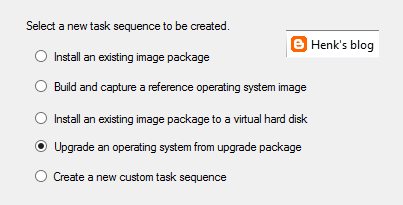
New task sequence: "Upgrade an operating system from upgrade package". This task sequence is used specially for Windows 10 upgrades. It contains a few steps only, but it does what it says: upgrade to Windows 10 in-place in just a few clicks. I did a Windows 8.1 to 10 upgrade within an hour with it.

Automatic Deployment Rules (ADR) can be connected to multiple collections now, without the need to set whole configuration again. Just click on the ADR and select "Add Deployment" to connect an existing ADR to another collection. When choosing properties on an existing ADR there is more overview, because of less tabs showing. Very nice there is improvement here!

Software Center and Application Catalog are (almost) merged now. Applications are showed in Software Center by default now, but approval still needs to be done in Application Catalog. Hope it will be merged totally in future soon. Software Center has a new look and feel, and can be used for (un)installing applications, software packages, and task sequence too. I use my for showing the Windows 10 upgrade task sequences available. Pity is still no e-mail notification is there by default. Other minus is that after approval the end user doesn't get an message that the application can be installed. Still some space for improvement if you ask me!

There will be full compatibility with existing features for Windows 10 (Windows as a service) in this release. And there will be a new hybrid option to manage Windows 10 devices via MDM with on-premises infrastructure. For this no ConfigMgr client is needed on the device. A workplace join (and company portal) is enough to show the device in ConfigMgr and push applications and policies. Just great isn't it?!

Hope to have my first ConfigMgr 2016 implementation and/or migration soon. This in combination with Microsoft Intune and Windows 10 for modern management. Microsoft is (still) the way to go! :) I'm very happy with the new possibilities till now.

More posts about ConfigMgr 2016:
New Microsoft System Center and Windows versions coming!
Installing ConfigMgr 2016 Technical Preview 3

Monday, August 24, 2015

What’s new in ConfigMgr and SCEP Technical Preview 3

Last week, ConfigMgr and SCEP Technical Preview 3 became available. Technical Preview 3 provides you with an early glimpse of the functionality that is planned for Q4 2015 (close to Windows 10), bringing with it full support for client deployment, upgrade, and management of Windows 10.

New features available in Technical Preview 3 include:
-Deployment of required applications to Windows 10 devices managed via on-premises mobile device management (MDM) – You now have the ability to deploy required applications to Windows 10 PCs and mobile devices managed via MDM with on-premises ConfigMgr infrastructure. (Intune subscription required)
-Cluster-aware settings – Servicing a cluster just became easier! With this third technical preview, you can deploy an update to a cluster while controlling the percent of servers that are online at any given time, and specify actions to run pre- and post-deployment. > Cluster-Aware Updating Overview
-High availability support with SQL Server 2014 AlwaysOn – Using SQL Server 2014 AlwaysOn Availability Groups, you now have improved support for both high availability and disaster recovery for the ConfigMgr database.
-Ability to run software update cleanup tasks – You can now schedule and run WSUS cleanup tasks from the ConfigMgr console. > Great feature!

Also included in this technical preview are features that were previously released in the first and second Technical Previews for ConfigMgr.

For more information and download have a look on:

Also, if you have a feature request, make sure to share your ideas on the new ConfigMgr UserVoice site.

Just download and enjoy this third Technical Preview!

Thursday, July 9, 2015

What’s new in ConfigMgr and SCEP Technical Preview 2

Today, ConfigMgr and SCEP Technical Preview 2 became available. Technical Preview 2 provides you with an early glimpse of the functionality that is planned for Q4 2015 (close to Windows 10), bringing with it full support for client deployment, upgrade, and management of Windows 10.

New features available in Technical Preview 2 include: 
-Universal Windows apps support for Windows 10 – Side-load internally developed Universal Windows apps to Windows 10 devices.
-Peer cache support for Windows PE – Includes OS deployment scenarios for Windows PE, extending our existing Configuration Manager peer cache content management.
-Ability to manage Windows 10 PCs and mobile devices via MDM with on-premises ConfigMgr infrastructure – Manage Windows 10 devices using ConfigMgr integrated with Microsoft Intune (hybrid) without the need to store your data in the cloud. This is especially helpful for managing devices that are unable to connect to the Internet such as Windows IoT/Embedded devices. (Intune subscription required)


Also included are features that were previously released in the first Technical Preview in May:
-Support for Windows 10 upgrade with OS deployment task sequence – In addition to providing support for existing wipe-and-load (refresh) scenarios, the ConfigMgr Technical Preview includes enhanced upgrade support with in-place upgrade to Windows 10.
-Support for installing ConfigMgr on Azure Virtual Machines – Similar to how you can install ConfigMgr on Hyper-V today, you can now run ConfigMgr in Azure VMs. This provides flexibility to move some or all of your datacenter server workloads to the cloud with Azure.


For more information and download have a look on:
TechNet Evaluation Center


Also, if you have a feature request, make sure to share your ideas on the new ConfigMgr UserVoice site.

Just download and enjoy this second Technical Preview!