Since ConfigMgr as a service (version 1511) is released, installation and upgrade can be done. I did a installation in my environment already, to see the difference with ConfigMgr 2012. Let's have a look at my experiences so far:
Splash.hta hasn't been changed, but Version 1511 is visible now! Installation (in my case) is done in 27 minutes, which is quite normal.
During installation 'Usage Data' is showed. It enables Microsoft to automatically collect diagnostics and usage information over the Internet. Enhanced mode is the default data collection level, but Basic and Full membership is possible too.
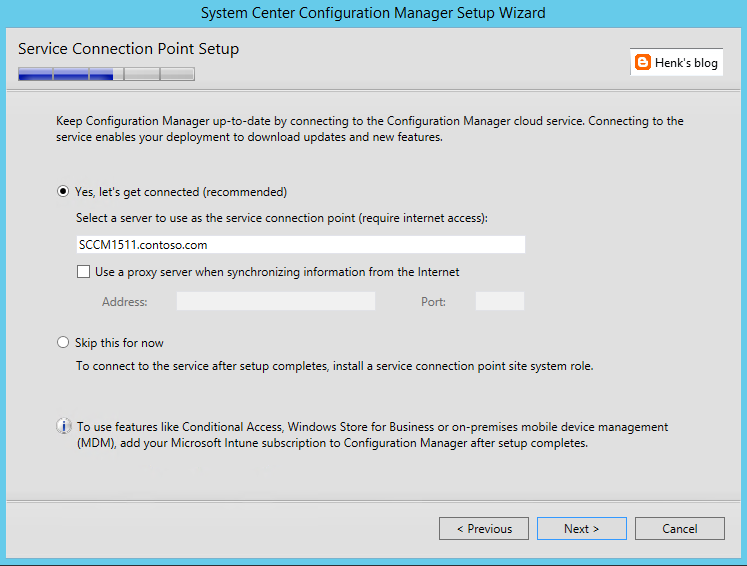
The new Service Connection point brings monthly updates in ConfigMgr and Intune more easily then before. When Online, new updates are applied and Usage Data (as mentioned before) is collected.
After installation Version 1511 is showed, which is the new ConfigMgr. Have a look at my other blogposts the new ConfigMgr also:
- What to expect from ConfigMgr as a service (version 1511)
- ConfigMgr and SCEP (version 1511) Generally Available now!
- My experience with ConfigMgr 2016 (Technical Preview 3) so far
For more information on 'Usage Data' have a look here:
Reference for System Center Configuration Manager Setup
ConfigMgr 1511 (better known as ConfigMgr as a service) is released yesterday. Have a look on my earlier blogpost for that. Let's have a look at some new features known so far:
-ConfigMgr is a 'as-a-service' solution from now on!
-ConfigMgr is called 1511 because of versioning, which is YYMM
-Microsoft has the ability to update ConfigMgr when needed
-With a Maintenance Window you can choose when the update is done!
-No complex individual upgrades are needed anymore
Windows 10 support
-It has full support for Windows 10 (provisioning, servicing, imaging)
-An in-place upgrade task sequence is available by default
-Windows 10 on-premises MDM possible, but Intune subscription is still needed
-Windows 10 servicing possible and dashboard integrated
-Both Endpoint Protection and Windows Defender management
Updates and servicing:
-No servicepacks, CU's and hotfixes needs to be installed anymore
-Client deployment monitoring in the console (cool feature)
-No reboots are needed when update ConfigMgr with new functionality
-Preferred management points in ConfigMgr possible (new feature)
Other new features:
-Multiple deployments for Automatic Deployment Rules :)
-Cluster aware patch management (instead of using WSUS)
-Combined Software center and Application catalog (finally)
-and much, much more...
Because Microsoft is moving away from Silverlight (using HTML5 instead) no Application Catalog (as second Software Center) is needed anymore, but both Application Catalog roles still needs to be installed. Microsoft is using a unifying Software Center now, which can handle both packages and applications. That's great for end user experience if you ask me! It can be enabled in Client settings.
Migration is possible from 2007 (side-by-side) and 2012 (in-place) with the recommendation to run the latest Cumulative Update.
Have a look at What’s new on the Configuration Manager horizon (session by @Tim_DK) for more information!
As for today (December 8th) ConfigMgr and SCEP (version 1511) are available! They can be downloaded from the Microsoft Evaluation Center, MSDN, and Volume Licensing Service Center. ConfigMgr 1511 (YYMM versioning) was designed to work with Windows 10, and gives you multiple options to deploy, update, and manage Windows 10 in the way that makes sense for your business.
With the new ConfigMgr (ConfigMgr as a service) it's no longer needed to install servicepacks, cumulative updates and additional hotfixes. With the Service connection point (connects ConfigMgr to Microsoft cloud services, used for Microsoft Intune, and to update and service your ConfigMgr installation) this will be done easier from now on! Have a look at this blogpost for more information on that.
This release provides key new capabilities:
Deploy/upgrade/provision Windows 10: ConfigMgr supports a variety of fast, efficient ways to deploy or upgrade devices to Windows 10.
Keep Windows 10 up-to-date: Once devices are running Windows 10, enterprises must keep them up-to-date to ensure they are properly secured.
More frequent and easier to install updates: ConfigMgr is now designed to make it easier to update without going through complex individual upgrades.
Manage Windows 10: You can manage devices using the traditional ConfigMgr agent and, when integrated with Microsoft Intune, also via cloud or on-premises MDM.
ConfigMgr provides an improved unified device management platform for customers using ConfigMgr integrated with Microsoft Intune to manage PCs, servers, and mobile devices. This release enables faster updates to bring new Intune features to your hybrid deployments.
Have a look at Removed and Deprecated Features for Configuration Manager to see differences between ConfigMgr 2012 and 1511.
Have a look for more information:
System Center Configuration Manager Overview
System Center Configuration Manager Team Blog
This is a great year again because of new Microsoft System Center and Windows versions coming soon. Let's have a look at some big announcements so far! It's really a hugh list this time.
ConfigMgr 2012 R2 SP2 is first in line, which contains Cumulative Update (CU) 1-4 and even more hopefully. It will be released probably around Microsoft Ignite which is held in Chicago in May. There will be an update also to support Windows 10 deployment, upgrade and management with existing ConfigMgr features.
Source: WindowsITPro.com
Windows 10 is expected in September this year. A new Preview version is expected probably around Microsoft Build which is held in San Francisco in April/May. Windows 10 may be the best OS since Windows 7 finally! Windows 10: One product family, One platform, One store. Love it! Update: Windows 10 Launching This Summer in 190 Countries and 111 Languages already.
Source: Blogging Windows
Windows 10 ADK, which is needed to deploy Windows OS to new computers, will be released around Windows 10. A Preview version can be downloaded already: Download Center
Note: Before you even try, this version is NOT compatible with MDT 2013 (6.2.5019.0) or ConfigMgr 2012 R2.
Source: Deployment Research
Windows Server 'vnext' (2016) is expected in H1 next year. Because of strong focus on Cloud (Azure), expect more integration on that part. The Windows Server Technical Preview can be downloaded here: Windows Server Evaluations
At this technical preview milestone, many of the features and scenarios of Windows 10 and Windows Server are still in development and are not intended for broad production roll out.
The System Center Technical Preview delivers unified management across on-premises, service provider, and Microsoft Azure environments, thereby enabling the Microsoft Cloud OS. You need to be running Windows Server Technical Preview and Microsoft SQL Server 2014. Expect a final release somewhere in 2015.
Download: TechNet Evaluation Center
Source: The System Center Team Blog
The next version of ConfigMgr will deliver full support for client deployment, upgrade, and management of Windows 10 and associated updates. The next version of ConfigMgr, will ship in a timeframe that aligns with Windows. Microsoft has decided not to ship a ConfigMgr preview at this time, and will do so in H1 CY15.
Source: System Center Configuration Manager Team Blog
Source: Server & Cloud Blog
Office 365: Since last week built-in mobile device management (MDM) is available for Office 365 commercial plans. With MDM for Office 365, you can manage access to Office 365 data across a diverse range of phones and tablets, including iOS, Android and Windows Phone devices, without the need for Microsoft Intune.
Source: Feature Comparison with MDM for Office 365
Microsoft Intune: In addition, as Windows 10 delivers advanced mobile device management (MDM) to support evolving enterprise requirements, Intune will provide the leading mobile-first, cloud-first management capabilities for Windows 10.
Source: System Center Configuration Manager Team Blog
Office 2016 for Windows and Mac has been in private preview for several months, though anyone could request access if they were so inclined. Microsoft has expanded the program in March to it's commercial Office 365 customers, interested in testing the upcoming release. The reason today’s Skype technical preview is tied to Office 2016 is simple: Skype for Business will be part of the suite! Office 2016 will be launching in the second half of this year.
Download: Microsoft Connect
Source: Office Blogs & VentureBeat
Can't wait to install the bits later this year! Life is good :-)
More blogposts on this topic:
My personal experience with Windows 10 Technical Preview
Feature Comparison with MDM for Office 365