A few months ago ConfigMgr Current Branch (1511) is released, which is ConfigMgr-as-a-service. There will be new updates available for it multiple times a year. This the same as Windows 10, which is Window-as-a-service. Microsoft is doing a great job here!
When using ConfigMgr Technical Preview 4 there will be new updates already. This for the 1512 and 1601 update. More about this here:
Update 1512 now available in System Center Configuration Manager Technical Preview
Update 1601 now available in System Center Configuration Manager Technical Preview
On twitter I received some great news too! There will be a ConfigMgr 1602 tech preview release soon. This followed by a 1602 production release next month. Sounds great to me :-)
Hope that updates went better in future also. This because of some negative experience with ConfigMgr 2012 R2 SP1 and 1511 updates. On twitter I received another great message: Deploying ConfigMgr will keep getting easier and easier :-)
Let's say: I'm very curious about upcoming releases!
Other blogposts about this topic:
Doing a ConfigMgr 1511 upgrade (Notes from the field)
Doing a ConfigMgr 2012 R2 SP1 upgrade (Notes from the field)
Showing posts with label SCCM 1512. Show all posts
Thursday, February 18, 2016
ConfigMgr 1602 tech preview and production release coming soon!
Thursday, December 10, 2015
Installing ConfigMgr as a service (version 1511) first experience
Since ConfigMgr as a service (version 1511) is released, installation and upgrade can be done. I did a installation in my environment already, to see the difference with ConfigMgr 2012. Let's have a look at my experiences so far:
Splash.hta hasn't been changed, but Version 1511 is visible now! Installation (in my case) is done in 27 minutes, which is quite normal.
During installation 'Usage Data' is showed. It enables Microsoft to automatically collect diagnostics and usage information over the Internet. Enhanced mode is the default data collection level, but Basic and Full membership is possible too.
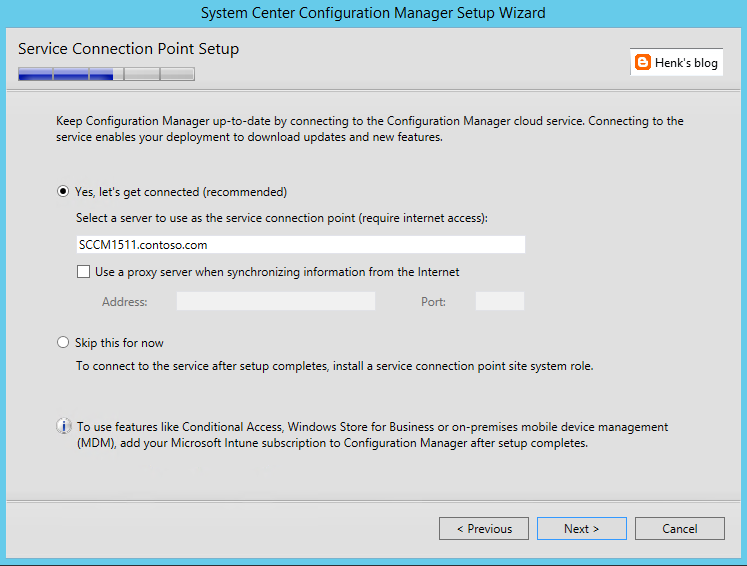
The new Service Connection point brings monthly updates in ConfigMgr and Intune more easily then before. When Online, new updates are applied and Usage Data (as mentioned before) is collected.
After installation Version 1511 is showed, which is the new ConfigMgr. Have a look at my other blogposts the new ConfigMgr also:
- What to expect from ConfigMgr as a service (version 1511)
- ConfigMgr and SCEP (version 1511) Generally Available now!
- My experience with ConfigMgr 2016 (Technical Preview 3) so far
For more information on 'Usage Data' have a look here:
Reference for System Center Configuration Manager Setup
Splash.hta hasn't been changed, but Version 1511 is visible now! Installation (in my case) is done in 27 minutes, which is quite normal.
During installation 'Usage Data' is showed. It enables Microsoft to automatically collect diagnostics and usage information over the Internet. Enhanced mode is the default data collection level, but Basic and Full membership is possible too.
The new Service Connection point brings monthly updates in ConfigMgr and Intune more easily then before. When Online, new updates are applied and Usage Data (as mentioned before) is collected.
After installation Version 1511 is showed, which is the new ConfigMgr. Have a look at my other blogposts the new ConfigMgr also:
- What to expect from ConfigMgr as a service (version 1511)
- ConfigMgr and SCEP (version 1511) Generally Available now!
- My experience with ConfigMgr 2016 (Technical Preview 3) so far
For more information on 'Usage Data' have a look here:
Reference for System Center Configuration Manager Setup
Wednesday, December 9, 2015
What to expect from ConfigMgr as a service (version 1511) and new features
ConfigMgr 1511 (better known as ConfigMgr as a service) is released yesterday. Have a look on my earlier blogpost for that. Let's have a look at some new features known so far:
-ConfigMgr is a 'as-a-service' solution from now on!
-ConfigMgr is called 1511 because of versioning, which is YYMM
-Microsoft has the ability to update ConfigMgr when needed
-With a Maintenance Window you can choose when the update is done!
-No complex individual upgrades are needed anymore
Windows 10 support
-It has full support for Windows 10 (provisioning, servicing, imaging)
-An in-place upgrade task sequence is available by default
-Windows 10 on-premises MDM possible, but Intune subscription is still needed
-Windows 10 servicing possible and dashboard integrated
-Both Endpoint Protection and Windows Defender management
Updates and servicing:
-No servicepacks, CU's and hotfixes needs to be installed anymore
-Client deployment monitoring in the console (cool feature)
-No reboots are needed when update ConfigMgr with new functionality
-Preferred management points in ConfigMgr possible (new feature)
Other new features:
-Multiple deployments for Automatic Deployment Rules :)
-Cluster aware patch management (instead of using WSUS)
-Combined Software center and Application catalog (finally)
-and much, much more...
Because Microsoft is moving away from Silverlight (using HTML5 instead) no Application Catalog (as second Software Center) is needed anymore, but both Application Catalog roles still needs to be installed. Microsoft is using a unifying Software Center now, which can handle both packages and applications. That's great for end user experience if you ask me! It can be enabled in Client settings.
Migration is possible from 2007 (side-by-side) and 2012 (in-place) with the recommendation to run the latest Cumulative Update.
Have a look at What’s new on the Configuration Manager horizon (session by @Tim_DK) for more information!
-ConfigMgr is a 'as-a-service' solution from now on!
-ConfigMgr is called 1511 because of versioning, which is YYMM
-Microsoft has the ability to update ConfigMgr when needed
-With a Maintenance Window you can choose when the update is done!
-No complex individual upgrades are needed anymore
Windows 10 support
-It has full support for Windows 10 (provisioning, servicing, imaging)
-An in-place upgrade task sequence is available by default
-Windows 10 on-premises MDM possible, but Intune subscription is still needed
-Windows 10 servicing possible and dashboard integrated
-Both Endpoint Protection and Windows Defender management
Updates and servicing:
-No servicepacks, CU's and hotfixes needs to be installed anymore
-Client deployment monitoring in the console (cool feature)
-No reboots are needed when update ConfigMgr with new functionality
-Preferred management points in ConfigMgr possible (new feature)
Other new features:
-Multiple deployments for Automatic Deployment Rules :)
-Cluster aware patch management (instead of using WSUS)
-Combined Software center and Application catalog (finally)
-and much, much more...
Because Microsoft is moving away from Silverlight (using HTML5 instead) no Application Catalog (as second Software Center) is needed anymore, but both Application Catalog roles still needs to be installed. Microsoft is using a unifying Software Center now, which can handle both packages and applications. That's great for end user experience if you ask me! It can be enabled in Client settings.
Migration is possible from 2007 (side-by-side) and 2012 (in-place) with the recommendation to run the latest Cumulative Update.
Have a look at What’s new on the Configuration Manager horizon (session by @Tim_DK) for more information!
Tuesday, December 8, 2015
ConfigMgr and SCEP (version 1511) Generally Available now!
As for today (December 8th) ConfigMgr and SCEP (version 1511) are available! They can be downloaded from the Microsoft Evaluation Center, MSDN, and Volume Licensing Service Center. ConfigMgr 1511 (YYMM versioning) was designed to work with Windows 10, and gives you multiple options to deploy, update, and manage Windows 10 in the way that makes sense for your business.
With the new ConfigMgr (ConfigMgr as a service) it's no longer needed to install servicepacks, cumulative updates and additional hotfixes. With the Service connection point (connects ConfigMgr to Microsoft cloud services, used for Microsoft Intune, and to update and service your ConfigMgr installation) this will be done easier from now on! Have a look at this blogpost for more information on that.
This release provides key new capabilities:
Deploy/upgrade/provision Windows 10: ConfigMgr supports a variety of fast, efficient ways to deploy or upgrade devices to Windows 10.
Keep Windows 10 up-to-date: Once devices are running Windows 10, enterprises must keep them up-to-date to ensure they are properly secured.
More frequent and easier to install updates: ConfigMgr is now designed to make it easier to update without going through complex individual upgrades.
Manage Windows 10: You can manage devices using the traditional ConfigMgr agent and, when integrated with Microsoft Intune, also via cloud or on-premises MDM.
ConfigMgr provides an improved unified device management platform for customers using ConfigMgr integrated with Microsoft Intune to manage PCs, servers, and mobile devices. This release enables faster updates to bring new Intune features to your hybrid deployments.
Have a look at Removed and Deprecated Features for Configuration Manager to see differences between ConfigMgr 2012 and 1511.
Have a look for more information:
System Center Configuration Manager Overview
System Center Configuration Manager Team Blog
With the new ConfigMgr (ConfigMgr as a service) it's no longer needed to install servicepacks, cumulative updates and additional hotfixes. With the Service connection point (connects ConfigMgr to Microsoft cloud services, used for Microsoft Intune, and to update and service your ConfigMgr installation) this will be done easier from now on! Have a look at this blogpost for more information on that.
This release provides key new capabilities:
Deploy/upgrade/provision Windows 10: ConfigMgr supports a variety of fast, efficient ways to deploy or upgrade devices to Windows 10.
Keep Windows 10 up-to-date: Once devices are running Windows 10, enterprises must keep them up-to-date to ensure they are properly secured.
More frequent and easier to install updates: ConfigMgr is now designed to make it easier to update without going through complex individual upgrades.
Manage Windows 10: You can manage devices using the traditional ConfigMgr agent and, when integrated with Microsoft Intune, also via cloud or on-premises MDM.
ConfigMgr provides an improved unified device management platform for customers using ConfigMgr integrated with Microsoft Intune to manage PCs, servers, and mobile devices. This release enables faster updates to bring new Intune features to your hybrid deployments.
Have a look at Removed and Deprecated Features for Configuration Manager to see differences between ConfigMgr 2012 and 1511.
Have a look for more information:
System Center Configuration Manager Overview
System Center Configuration Manager Team Blog
Subscribe to:
Posts (Atom)