Today (September 27th) the latest ConfigMgr (preview) version is released: Update 1609 for ConfigMgr Technical Preview. Update 1609 for Technical Preview is available directly in the ConfigMgr console. If you want to install ConfigMgr Technical Preview for the first time, the installation bits (currently based on Technical Preview 1603) are available on TechNet Evaluation Center. The new version offers lots of new functionality, with several great new features.
This update includes the following improvements:
-Windows 10 Upgrade Analytics (assess and analyze device readiness and compatibility with Windows 10 to allow smoother upgrades)
-Office 365 Client Management Dashboard (track Office 365 updates and deployments)
-Deploy Office 365 apps to clients (Office 365 Servicing node in Software Library, deploy Office 365 apps to clients)
-Improvements for BIOS to UEFI conversion (OS deployment task sequence with a new variable, called TSUEFIDrive)
-Improvement to Endpoint Protection antimalware policy settings (specify the level to block suspicious files)
-Boundary Group Improvements (more granular control of fallback behavior, and greater clarity which DP's are used)
This update also includes new features for customers using ConfigMgr integrated with Intune (hybrid scenario):
-TouchID, ApplePay and Zoom DEP Settings (create enrollment profiles to skip initial setup screens for new iOS devices)
-Windows Store for Business (allows customers to obtain applications, purchased or free, and deploy them to users)
-Android, iOS, and Windows Additional Settings (create Windows 10 VPN profiles without using OMA-URI)
-Intune Compliance Charts (quick view of overall device compliance, and top reasons for non-compliance using new charts)
And nested task sequences will be available soon too! Just great a new (preview) version is available now! Happy installing :-)
Source: Enterprise Mobility and Security Blog
Detailed overview of new features: Microsoft TechNet

Showing posts with label SCCM Technical Preview. Show all posts
Showing posts with label SCCM Technical Preview. Show all posts
Wednesday, September 28, 2016

Tuesday, June 21, 2016
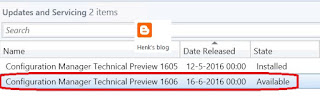
Now Available: Update 1606 for ConfigMgr Technical Preview
Today (June 21th) the latest ConfigMgr (preview) version is released: Update 1606 for ConfigMgr Technical Preview. Update 1606 for Technical Preview is available directly in the ConfigMgr console. If you want to install ConfigMgr Technical Preview for the first time, the installation bits (currently based on Technical Preview 1603) are available on TechNet Evaluation Center.
This update includes the following improvements:
-ConfigMgr as a managed installer with Device Guard (ConfigMgr-deployed software is automatically trusted)
-Cloud Proxy Service (manage ConfigMgr clients on the Internet, with an Azure subscription)
-Grace period for application and software update deployments (give users a grace period to install required applications or software updates)
-Multiple device management points for Windows 10 Anniversary Edition devices (automatically configures an enrolled device to have more than one device management point available for use)
This update also includes new features for customers using ConfigMgr integrated with Intune (hybrid scenario):
-Device categories (automatically place devices in device collections when used in hybrid environments)
Hope that nested task sequences will be available soon too!
Just great a new (preview) version is available now!
Source: Enterprise Mobility and Security Blog

This update includes the following improvements:
-ConfigMgr as a managed installer with Device Guard (ConfigMgr-deployed software is automatically trusted)
-Cloud Proxy Service (manage ConfigMgr clients on the Internet, with an Azure subscription)
-Grace period for application and software update deployments (give users a grace period to install required applications or software updates)
-Multiple device management points for Windows 10 Anniversary Edition devices (automatically configures an enrolled device to have more than one device management point available for use)
This update also includes new features for customers using ConfigMgr integrated with Intune (hybrid scenario):
-Device categories (automatically place devices in device collections when used in hybrid environments)
Hope that nested task sequences will be available soon too!
Just great a new (preview) version is available now!
Source: Enterprise Mobility and Security Blog
Subscribe to:
Posts (Atom)