Yesterday another update on ConfigMgr 2016 TP3 (Technical Preview 3) is done. This new update brings with it an early view of the new Windows 10 Servicing node, which enables you to view the state of Windows as a service in your environment, create flexible servicing plans to form deployment rings, and view alerts when Windows 10 clients are near end of support for their build of Current Branch or Current Branch for Business.
To read more about the new Windows 10 servicing dashboard, please refer to the TechNet documentation.
The Windows 10 Servicing dashboard is the latest addition to ConfigMgr’s rich support for Windows 10, including client deployment, upgrade, and management. You can find additional guidance for Windows 10 servicing and deployment on the Windows for IT Pros blog.
This update also introduces the ability to natively manage Office 365 desktop client updates using the Configuration Manager Software Update Management (SUM) workflow. You can now manage Office 365 desktop client updates just like you manage any other Microsoft Update.
In order to enable update 1510 for TP3, have a look here: System Center Configuration Manager Team Blog
Just great to have "ConfigMgr as a service" from now on!
More blogposts on ConfigMgr 2016 TP3:
Installing ConfigMgr 2016 Technical Preview 3
My experience with ConfigMgr 2016 (Technical Preview 3) so far
Last weeks I did a lot on ConfigMgr 2016 (Technical Preview 3). When installing the product (I used SQL 2014 and ADK 10 for this) and starting the console, no changes seems to be made. Thing is, most changes are not visible right away. You must use the product to see changes between the 2012 and 2016 release. The biggest one is under the hood. Let's have a look at my experience so far.
Because ConfigMgr 2016 is another x64 release, an in-place migration is possible from 2012 (when the product is final!). Only thing is, you need to update ADK (remove ADK 8.x and install ADK 10). It's possible to update SQL as well, but that's not a required thing. ConfigMgr 2016 can be installed as a servicepack (maybe it is off the record). You feel comfortable with it right away, which is quite nice. Just great to have a new release for the next coming years :)
Most important changes are:
Service connection point (connects ConfigMgr to Microsoft cloud services, it is used for Microsoft Intune subscription, and to update and service your ConfigMgr installation). You can choose between Online (persistent connection), which is recommended, and Offline (on-demand connection). Beneath Cloud Services (Administration tab) "Updates and Servicing" is added. Beneath that Features can be added by Microsoft dynamically. I installed "(Pre-Release) Version 1509 for Technical Preview" myself that way. With that you have "ConfigMgr as a service" from now on.
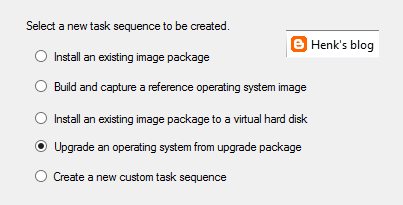
New task sequence: "Upgrade an operating system from upgrade package". This task sequence is used specially for Windows 10 upgrades. It contains a few steps only, but it does what it says: upgrade to Windows 10 in-place in just a few clicks. I did a Windows 8.1 to 10 upgrade within an hour with it.
Automatic Deployment Rules (ADR) can be connected to multiple collections now, without the need to set whole configuration again. Just click on the ADR and select "Add Deployment" to connect an existing ADR to another collection. When choosing properties on an existing ADR there is more overview, because of less tabs showing. Very nice there is improvement here!
Software Center and Application Catalog are (almost) merged now. Applications are showed in Software Center by default now, but approval still needs to be done in Application Catalog. Hope it will be merged totally in future soon. Software Center has a new look and feel, and can be used for (un)installing applications, software packages, and task sequence too. I use my for showing the Windows 10 upgrade task sequences available. Pity is still no e-mail notification is there by default. Other minus is that after approval the end user doesn't get an message that the application can be installed. Still some space for improvement if you ask me!
There will be full compatibility with existing features for Windows 10 (Windows as a service) in this release. And there will be a new hybrid option to manage Windows 10 devices via MDM with on-premises infrastructure. For this no ConfigMgr client is needed on the device. A workplace join (and company portal) is enough to show the device in ConfigMgr and push applications and policies. Just great isn't it?!
Hope to have my first ConfigMgr 2016 implementation and/or migration soon. This in combination with Microsoft Intune and Windows 10 for modern management. Microsoft is (still) the way to go! :) I'm very happy with the new possibilities till now.
More posts about ConfigMgr 2016:
New Microsoft System Center and Windows versions coming!
Installing ConfigMgr 2016 Technical Preview 3
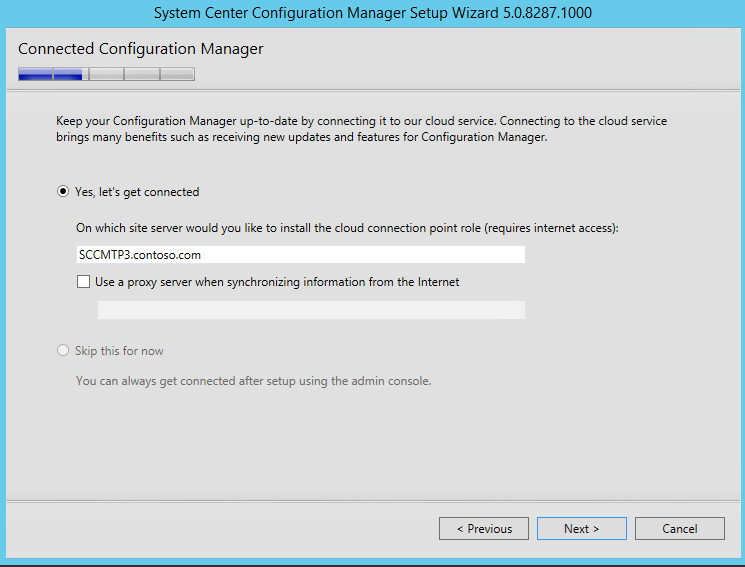
On August 19th ConfigMgr Technical Preview 3 has become available. This is the third ConfigMgr 2016 preview, which is expected in Q4 this year. With every preview new functionality and features is added. More about this can be found on System Center Configuration Manager Team Blog. During installation a new feature is displayed; it's called Connected Configuration Manager or Cloud service if you wish. It mentions: Keep your ConfigMgr up-to-date by connecting to our cloud service. Connecting to the cloud service brings many benefits such as receiving new updates and features for ConfigMgr.
After installation a Cloud connection point is installed on the site server. This can be set Online or Offline for the moment. Let's have a look at the possibilities.
-Online mode creates a persistent connection to the ConfigMgr cloud service and proactively notifies you of updates.
-Offline mode requires you to run the Cloud Connection tool to set the initial configuration of the role and configure notifications.
When looking on TechNet Library it mentions:
When you install the Technical Preview 3 it automatically installs and configures a new site system role on the site server, the cloud connection point. When this role installs it defaults to:
-Online mode
-A data collection level of Enhanced
When this role is online, it enables Microsoft to automatically collect diagnostics and usage data over the Internet. Information that is collected helps us identify and troubleshoot problems as well as improve our products and services.
The three levels of data collection that are planned for future releases include:
-Basic includes data about setup and upgrade like the number of sites and which Configuration Manager features are enabled. No personally indefinable information will be transmitted.
-Enhanced includes the data in the Basic setting plus transmits data about the hierarchy, how each feature is used (frequency and duration), and enhanced diagnostic information like the memory state of your server when a system or app crash occurs. No personally identifiable data will be transmitted.
-Full includes the data in the Basic and Enhanced settings and also sends advanced diagnostic information like system files and memory snapshots. This option may include personally identifiably information, but we won’t use that information to identify or contact you, or target advertising to you.
For it seems the Cloud connection point is not used for updates only, it collect diagnostics and usage data (over the Internet) as well. Probably you cannot choose if you want to receive updates only. Microsoft wants to collect diagnostics and usage data as well, and as a benefit you will receive updates in return. With this feature ConfigMgr-as-a-service is born! Hope it will be more detailed in a next release :-)
When starting the new ConfigMgr console (look and feel) there are no much changes in this release. But with the Cloud connection point in-place, anything is possible!