Recently I did some blogposts about ConfigMgr issues and improvements, which I posted on Microsoft Connect.
More about that here:
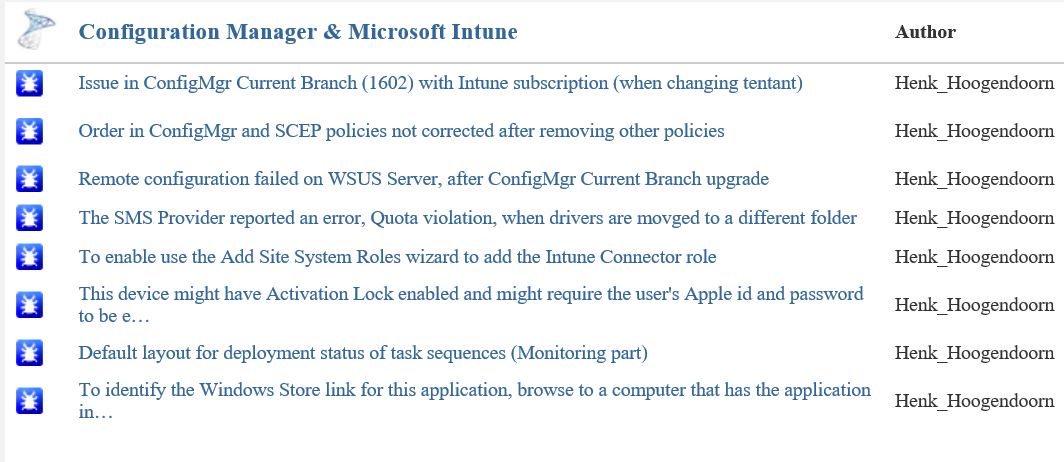
Issue in ConfigMgr Current Branch (1602) with Intune subscription Some small bugs found in ConfigMgr Current Branch (1602)
The current status after two months looks good to me:
-Issue in ConfigMgr Current Branch (1602) with Intune subscription (when changing tentant) = Fixed
-Order in ConfigMgr and SCEP policies not corrected after removing other policies = By design
-Remote configuration failed on WSUS Server, after ConfigMgr Current Branch upgrade = Active
-The SMS Provider reported an error, Quota violation, when drivers are movged to a different folder = Fixed
-To enable use the Add Site System Roles wizard to add the Intune Connector role = Fixed
-This device might have Activation Lock enabled and might require the user's Apple id and password to be entered to be reactivated = Won't fix
-Default layout for deployment status of task sequences (Monitoring part) = Active
-To identify the Windows Store link for this application, browse to a computer that has the application installed = Active
As for the "Order in ConfigMgr and SCEP policies not corrected after removing other policies" the following details:
This is actually changed by design in ConfigMgr v1511. Several customers asked for the ability to configure security scopes for antimalware policies; there are some existing Connect items for it (e.g. 1015855 and 1015641).
The reason we made this change is because a ConfigMgr admin who is subject to security scopes cannot always "see" the policies of other users. If they change the priorities of their own policies, when the Console cannot "see" the other admins' policies, then it is possible to end up with two policies having the same priority. If both of these policies are present on a client, then the client cannot reconcile the two policies and may encounter errors.
We altered the priority logic to guarantee that no two have the same priority, even when there are scoped users involved. As a result of this we no longer reshuffle priorities when policies get deleted.
Very good to see that Microsoft is still making progress here, with most issues fixed and a few active! Way to go :-)
Recently I did some blogposts about ConfigMgr issues and improvements, which I posted on Microsoft Connect.
More about that here:
Issue in ConfigMgr Current Branch (1602) with Intune subscription
Some small bugs found in ConfigMgr Current Branch (1602)
The current status after one month looks good to me:
-Issue in ConfigMgr Current Branch (1602) with Intune subscription (when changing tenant) = Fixed
-To enable use the Add Site System Roles wizard to add the Intune Connector role = Fixed
-This device might have Activation Lock enabled and might require the user's Apple id and password to be entered to be reactivated = Won't fix
-Default layout for deployment status of task sequences (Monitoring part) = Active
-To identify the Windows Store link for this application, browse to a computer that has the application installed = Active
Very good to see that Microsoft is making progress here, with one issue and one improvement fixed! Way to go :-)
Last days I did use ConfigMgr Current Branch a lot. A few small bugs were seen and a big one too. That one is mentioned in another blogpost. This bug was about changing an Intune subscription or tenant in the ConfigMgr console. I did see some small bugs too, which I posted on connect.microsoft.com. Let's have a look at them.
When connecting an Intune subscription, without the new Service Connection point in-place, the following message is displayed: To enable use the Add Site System Roles wizard to add the Intune Connector role. Then, click Configure Platforms to enable the necessary platforms. This must be the new Service Connection point instead.
When creating a new application, based on Windows app package in the Windows Store, the following message is displayed: "To identify the Windows Store link for this application, browse to a computer that has the application installed."
This was the situation in earlier versions indeed, but when clicking on "Browse" now the Windows store is opened instead of browsing to a computer. Way better, but misleading this way..
When creating applications/apps for Windows 10 Mobile, you must choose Windows Phone app package in the Windows Phone store. Why not Windows app package in the Windows store? (because all Windows stores are merged now)
When creating Configuration Items or Compliance Settings for Windows 10 Mobile, sometimes they are found beneath Windows Phone, the other time beneath Windows 8.1 and 10. Not sure if Microsoft knows where to find Windows 10 Mobile too :-)
Within mobile device settings the OS is called both Windows 10 Mobile and Windows Mobile 10 (other way around).
As mentioned in an earlier blogpost, Health attestation isn't working for Windows devices yet. The only device mentioning here is a mobile device. Hope it will be available in a later release.
Probably there are more (small) bugs found in ConfigMgr Current Branch (1602), so just use comments to mention them!
Update 13-4: When doing a full wipe on Windows Phone or Android devices, the following message is displayed: "This device might have Activation Lock enabled and might require the user's Apple id and password to be entered to be reactivated." This seems to be a message for Apple devices, not for other devices?
All bugs mentioned are posted on connect.microsoft.com too.
Hope it helps!