Last weeks sad news is coming from many news sites. Because of bad selling of Microsoft Lumia devices, Microsoft will pull the plug and ending sales of all Lumia smartphones by the end of this year. That's not strange with 0,7% market share only in Q1 2016 (Gartner). Probably the Surface Phone fits better, but it will be no consumer device for sure. This news is killing for Lumia owners like me, where devices are half of price after release 9 months ago.
Where my Lumia 950 was €599 around 9 months ago, with another €99 for a Display Dock (which was included with 950XL only), price has now dropped down to €299 with a free Display Dock instead. That's a €399 price drop within a year, which is frankly outrageous if you ask me! Microsoft is abandon Windows Phone lovers that way really quick. No good residual value for the money here, and no one daring to buy Surface Phone at later time. My 2 cents..
Where promises were made on Continuum and Appstore support, on both Android (Project Astoria) and iOS (Project Islandwood), nothing has been released so far. Continuum was not as expected, without further app support and possibility to open a single app multiple times. Appstore support on both Android and iOS transfers has never been released, which was another reason for me to buy this flagship. No single reaction from Microsoft so far on this!
So yes, it's no secret, Microsoft is done with it's Lumia line of devices. Probably Surface Phone will be coming end of 2017, where current Lumia 950 (XL) owners will not try it again. Time will tell if Surface Phone (when released, because currently just a product that's in-development internally), is good value for money after all. Still a disappointment for me and many other Windows Phone lovers, and time to look for a new device and platform.
My personal experience on: Microsoft Lumia 950 experience after 9 months (pro's and cons)
Other news on Lumia smartphones:
-Goodbye, Microsoft Lumia. Hello New Surface Phone
-Should you wait for the Surface Phone or buy a Lumia 950 now?
-
Top 4 Reasons The Microsoft Surface Phone Will Be The Best Phone To Enter The Market
-Microsoft’s rumoured ‘Surface Phone’ may not arrive until next Fall
-Microsoft Surface Phone To Replace Lumia 950 Line; Release Date Moved To 2017?
Since December last year I'm using a Microsoft Lumia 950 as my primary phone. Since start I experienced many bugs, with lot's of unexpected reboots, overheating and all kind of nasty issues. With later builds this was getting better, but still I experience lot's of bugs. Where Windows Phone 8.1 (Samsung Ativ S) did perform excellent for many years, Windows 10 Mobile still isn't at some points. Let's have a look at my experiences so far.
Pro's
-Real Microsoft phone :-)
-Windows 10 Operating System
-Resolution (2560x1440, 564 ppi)
-Lot's of updates (with Insider builds)
-20 MP Camera (good quality)
-Windows Hello (when working)
-Gorilla Glass (no scratches)
-Battery (enough for one day)
-Fast charging (Superb!)
-Glance screen (very useful)
Cons
-Continuum (less features then expected)
-Unexpected reboots (cannot count them anymore)
-Camera button not working (very annoying, reboot needed)
-Camera reacts very slow sometimes (reboot needed)
-Camera app not working (error message, reboot needed)
-Lock screen black with red light only (happens sometimes)
-Incoming call cannot answer (very annoying, reboot needed)
-Store or other apps not working (error message, reboot needed)
-Windows Hello active during the night (very annoying, happens rarely)
-Photo saved as white image (guess this is a Micro SD problem?)
-Photo (un)zoom crash (happens almost all the time, no fix found)
-Bad photos in dark environments (guess because of camera)
-Less apps available then expected (very bad and not as promised)
-Pointer on screen not accurate (during games, happens a lot)
Note: On every location which says [reboot needed], the issue is (temporarily) solved, but not gone completely.
As you can see I experience more cons then pro's after heavy usage and many updates. This because I'm using camera and photo app a lot, and both are (still) not stable. Besides of that I ordered the Lumia 950 for Windows Hello and Continuum, where both I'm not using. Windows Hello is to slow for me, and doesn't recognize me sometimes. Continuum is not as expected, with less supported apps available, and not a full PC environment as promised on start. No possibility to open apps twice either.
Windows 10 Mobile (even on 1607) is not stable all the time, where apps (even Camera and Store) can crash, the lock screen can crash, and incoming calls can crash too. The Windows store isn't updated with iOS and/or Android apps as promised earlier. Therefore I thinking about switching my device to another platform now. Guess the Lumia 950 will be my secondary phone from now on, which is pity because Microsoft could have a winner here!
Other news on Windows 10 Mobile:
-Even Microsoft's biggest fan doesn't want Windows 10 Mobile
-Mary Jo Foley becomes the latest to dump Windows Phone for Android
-Why I broke up with Windows Phone: It's not me, it's you
-Is It Last Call for Windows Mobile?
-The Great Windows Phone App Exodus of 2016 (Premium)
-Rethinking Windows Phone (Premium)
-Windows Phone market share sinks below 1 percent
Recently I did some blogposts about ConfigMgr issues and improvements, which I posted on Microsoft Connect.
More about that here:
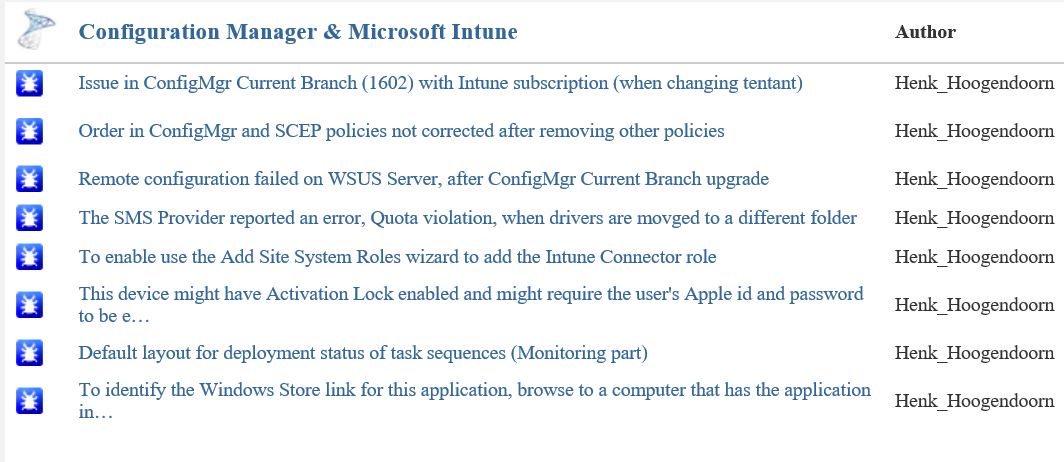
Issue in ConfigMgr Current Branch (1602) with Intune subscription Some small bugs found in ConfigMgr Current Branch (1602)
The current status after two months looks good to me:
-Issue in ConfigMgr Current Branch (1602) with Intune subscription (when changing tentant) = Fixed
-Order in ConfigMgr and SCEP policies not corrected after removing other policies = By design
-Remote configuration failed on WSUS Server, after ConfigMgr Current Branch upgrade = Active
-The SMS Provider reported an error, Quota violation, when drivers are movged to a different folder = Fixed
-To enable use the Add Site System Roles wizard to add the Intune Connector role = Fixed
-This device might have Activation Lock enabled and might require the user's Apple id and password to be entered to be reactivated = Won't fix
-Default layout for deployment status of task sequences (Monitoring part) = Active
-To identify the Windows Store link for this application, browse to a computer that has the application installed = Active
As for the "Order in ConfigMgr and SCEP policies not corrected after removing other policies" the following details:
This is actually changed by design in ConfigMgr v1511. Several customers asked for the ability to configure security scopes for antimalware policies; there are some existing Connect items for it (e.g. 1015855 and 1015641).
The reason we made this change is because a ConfigMgr admin who is subject to security scopes cannot always "see" the policies of other users. If they change the priorities of their own policies, when the Console cannot "see" the other admins' policies, then it is possible to end up with two policies having the same priority. If both of these policies are present on a client, then the client cannot reconcile the two policies and may encounter errors.
We altered the priority logic to guarantee that no two have the same priority, even when there are scoped users involved. As a result of this we no longer reshuffle priorities when policies get deleted.
Very good to see that Microsoft is still making progress here, with most issues fixed and a few active! Way to go :-)
Recently I did some blogposts about ConfigMgr issues and improvements, which I posted on Microsoft Connect.
More about that here:
Issue in ConfigMgr Current Branch (1602) with Intune subscription
Some small bugs found in ConfigMgr Current Branch (1602)
The current status after one month looks good to me:
-Issue in ConfigMgr Current Branch (1602) with Intune subscription (when changing tenant) = Fixed
-To enable use the Add Site System Roles wizard to add the Intune Connector role = Fixed
-This device might have Activation Lock enabled and might require the user's Apple id and password to be entered to be reactivated = Won't fix
-Default layout for deployment status of task sequences (Monitoring part) = Active
-To identify the Windows Store link for this application, browse to a computer that has the application installed = Active
Very good to see that Microsoft is making progress here, with one issue and one improvement fixed! Way to go :-)
Last days I did use ConfigMgr Current Branch a lot. A few small bugs were seen and a big one too. That one is mentioned in another blogpost. This bug was about changing an Intune subscription or tenant in the ConfigMgr console. I did see some small bugs too, which I posted on connect.microsoft.com. Let's have a look at them.
When connecting an Intune subscription, without the new Service Connection point in-place, the following message is displayed: To enable use the Add Site System Roles wizard to add the Intune Connector role. Then, click Configure Platforms to enable the necessary platforms. This must be the new Service Connection point instead.
When creating a new application, based on Windows app package in the Windows Store, the following message is displayed: "To identify the Windows Store link for this application, browse to a computer that has the application installed."
This was the situation in earlier versions indeed, but when clicking on "Browse" now the Windows store is opened instead of browsing to a computer. Way better, but misleading this way..
When creating applications/apps for Windows 10 Mobile, you must choose Windows Phone app package in the Windows Phone store. Why not Windows app package in the Windows store? (because all Windows stores are merged now)
When creating Configuration Items or Compliance Settings for Windows 10 Mobile, sometimes they are found beneath Windows Phone, the other time beneath Windows 8.1 and 10. Not sure if Microsoft knows where to find Windows 10 Mobile too :-)
Within mobile device settings the OS is called both Windows 10 Mobile and Windows Mobile 10 (other way around).
As mentioned in an earlier blogpost, Health attestation isn't working for Windows devices yet. The only device mentioning here is a mobile device. Hope it will be available in a later release.
Probably there are more (small) bugs found in ConfigMgr Current Branch (1602), so just use comments to mention them!
Update 13-4: When doing a full wipe on Windows Phone or Android devices, the following message is displayed: "This device might have Activation Lock enabled and might require the user's Apple id and password to be entered to be reactivated." This seems to be a message for Apple devices, not for other devices?
All bugs mentioned are posted on connect.microsoft.com too.
Hope it helps!
Recently on the Microsoft Windows 10 devices event new Lumia phones are announced. Last year the last Nokia phone (930) was released, which is still loved by many people. Microsoft skipped the 940 version, and is using the 950 and 950XL version now. Devices are called Microsoft Lumia now, with Windows 10 Mobile onboard. With this release, Microsoft wants to make sure this is a major release, kind of new generation. Same thing as for Windows 10 for desktops.
Let's have a look at the 950 and 950XL specs so far:
When looking for a comparison with the 930 have a look here:
Because of new functionality (Continuum, Windows Hello, Wireless charging, Cortana, Adaptive antenna technology, Octacore & Hexacore processors and Liquid cooling technology) this must be my next phone! Therefore I ordered the Lumia 950 today, which will be my next device in around 6 weeks. Hope to share my personal experience within a few months. Just click on the pictures for a better view :)
Source and photos: OneTechStop.net
Finally Windows 10 is there! I'm running it on Surface Pro 3 for a while and don't want to go back to Windows 8.1 anymore :) Microsoft has released Windows 10 for all customers worldwide now, using Windows Update or the ISO's available. Next wait is for Windows 10 Mobile which is expected somewhere in October this year.
Before you begin, make sure you have:
-An internet connection (internet service provider fees may apply).
-Sufficient data storage available on a computer, USB or external drive for the download.
-A blank USB or DVD (and DVD burner) with at least 4 GB of space if you want to create media.
-If you will be installing the operating system for the first time, you will need your Windows product key.
Download Windows 10 Home and Pro ISO's: Software Download
For Enterprise editions visit the Volume Licensing Service Center
For MSDN subscriptions visit the website: Subscriber Downloads
Download Windows 10 Enterprise 90-day evaluation: Windows Evaluations
Just enjoy the new Windows 10 experience!