Day 3 in Atlanta was best till now, with lot of great sessions. I did breakout sessions for 75 minutes again only, all on Windows 10 and Microsoft Intune. I skipped the session during lunch, to have some rest and load both Surface and Lumia devices. Two sessions in the morning and two in the afternoon is best for me. Let's see which interesting stuff has been mentioned today!
Windows 10 deployment experience
-MDM or Microsoft Intune does not replace Group Policy and ConfigMgr. Improvements are coming!
-Windows Defender team is world class now. Take a look at Defender and you will be surprised :-)
Securing Android devices and apps with Microsoft Intune
-Android fragmentation challenges: 24.000 distinct devices within 1.294 brands!
-Android for work, Requires Android 6.0+ devices Website
-Android is missing some key features, Android security is lacking, Android device fragmentation
-Samsung KNOX extends native Android in a number of areas, 28 additional settings exposed by Samsung API's.
-Android for Work is Generally Available starting in October service release.
-Android for Work is filling the gap with managing Android or Samsung KNOX devices, given new policies and a business store!
Manage and secure iOS and Mac devices with Microsoft Intune
-Microsoft Intune with Apple DEP looks great, but it's a pain to get the certificate from resellers sometimes?
-Lots of information today on Android and iOS management with Microsoft Intune. It's getting better and better!
-Mac OS management with Microsoft Intune, seems to be a great solution!
-It doesn't care which iOS apps are installed by users, you can hide them with Microsoft Intune (in supervised mode)
-Coming up: Azure based console, Device based VPP, Multi-token support, iOS education features, Lost mode, More restrictions
-Azure based Intune console (looks great to me!)
Windows 10 security with ConfigMgr and Microsoft Intune
-Running your ConfigMgr environment on Azure is an Infrastructures as a Service (IaaS) solution
-Windows Store for Business integration in Microsoft Intune or ConfigMgr console is nice add-on for publishing apps!
-Google Play for Work looks and works same as Windows Store for Business Website
-Lot's of (new) dashboards in ConfigMgr console: Health Attestation, Software Updates and Windows Defender ATP
-What's new in Windows Update for Business (WUfB)
-WUfB Is the way to update devices in ConfigMgr in a controlled way
-Coming soon: Windows Upgrade Analytics in ConfigMgr console
Hope you like my findings so far! Stay tuned for more session findings later this week. Microsoft Ignite is rocking bigtime!
More blogposts on Microsoft Ignite:
My findings on Microsoft Ignite 2016 day 2 (Session) recap
My findings on Microsoft Ignite 2016 day 1 (Keynote and Event) recap
My scheduled sessions and product focus on Microsoft Ignite 2016
Thursday, September 29, 2016
My findings on Microsoft Ignite 2016 day 3 (Session) recap
Wednesday, September 28, 2016
My findings on Microsoft Ignite 2016 day 2 (Session) recap
Day 2 in Atlanta was better overall, where I did breakout sessions for 75 minutes only. No theater or other short sessions for me. Because of long walk between the sessions, you want to give your legs and feet some rest, and sit for a while. Problem again was the battery load on both Surface and Lumia device. When you use your device a lot for tweeting too (like me), you must load your battery during the day. Unfortunately you must really search for that, where it's not possible to load during the sessions.
Therefore I skipped a session partly during the day, to load both devices. Other point of complaining is lunch, which is a 15-20 minute walk, depends on where you are. Where spare time between sessions is around 30 minutes, you don't have time to walk to food service, eat your lunch, and be on time for the next session. Everything you need to do must be in a rush, which I do not prefer. Today I did 5 breakout sessions, with mixed feelings. Some where great, some moderate. It depends per session, but you can't walk out for another one, because of timeframe between other locations.
The following interesting stuff I heard (in first session):
-When you need to go fast with Windows 10, you need to go fast with ConfigMgr too.
-All Windows 10 deployment methodologies possible, where servicing is advised for future upgrades!
-A new Microsoft Deployment Toolkit is coming this year named MDT and not MDT 2016, which is the latest version!
-ConfigMgr Technical Preview 1609 is released yesterday with lot of great new features. Website
-How to migrate BIOS to UEFI during OSD task sequence > multiple solutions available.
-Nested task sequences are coming in ConfigMgr, which is the most requested feature!
-Language and region support (installing language packs) and customizable end user notifications are coming too!
-Coming soon: Clients will fallback to a next distribution point in 2 minutes by default (used to be 2 hours)
-User voice: 623 submitted ideas, 60 shipped in ConfigMgr current branch. Feedback
-What's needed for Windows 10 servicing in ConfigMgr Current Branch?
-With Windows Update for Business you delegate updates to Microsoft. Handy or not?
The following interesting stuff I heard (in other sessions):
-The Microsoft Intune portal is moving from Silverlight to Azure platform completely! Really awesome.
-The New Microsoft Intune portal in Azure is expected somewhere in Q1 2017.
-Microsoft Intune Mobile Application Management is the way to go! Really awesome functionality and possibilities
-Everything is going to the cloud: Identity, Membership, Applications, Policies, you name it.
-20,533 total tenants on ConfigMgr Current Branch worldwide! With around 50% running on the latest build (1606).
-40,497,142 million total clients managed by ConfigMgr worldwide! With around 75% on latest builds (1602, 1606)
-New ConfigMgr Current Branch release is called 1610 and offers cloud-based management and peer caching for all content.
-Identity is the new attack surface! Not firewall anymore
-Identity challenges today: organizations want greater control, users wants simple passwords, multi-factor is to complex.
Stay tuned for more on new ConfigMgr features, Windows 10 servicing and mobile device & application management.
More blogposts on Microsoft Ignite:
My findings on Microsoft Ignite 2016 day 1 (Keynote and Event) recap
My scheduled sessions and product focus on Microsoft Ignite 2016
Therefore I skipped a session partly during the day, to load both devices. Other point of complaining is lunch, which is a 15-20 minute walk, depends on where you are. Where spare time between sessions is around 30 minutes, you don't have time to walk to food service, eat your lunch, and be on time for the next session. Everything you need to do must be in a rush, which I do not prefer. Today I did 5 breakout sessions, with mixed feelings. Some where great, some moderate. It depends per session, but you can't walk out for another one, because of timeframe between other locations.
The following interesting stuff I heard (in first session):
-When you need to go fast with Windows 10, you need to go fast with ConfigMgr too.
-A new Microsoft Deployment Toolkit is coming this year named MDT and not MDT 2016, which is the latest version!
-ConfigMgr Technical Preview 1609 is released yesterday with lot of great new features. Website
-How to migrate BIOS to UEFI during OSD task sequence > multiple solutions available.
-Nested task sequences are coming in ConfigMgr, which is the most requested feature!
-Language and region support (installing language packs) and customizable end user notifications are coming too!
-Coming soon: Clients will fallback to a next distribution point in 2 minutes by default (used to be 2 hours)
-User voice: 623 submitted ideas, 60 shipped in ConfigMgr current branch. Feedback
-What's needed for Windows 10 servicing in ConfigMgr Current Branch?
-With Windows Update for Business you delegate updates to Microsoft. Handy or not?
The following interesting stuff I heard (in other sessions):
-The Microsoft Intune portal is moving from Silverlight to Azure platform completely! Really awesome.
-The New Microsoft Intune portal in Azure is expected somewhere in Q1 2017.
-Microsoft Intune Mobile Application Management is the way to go! Really awesome functionality and possibilities
-Everything is going to the cloud: Identity, Membership, Applications, Policies, you name it.
-20,533 total tenants on ConfigMgr Current Branch worldwide! With around 50% running on the latest build (1606).
-40,497,142 million total clients managed by ConfigMgr worldwide! With around 75% on latest builds (1602, 1606)
-New ConfigMgr Current Branch release is called 1610 and offers cloud-based management and peer caching for all content.
-Identity is the new attack surface! Not firewall anymore
-Identity challenges today: organizations want greater control, users wants simple passwords, multi-factor is to complex.
Stay tuned for more on new ConfigMgr features, Windows 10 servicing and mobile device & application management.
More blogposts on Microsoft Ignite:
My findings on Microsoft Ignite 2016 day 1 (Keynote and Event) recap
My scheduled sessions and product focus on Microsoft Ignite 2016
Now Available: Update 1609 for ConfigMgr Technical Preview
Today (September 27th) the latest ConfigMgr (preview) version is released: Update 1609 for ConfigMgr Technical Preview. Update 1609 for Technical Preview is available directly in the ConfigMgr console. If you want to install ConfigMgr Technical Preview for the first time, the installation bits (currently based on Technical Preview 1603) are available on TechNet Evaluation Center. The new version offers lots of new functionality, with several great new features.
This update includes the following improvements:
-Windows 10 Upgrade Analytics (assess and analyze device readiness and compatibility with Windows 10 to allow smoother upgrades)
-Office 365 Client Management Dashboard (track Office 365 updates and deployments)
-Deploy Office 365 apps to clients (Office 365 Servicing node in Software Library, deploy Office 365 apps to clients)
-Improvements for BIOS to UEFI conversion (OS deployment task sequence with a new variable, called TSUEFIDrive)
-Improvement to Endpoint Protection antimalware policy settings (specify the level to block suspicious files)
-Boundary Group Improvements (more granular control of fallback behavior, and greater clarity which DP's are used)
This update also includes new features for customers using ConfigMgr integrated with Intune (hybrid scenario):
-TouchID, ApplePay and Zoom DEP Settings (create enrollment profiles to skip initial setup screens for new iOS devices)
-Windows Store for Business (allows customers to obtain applications, purchased or free, and deploy them to users)
-Android, iOS, and Windows Additional Settings (create Windows 10 VPN profiles without using OMA-URI)
-Intune Compliance Charts (quick view of overall device compliance, and top reasons for non-compliance using new charts)
And nested task sequences will be available soon too! Just great a new (preview) version is available now! Happy installing :-)
Source: Enterprise Mobility and Security Blog
Detailed overview of new features: Microsoft TechNet
This update includes the following improvements:
-Windows 10 Upgrade Analytics (assess and analyze device readiness and compatibility with Windows 10 to allow smoother upgrades)
-Office 365 Client Management Dashboard (track Office 365 updates and deployments)
-Deploy Office 365 apps to clients (Office 365 Servicing node in Software Library, deploy Office 365 apps to clients)
-Improvements for BIOS to UEFI conversion (OS deployment task sequence with a new variable, called TSUEFIDrive)
-Improvement to Endpoint Protection antimalware policy settings (specify the level to block suspicious files)
-Boundary Group Improvements (more granular control of fallback behavior, and greater clarity which DP's are used)
This update also includes new features for customers using ConfigMgr integrated with Intune (hybrid scenario):
-TouchID, ApplePay and Zoom DEP Settings (create enrollment profiles to skip initial setup screens for new iOS devices)
-Windows Store for Business (allows customers to obtain applications, purchased or free, and deploy them to users)
-Android, iOS, and Windows Additional Settings (create Windows 10 VPN profiles without using OMA-URI)
-Intune Compliance Charts (quick view of overall device compliance, and top reasons for non-compliance using new charts)
And nested task sequences will be available soon too! Just great a new (preview) version is available now! Happy installing :-)
Source: Enterprise Mobility and Security Blog
Detailed overview of new features: Microsoft TechNet
Tuesday, September 27, 2016
My findings on Microsoft Ignite 2016 day 1 (Keynote and Event) recap
Day 1 in Atlanta was somewhat expected but not what I hoped for. The day was starting with the keynote (part 1), where part 2 was presented end of day. With around 23.000 attendees (which is equal as last year) it was full house! Within the Philips Arena itself there was plenty of space left, which is strange because there is room for 18.000 people as mentioned on Wikipedia. My guess is there were around 10.000-12.000 people at maximum :-)
Speakers were Julia White, Satya Nadella, Scott Guthrie, Donovan Brown and Laura Jones. No names like Joe Belfiore, Gurdeep Singh Pall or Brad Anderson this time. Instead of other keynotes before, Wi-Fi was working great this time. Even during the keynote opening, which is very pleasant! Point is, there were some announcements mentioned, but no technology demo's on them. Instead of that a lot of Microsoft marketing and topics like cloud solutions and artificial intelligence were mentioned. And that's pity if you get what I mean.
Announcements were done on the following products or solutions:
-Windows Server 2016 is GA (Download)
-System Center 2016 is GA (Download)
-Azure Monitoring dashboard, for overview
-Delve Analytics Outlook add-in for email statistics
-Surface hub stormboard app, offers new features
-Windows Defender Application Guard for Edge browser
Furthermore the following was mentioned during the first keynote:
-IT stands for Innovation and Transformation
-Azure in 34 regions now, 2 times more as Amazon AWS
-Azure platform is growing strong says Gartner
-Windows 10 running on 400 million devices now
-MS Edge is the most secure browser for enterprises
-Cortana has 133 million users, 12 billion questions
Besides of that I went to two sessions on Windows 10 functionality and deployment. Both were level 200, which is kind of marketing level with a bit of tech information. More information on that in a next blogpost. No interesting information on Windows Server 2016, System Center 2016, Enterprise Mobility and/or MS Intune at all which is odd.
The Georgia World Congress Center itself is a really huge place, with lot's of floors and escalators. Many of them were malfunction for a while too. When moving between sessions, Expo hall or Food service, it is possible that a 20-30 minutes walk is needed. When a session is overbooked, it's almost impossible to be on-time for another one. That's the downside of an event with so many attendees. Back in the days of Microsoft Management Summit (MMS), with around 5.000 attendees this was never a problem at all.
Bus transfers are great, you never have to wait for transfers to Microsoft Ignite conference or hotel. Point of discussion is there is no paper conference guide this time, it's all mobile driven now. When you use your phone a lot for tweeting too (like me), you must load your battery during the day. Unfortunately you must really search for that, where it's not possible to load during the sessions. Between the sessions there is less time in between, which given a (partly)missed session to be battery loaded again.
My overall feeling after day 1 with two keynotes is somewhat expected but not what I hoped for (as mentioned earlier). Because Microsoft is talking about Mobile-first, Cloud-first and Azure solutions only, there's no feeling with new on-premises solutions and features like Windows Server 2016 and/or System Center 2016. Count that with long walks and bad lunch, and you have a kind of superficial day. Hope that next days (with more tech sessions) will be much better!
Stay tuned for more information on this.
More blogposts on Microsoft Ignite:
My scheduled sessions and product focus on Microsoft Ignite 2016
Speakers were Julia White, Satya Nadella, Scott Guthrie, Donovan Brown and Laura Jones. No names like Joe Belfiore, Gurdeep Singh Pall or Brad Anderson this time. Instead of other keynotes before, Wi-Fi was working great this time. Even during the keynote opening, which is very pleasant! Point is, there were some announcements mentioned, but no technology demo's on them. Instead of that a lot of Microsoft marketing and topics like cloud solutions and artificial intelligence were mentioned. And that's pity if you get what I mean.
![]() |
| Julia White on stage |
Announcements were done on the following products or solutions:
-Windows Server 2016 is GA (Download)
-System Center 2016 is GA (Download)
-Azure Monitoring dashboard, for overview
-Delve Analytics Outlook add-in for email statistics
-Surface hub stormboard app, offers new features
-Windows Defender Application Guard for Edge browser
Furthermore the following was mentioned during the first keynote:
-IT stands for Innovation and Transformation
-Azure in 34 regions now, 2 times more as Amazon AWS
-Azure platform is growing strong says Gartner
-Windows 10 running on 400 million devices now
-MS Edge is the most secure browser for enterprises
-Cortana has 133 million users, 12 billion questions
![]() |
| Small moment of fame |
Besides of that I went to two sessions on Windows 10 functionality and deployment. Both were level 200, which is kind of marketing level with a bit of tech information. More information on that in a next blogpost. No interesting information on Windows Server 2016, System Center 2016, Enterprise Mobility and/or MS Intune at all which is odd.
The Georgia World Congress Center itself is a really huge place, with lot's of floors and escalators. Many of them were malfunction for a while too. When moving between sessions, Expo hall or Food service, it is possible that a 20-30 minutes walk is needed. When a session is overbooked, it's almost impossible to be on-time for another one. That's the downside of an event with so many attendees. Back in the days of Microsoft Management Summit (MMS), with around 5.000 attendees this was never a problem at all.
Bus transfers are great, you never have to wait for transfers to Microsoft Ignite conference or hotel. Point of discussion is there is no paper conference guide this time, it's all mobile driven now. When you use your phone a lot for tweeting too (like me), you must load your battery during the day. Unfortunately you must really search for that, where it's not possible to load during the sessions. Between the sessions there is less time in between, which given a (partly)missed session to be battery loaded again.
My overall feeling after day 1 with two keynotes is somewhat expected but not what I hoped for (as mentioned earlier). Because Microsoft is talking about Mobile-first, Cloud-first and Azure solutions only, there's no feeling with new on-premises solutions and features like Windows Server 2016 and/or System Center 2016. Count that with long walks and bad lunch, and you have a kind of superficial day. Hope that next days (with more tech sessions) will be much better!
Stay tuned for more information on this.
More blogposts on Microsoft Ignite:
My scheduled sessions and product focus on Microsoft Ignite 2016
Friday, September 23, 2016
My scheduled sessions and product focus on Microsoft Ignite 2016
Next week Microsoft Ignite is already there! As for many months, the Microsoft Ignite general attendee registration is SOLD OUT! With around 20,000 attendees in attendance (which is same as last year), it will be a great event full off Microsoft announcements and new technology. More about that can be found HERE. In this blogpost I mention my focus on products and sessions scheduled.
When we look on products first, the following have my attention:
- Microsoft Azure
- Microsoft Intune
- System Center 2016
- Windows 10
- Windows Server 2016
Most sessions will be on Mobile Device & Application Management and how to keep Windows 10 secure:
- Conditional Access
- Credential Guard
- Device Guard
- Federation Services
- Manage Android devices
- Manage iOS devices
- Windows Defender ATP
- Windows Information Protection
- Windows Store for Business
- Windows Update for Business
Where Windows 10 is one year old now, there's a business need to keep it secure and safely. Therefore less sessions on OS deployment this year for me, but security it is :-)
Expect a lot of tweets and blogposts around Microsoft Ignite from me, and lot's of other people love sharing knowledge.
Follow me on Twitter: @HenkHoogendoorn / @SCCM2016 / @Server2016 / @SysCtr2016
When we look on products first, the following have my attention:
- Microsoft Azure
- Microsoft Intune
- System Center 2016
- Windows 10
- Windows Server 2016
Most sessions will be on Mobile Device & Application Management and how to keep Windows 10 secure:
- Conditional Access
- Credential Guard
- Device Guard
- Federation Services
- Manage Android devices
- Manage iOS devices
- Windows Defender ATP
- Windows Information Protection
- Windows Store for Business
- Windows Update for Business
Where Windows 10 is one year old now, there's a business need to keep it secure and safely. Therefore less sessions on OS deployment this year for me, but security it is :-)
Expect a lot of tweets and blogposts around Microsoft Ignite from me, and lot's of other people love sharing knowledge.
Follow me on Twitter: @HenkHoogendoorn / @SCCM2016 / @Server2016 / @SysCtr2016
Wednesday, September 21, 2016
Microsoft probably won't release a Band 3 this year (or later)
Where Windows Phone worldwide sales is dropped to 0.7% market share only, next point of discussion is Microsoft Band. Microsoft probably won't release a Band 3 this year (or later). Didn't find statistics on market share on this, but would be pity if both Windows Phone and Band are end of life. Where other wearables must be used with the same operating system, Microsoft Band can be used in combination with your favorite phone. There are health apps for both Android, iOS and Windows Phone available.
Besides of that current Band is cheaper now, where price is dropped with $75 (temporarily). When looking for wearables market share, Microsoft is not mentioned at all. Maybe sales on Band is as worse as Windows Phone, where Microsoft stepped in to late to make a difference! Time will tell, because Microsoft has planned a device event on October 26th already. Hope that announcements are coming on both expired and future devices.
My personal experience on Windows Phone:
Microsoft Lumia 950 experience after 9 months (pro's and cons)
Microsoft will be ending sales of all Lumia smartphones by end of this year!
Other news on Microsoft Band 3:
Microsoft probably won't release a Band 3 this year
Don't expect a new Microsoft Band device this year (or maybe ever)
And finally: Microsoft Band to be dumped and more
Besides of that current Band is cheaper now, where price is dropped with $75 (temporarily). When looking for wearables market share, Microsoft is not mentioned at all. Maybe sales on Band is as worse as Windows Phone, where Microsoft stepped in to late to make a difference! Time will tell, because Microsoft has planned a device event on October 26th already. Hope that announcements are coming on both expired and future devices.
My personal experience on Windows Phone:
Microsoft Lumia 950 experience after 9 months (pro's and cons)
Microsoft will be ending sales of all Lumia smartphones by end of this year!
Other news on Microsoft Band 3:
Microsoft probably won't release a Band 3 this year
Don't expect a new Microsoft Band device this year (or maybe ever)
And finally: Microsoft Band to be dumped and more
Tuesday, September 20, 2016
Microsoft will be ending sales of all Lumia smartphones by end of this year!
Last weeks sad news is coming from many news sites. Because of bad selling of Microsoft Lumia devices, Microsoft will pull the plug and ending sales of all Lumia smartphones by the end of this year. That's not strange with 0,7% market share only in Q1 2016 (Gartner). Probably the Surface Phone fits better, but it will be no consumer device for sure. This news is killing for Lumia owners like me, where devices are half of price after release 9 months ago.
Where my Lumia 950 was €599 around 9 months ago, with another €99 for a Display Dock (which was included with 950XL only), price has now dropped down to €299 with a free Display Dock instead. That's a €399 price drop within a year, which is frankly outrageous if you ask me! Microsoft is abandon Windows Phone lovers that way really quick. No good residual value for the money here, and no one daring to buy Surface Phone at later time. My 2 cents..
Where promises were made on Continuum and Appstore support, on both Android (Project Astoria) and iOS (Project Islandwood), nothing has been released so far. Continuum was not as expected, without further app support and possibility to open a single app multiple times. Appstore support on both Android and iOS transfers has never been released, which was another reason for me to buy this flagship. No single reaction from Microsoft so far on this!
So yes, it's no secret, Microsoft is done with it's Lumia line of devices. Probably Surface Phone will be coming end of 2017, where current Lumia 950 (XL) owners will not try it again. Time will tell if Surface Phone (when released, because currently just a product that's in-development internally), is good value for money after all. Still a disappointment for me and many other Windows Phone lovers, and time to look for a new device and platform.
My personal experience on: Microsoft Lumia 950 experience after 9 months (pro's and cons)
Other news on Lumia smartphones:
-Goodbye, Microsoft Lumia. Hello New Surface Phone
-Should you wait for the Surface Phone or buy a Lumia 950 now?
-Top 4 Reasons The Microsoft Surface Phone Will Be The Best Phone To Enter The Market
-Microsoft’s rumoured ‘Surface Phone’ may not arrive until next Fall
-Microsoft Surface Phone To Replace Lumia 950 Line; Release Date Moved To 2017?
Where my Lumia 950 was €599 around 9 months ago, with another €99 for a Display Dock (which was included with 950XL only), price has now dropped down to €299 with a free Display Dock instead. That's a €399 price drop within a year, which is frankly outrageous if you ask me! Microsoft is abandon Windows Phone lovers that way really quick. No good residual value for the money here, and no one daring to buy Surface Phone at later time. My 2 cents..
Where promises were made on Continuum and Appstore support, on both Android (Project Astoria) and iOS (Project Islandwood), nothing has been released so far. Continuum was not as expected, without further app support and possibility to open a single app multiple times. Appstore support on both Android and iOS transfers has never been released, which was another reason for me to buy this flagship. No single reaction from Microsoft so far on this!
So yes, it's no secret, Microsoft is done with it's Lumia line of devices. Probably Surface Phone will be coming end of 2017, where current Lumia 950 (XL) owners will not try it again. Time will tell if Surface Phone (when released, because currently just a product that's in-development internally), is good value for money after all. Still a disappointment for me and many other Windows Phone lovers, and time to look for a new device and platform.
My personal experience on: Microsoft Lumia 950 experience after 9 months (pro's and cons)
Other news on Lumia smartphones:
-Goodbye, Microsoft Lumia. Hello New Surface Phone
-Should you wait for the Surface Phone or buy a Lumia 950 now?
-Top 4 Reasons The Microsoft Surface Phone Will Be The Best Phone To Enter The Market
-Microsoft’s rumoured ‘Surface Phone’ may not arrive until next Fall
-Microsoft Surface Phone To Replace Lumia 950 Line; Release Date Moved To 2017?
Wednesday, September 14, 2016
Microsoft Lumia 950 experience after 9 months (pro's and cons)
Since December last year I'm using a Microsoft Lumia 950 as my primary phone. Since start I experienced many bugs, with lot's of unexpected reboots, overheating and all kind of nasty issues. With later builds this was getting better, but still I experience lot's of bugs. Where Windows Phone 8.1 (Samsung Ativ S) did perform excellent for many years, Windows 10 Mobile still isn't at some points. Let's have a look at my experiences so far.
Pro's
-Real Microsoft phone :-)
-Windows 10 Operating System
-Resolution (2560x1440, 564 ppi)
-Lot's of updates (with Insider builds)
-20 MP Camera (good quality)
-Windows Hello (when working)
-Gorilla Glass (no scratches)
-Battery (enough for one day)
-Fast charging (Superb!)
-Glance screen (very useful)
Cons
-Continuum (less features then expected)
-Unexpected reboots (cannot count them anymore)
-Camera button not working (very annoying, reboot needed)
-Camera reacts very slow sometimes (reboot needed)
-Camera app not working (error message, reboot needed)
-Lock screen black with red light only (happens sometimes)
-Incoming call cannot answer (very annoying, reboot needed)
-Store or other apps not working (error message, reboot needed)
-Windows Hello active during the night (very annoying, happens rarely)
-Photo saved as white image (guess this is a Micro SD problem?)
-Photo (un)zoom crash (happens almost all the time, no fix found)
-Bad photos in dark environments (guess because of camera)
-Less apps available then expected (very bad and not as promised)
-Pointer on screen not accurate (during games, happens a lot)
Note: On every location which says [reboot needed], the issue is (temporarily) solved, but not gone completely.
As you can see I experience more cons then pro's after heavy usage and many updates. This because I'm using camera and photo app a lot, and both are (still) not stable. Besides of that I ordered the Lumia 950 for Windows Hello and Continuum, where both I'm not using. Windows Hello is to slow for me, and doesn't recognize me sometimes. Continuum is not as expected, with less supported apps available, and not a full PC environment as promised on start. No possibility to open apps twice either.
Windows 10 Mobile (even on 1607) is not stable all the time, where apps (even Camera and Store) can crash, the lock screen can crash, and incoming calls can crash too. The Windows store isn't updated with iOS and/or Android apps as promised earlier. Therefore I thinking about switching my device to another platform now. Guess the Lumia 950 will be my secondary phone from now on, which is pity because Microsoft could have a winner here!
Other news on Windows 10 Mobile:
-Even Microsoft's biggest fan doesn't want Windows 10 Mobile
-Mary Jo Foley becomes the latest to dump Windows Phone for Android
-Why I broke up with Windows Phone: It's not me, it's you
-Is It Last Call for Windows Mobile?
-The Great Windows Phone App Exodus of 2016 (Premium)
-Rethinking Windows Phone (Premium)
-Windows Phone market share sinks below 1 percent
Pro's
-Real Microsoft phone :-)
-Windows 10 Operating System
-Resolution (2560x1440, 564 ppi)
-Lot's of updates (with Insider builds)
-20 MP Camera (good quality)
-Windows Hello (when working)
-Gorilla Glass (no scratches)
-Battery (enough for one day)
-Fast charging (Superb!)
-Glance screen (very useful)
Cons
-Continuum (less features then expected)
-Unexpected reboots (cannot count them anymore)
-Camera button not working (very annoying, reboot needed)
-Camera reacts very slow sometimes (reboot needed)
-Camera app not working (error message, reboot needed)
-Lock screen black with red light only (happens sometimes)
-Incoming call cannot answer (very annoying, reboot needed)
-Store or other apps not working (error message, reboot needed)
-Windows Hello active during the night (very annoying, happens rarely)
-Photo saved as white image (guess this is a Micro SD problem?)
-Photo (un)zoom crash (happens almost all the time, no fix found)
-Bad photos in dark environments (guess because of camera)
-Less apps available then expected (very bad and not as promised)
-Pointer on screen not accurate (during games, happens a lot)
Note: On every location which says [reboot needed], the issue is (temporarily) solved, but not gone completely.
As you can see I experience more cons then pro's after heavy usage and many updates. This because I'm using camera and photo app a lot, and both are (still) not stable. Besides of that I ordered the Lumia 950 for Windows Hello and Continuum, where both I'm not using. Windows Hello is to slow for me, and doesn't recognize me sometimes. Continuum is not as expected, with less supported apps available, and not a full PC environment as promised on start. No possibility to open apps twice either.
Windows 10 Mobile (even on 1607) is not stable all the time, where apps (even Camera and Store) can crash, the lock screen can crash, and incoming calls can crash too. The Windows store isn't updated with iOS and/or Android apps as promised earlier. Therefore I thinking about switching my device to another platform now. Guess the Lumia 950 will be my secondary phone from now on, which is pity because Microsoft could have a winner here!
Other news on Windows 10 Mobile:
-Even Microsoft's biggest fan doesn't want Windows 10 Mobile
-Mary Jo Foley becomes the latest to dump Windows Phone for Android
-Why I broke up with Windows Phone: It's not me, it's you
-Is It Last Call for Windows Mobile?
-The Great Windows Phone App Exodus of 2016 (Premium)
-Rethinking Windows Phone (Premium)
-Windows Phone market share sinks below 1 percent
Monday, September 12, 2016
Unable to promote pre-production client in ConfigMgr Current Branch
Today I did an upgrade on ConfigMgr Current Branch from version 1602 to 1606. During the upgrade I choose to validate the client package in pre-production first. After the upgrade however, there was no possiblity to promote the ConfigMgr client to the latest version. I restarted the ConfigMgr server and console, but without any luck. After that I decided to install Update Rollup 1, which was successful again, but still the same behaviour. No possibility to promote the ConfigMgr client to the latest version again.
Lucky me I found the following thread: Microsoft TechNet
It mentioned: I solved my problem. It seems to be a RBAC problem. The user I used in ConfigMgr was "Full Administrator" but assigned though an AD group and not directly assigned. When I added my user directly as a user account in the ConfigMgr console and gave him "Full Administrator" rights then I could promote the client to production.
In my case (customer location) this was the same situation. The user which did the upgrade and was logged on is part of an security group. That's a nasty situation for sure! Long story short: I added the user directly as Full Administrator in the console, and the "Promote Pre-production Client" button became available again. Hope that Microsoft will fix this for future builds, because adding users instead of groups is not the way to go. Hope it helps!
Lucky me I found the following thread: Microsoft TechNet
It mentioned: I solved my problem. It seems to be a RBAC problem. The user I used in ConfigMgr was "Full Administrator" but assigned though an AD group and not directly assigned. When I added my user directly as a user account in the ConfigMgr console and gave him "Full Administrator" rights then I could promote the client to production.
In my case (customer location) this was the same situation. The user which did the upgrade and was logged on is part of an security group. That's a nasty situation for sure! Long story short: I added the user directly as Full Administrator in the console, and the "Promote Pre-production Client" button became available again. Hope that Microsoft will fix this for future builds, because adding users instead of groups is not the way to go. Hope it helps!
Thursday, September 8, 2016
Software Center not showing applications in ConfigMgr Current Branch
Recently I had an issue at customer location where applications were not showing in ConfigMgr Current Branch. When opening Application Catalog instead all applications showing up without any problem. In the old days only software packages were displayed in Software Center, leaving the Application Catalog for applications. Apparently I was closer to the solution then expected, because I was still looking at the older Software Center, where using the new one was enabled in Client settings. Let's have a closer look.
At this location the shortcut was offered by Group Policy Preferences instead of ConfigMgr default. Microsoft did update the Software Center in ConfigMgr Current Branch, but did not replace the executable which is used. Therefore the link which is used for the old and new Software Center differs form each other:
So yes, you can offer both old and new Software Center, where the old one only showing software packages, and the new one offers both software packages and applications. Long story short: after changing the shortcut in Group Policy Preferences, the issue was gone. Happy with this easy solution ;-)
At this location the shortcut was offered by Group Policy Preferences instead of ConfigMgr default. Microsoft did update the Software Center in ConfigMgr Current Branch, but did not replace the executable which is used. Therefore the link which is used for the old and new Software Center differs form each other:
Old location > C:\Windows\CCM\SCClient.exe
New location > C:\Windows\CCM\ClientUX\SCClient.exe
So yes, you can offer both old and new Software Center, where the old one only showing software packages, and the new one offers both software packages and applications. Long story short: after changing the shortcut in Group Policy Preferences, the issue was gone. Happy with this easy solution ;-)
Wednesday, September 7, 2016
Update Rollup 1 for ConfigMgr Current Branch, version 1606 available now!
Today the following ConfigMgr update is released: Update Rollup 1 for ConfigMgr Current Branch, version 1606. It fixes 16 issues and 1 additional change is included. It sounds like a cumulative update with many improvements to me :) Let's have a look at the fixes.
This update includes the following improvements:
-Administrator Console (1 fix)
-Updates and servicing (1 fix)
-Client (4 fixes)
-Software Updates (2 fixes)
-Site Systems (1 fix)
-Operating System Deployment (1 fix)
-Windows Store for Business (4 fixes)
-Software distribution and content management (1 fix)
-Endpoint Protection (1 fix)
Additional changes included in this update:
-Windows Server 2016 is now available in the supported platform list for Content Distribution, Software Update Management, and Settings Management.
This update is available for installation in the Updates and Servicing node of the ConfigMgr console. If the service connection point is in offline mode, you have to re-import the update so that it is listed in the ConfigMgr console. Refer to Install Updates for System Center Configuration Manager for details.
For more details and to view the full list of new features in this update check out our documentation on TechNet.
This update includes the following improvements:
-Administrator Console (1 fix)
-Updates and servicing (1 fix)
-Client (4 fixes)
-Software Updates (2 fixes)
-Site Systems (1 fix)
-Operating System Deployment (1 fix)
-Windows Store for Business (4 fixes)
-Software distribution and content management (1 fix)
-Endpoint Protection (1 fix)
Additional changes included in this update:
-Windows Server 2016 is now available in the supported platform list for Content Distribution, Software Update Management, and Settings Management.
This update is available for installation in the Updates and Servicing node of the ConfigMgr console. If the service connection point is in offline mode, you have to re-import the update so that it is listed in the ConfigMgr console. Refer to Install Updates for System Center Configuration Manager for details.
For more details and to view the full list of new features in this update check out our documentation on TechNet.
Tuesday, September 6, 2016
Create and deploy a Wi-Fi profile with pre-shared key in Microsoft Intune
Recently I wanted to deploy a Wi-Fi profile with pre-shared key in Microsoft Intune. This both on Windows 10 Enterprise (Surface Pro 3) and Mobile (Lumia 950). This is described on multiple blogposts and can be done in various ways. But after some hours digging it still didn't work. Finally I found a solution which did the trick. In this blogpost I share my thoughts about it.
Within Intune you can choose between a Custom configuration policy or Wi-Fi import (Windows 8.1 or later). With both solutions you need an XML file with the Wi-Fi configuration. This file can be created with the command: netsh wlan export profile name="ProfileName" folder="Source". When not sure which ProfileName to choose, use the command netsh wlan show profiles to see an overview of all Wi-Fi connections used before.
Let's have a look at both solutions now:
-Wi-Fi import: Use the Windows Wi-Fi Import Policy to import a set of Wi-Fi settings that you can then deploy to the required user or device groups. Didn't used this solution myself, because this one is without a pre-shared key. More information can be found HERE.
-Custom configuration policy: To create a Wi-Fi profile with a pre-shared key for Android or Windows, or an EAP-based Wi-Fi profile, when you create a policy choose Custom Configuration for that device platform, rather than a Wi-Fi profile. This is based on a OMA-URI setting instead of a profile. More information can be found HERE.
Trick is there's an typo in the solution mentioned. In the document ./Vendor/MSFT/Wi-Fi/Profile/<SSID>/Settings is mentioned, where ./Vendor/MSFT/WiFi/Profile/<SSID>/Settings must be used. Still deployment of Wi-Fi profiles didn't work out for me. Looking on another page a different OMA-URI setting was used, ./Vendor/MSFT/WiFi/Profile/MyNetwork/WlanXml. This one was working right away! Very confusing to see different solutions mentioned on Microsoft websites if you ask me. More information about that HERE.
Nice thing is you can add additional OMA-URI settings too. This to disable Wi-Fi sense (sharing Wi-Fi profiles) and some other cool things ;). This setting is called AllowInternetSharing and can be found HERE.
In the end the following is seen on my mobile device:
Just great if you ask me! ;)
Within Intune you can choose between a Custom configuration policy or Wi-Fi import (Windows 8.1 or later). With both solutions you need an XML file with the Wi-Fi configuration. This file can be created with the command: netsh wlan export profile name="ProfileName" folder="Source". When not sure which ProfileName to choose, use the command netsh wlan show profiles to see an overview of all Wi-Fi connections used before.
Let's have a look at both solutions now:
-Wi-Fi import: Use the Windows Wi-Fi Import Policy to import a set of Wi-Fi settings that you can then deploy to the required user or device groups. Didn't used this solution myself, because this one is without a pre-shared key. More information can be found HERE.
-Custom configuration policy: To create a Wi-Fi profile with a pre-shared key for Android or Windows, or an EAP-based Wi-Fi profile, when you create a policy choose Custom Configuration for that device platform, rather than a Wi-Fi profile. This is based on a OMA-URI setting instead of a profile. More information can be found HERE.
Trick is there's an typo in the solution mentioned. In the document ./Vendor/MSFT/Wi-Fi/Profile/<SSID>/Settings is mentioned, where ./Vendor/MSFT/WiFi/Profile/<SSID>/Settings must be used. Still deployment of Wi-Fi profiles didn't work out for me. Looking on another page a different OMA-URI setting was used, ./Vendor/MSFT/WiFi/Profile/MyNetwork/WlanXml. This one was working right away! Very confusing to see different solutions mentioned on Microsoft websites if you ask me. More information about that HERE.
Nice thing is you can add additional OMA-URI settings too. This to disable Wi-Fi sense (sharing Wi-Fi profiles) and some other cool things ;). This setting is called AllowInternetSharing and can be found HERE.
In the end the following is seen on my mobile device:
Just great if you ask me! ;)
Friday, September 2, 2016
Microsoft Azure RemoteApp will be replaced with Citrix XenApp Express
During my vacation Microsoft has announced that Azure RemoteApp (ARA) is ending/ended. The service provided the ability for mobile devices running on different platforms to get access to any corporate app. Microsoft will continue support to existing Azure RemoteApp customers on the service through August 31st, 2017, when the service will be wound down. Nobody saw this coming, I guess?
But the good news is: Citrix is introducing a new Citrix application virtualization service ”XenApp Express” that will serve as the next generation service for Microsoft Azure RemoteApp customers. This revolutionary new app delivery service will combine the speed of Microsoft Azure RemoteApp with many of the enterprise capabilities of Citrix XenApp to create the fastest, simplest way for you to access your app from the cloud.
In many ways, you can look at this "XenApp express” service as Azure RemoteApp v2.0. You can also see it as the fastest, easiest way to use XenApp in the cloud. Either way, this new service will be the next generation application virtualization and delivery service for Azure. Hope to see more about that in future!
Did post a few blogposts myself about Azure RemoteApp, but unfortunately the cloud solution is no more. Just have a look at the following blogposts for more information. XenApp Express will be expected somewhere in 2017.
From Microsoft:
Application remoting and the Cloud
Microsoft and Citrix Partner to Help Customers Move to the Cloud
From Citrix:
An Open Letter to Microsoft Azure RemoteApp Customers
Citrix to Introduce a Cloud Service that Delivers Secure Apps from Azure to any Device
But the good news is: Citrix is introducing a new Citrix application virtualization service ”XenApp Express” that will serve as the next generation service for Microsoft Azure RemoteApp customers. This revolutionary new app delivery service will combine the speed of Microsoft Azure RemoteApp with many of the enterprise capabilities of Citrix XenApp to create the fastest, simplest way for you to access your app from the cloud.
In many ways, you can look at this "XenApp express” service as Azure RemoteApp v2.0. You can also see it as the fastest, easiest way to use XenApp in the cloud. Either way, this new service will be the next generation application virtualization and delivery service for Azure. Hope to see more about that in future!
Did post a few blogposts myself about Azure RemoteApp, but unfortunately the cloud solution is no more. Just have a look at the following blogposts for more information. XenApp Express will be expected somewhere in 2017.
From Microsoft:
Application remoting and the Cloud
Microsoft and Citrix Partner to Help Customers Move to the Cloud
From Citrix:
An Open Letter to Microsoft Azure RemoteApp Customers
Citrix to Introduce a Cloud Service that Delivers Secure Apps from Azure to any Device
Wednesday, August 31, 2016
Both App-V and UE-V integrated in Windows 10 Enterprise now!
Within Windows 10 version 1607, both App-V and UE-V are part of the Operating System as Windows features. This instead of inclusion in MDOP, which required a separate download and installation.
With Windows 10, version 1607 and later releases, Application Virtualization (App-V) is included with Windows 10 for Enterprise and Windows 10 for Education and is no longer part of the Microsoft Desktop Optimization Pack anymore.
The changes in App-V for Windows 10, version 1607 impact already existing implementations of App-V in the following ways:
-The App-V client is installed on user devices automatically with Windows 10, version 1607, and no longer has to be deployed separately. Performing an in-place upgrade to Windows 10, version 1607, on user devices automatically installs the App-V client.
-The App-V application sequencer is available from the Windows 10 Assessment and Deployment Kit (ADK). In previous releases of App-V, the application sequencer was included in the Microsoft Desktop Optimization Pack. Although you’ll need to use the new application sequencer to create new virtualized applications, existing virtualized applications will continue to work.
App-V supports System Center 2016 and 2012 R2. See Planning for App-V Integration with Configuration Manager for information about integrating your App-V environment with ConfigMgr.
Sources:
Getting Started with App-V for Windows 10
User Experience Virtualization (UE-V) for Windows 10 overview
What’s new for IT pros in the Windows 10 Anniversary Update
With Windows 10, version 1607 and later releases, Application Virtualization (App-V) is included with Windows 10 for Enterprise and Windows 10 for Education and is no longer part of the Microsoft Desktop Optimization Pack anymore.
The changes in App-V for Windows 10, version 1607 impact already existing implementations of App-V in the following ways:
-The App-V client is installed on user devices automatically with Windows 10, version 1607, and no longer has to be deployed separately. Performing an in-place upgrade to Windows 10, version 1607, on user devices automatically installs the App-V client.
-The App-V application sequencer is available from the Windows 10 Assessment and Deployment Kit (ADK). In previous releases of App-V, the application sequencer was included in the Microsoft Desktop Optimization Pack. Although you’ll need to use the new application sequencer to create new virtualized applications, existing virtualized applications will continue to work.
App-V supports System Center 2016 and 2012 R2. See Planning for App-V Integration with Configuration Manager for information about integrating your App-V environment with ConfigMgr.
Sources:
Getting Started with App-V for Windows 10
User Experience Virtualization (UE-V) for Windows 10 overview
What’s new for IT pros in the Windows 10 Anniversary Update
Labels:
1607,
App-V,
App-V Sequencer,
Build 1607,
System Center 2016,
UE-V,
Windows 10 1607
Monday, August 29, 2016
New Group Policy templates and Windows ADK available!
With Windows 10 Build 1607 available, new Group Policy templates has been release too. This is needed to manage all changes and new features avaiable in the Operating System. Expect a new update on this with every new Windows 10 release. Besides of that a new Windows ADK is released too. ADK offers some additional features now too. Let's have a look at the changes so far.
Group Policy:
New Group Policy templates for Windows 10 and Windows Server 2016 can be downloaded here: Microsoft
There is a new Group Policy Settings Reference for Windows and Windows Server available too: Microsoft
The following References can be found:
-Windows 10 ADMX spreadsheet.xlsx (1511)
-Windows10andWindowsServer2016PolicySettings.xlsx (1607)
There are almost 400 lines added in the new reference!
Because both App-V and UE-V are part of Windows 10 now, a lot of settings are based on that functionality. Furthermore some settings has been moved from Pro to Enterprise described here: Blog
More on both App-V and UE-V in a future blogpost!
Windows ADK:
New Windows ADK for Windows 10, version 1607 can be downloaded here: Microsoft
The Windows ADK now includes Windows Imaging and Configuration Designer, the Windows Assessment Toolkit, the Windows Performance Toolkit, and several new and improved deployment tools that can help you automate a large-scale deployment of Windows 10.
Windows ICD in Windows 10, Version 1607, supports the following scenarios for IT administrators: Simple provisioning, Provision school devices, and Advanced provisioning, where the first two offers a new and easy wizard.
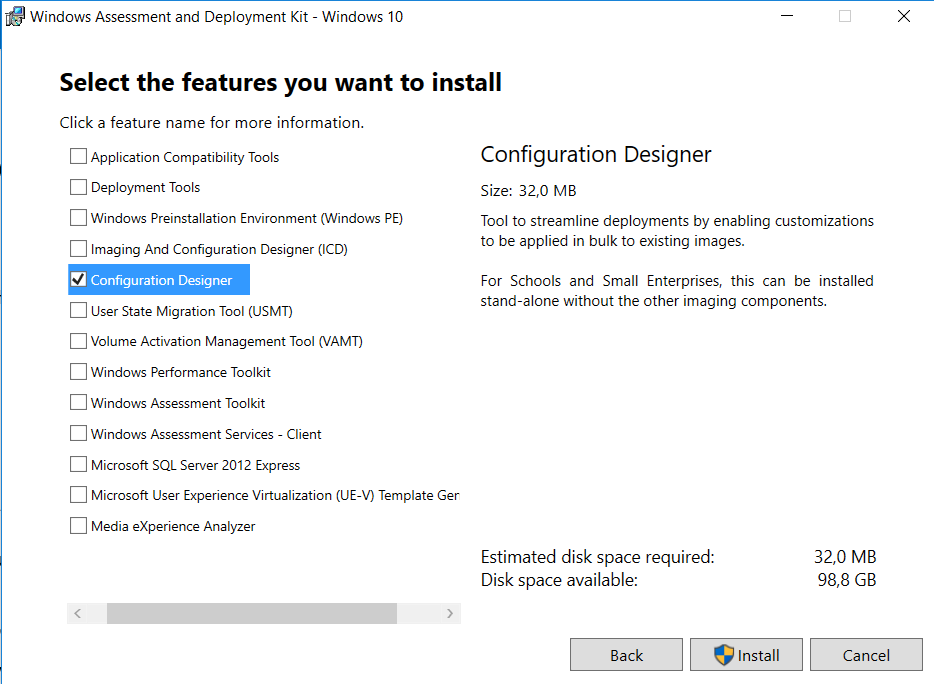
In previous versions of the Windows 10 ADK, you had to install additional features for Windows ICD to run. Starting in version 1607, you can install Windows ICD without other ADK features (as showed earlier). Much better if you have a dedicated device to create or edit provisioning packages.
Sources:
Windows ADK for Windows 10 version 1607 available for download
Provisioning packages for Windows 10
Group Policy:
New Group Policy templates for Windows 10 and Windows Server 2016 can be downloaded here: Microsoft
There is a new Group Policy Settings Reference for Windows and Windows Server available too: Microsoft
The following References can be found:
-Windows 10 ADMX spreadsheet.xlsx (1511)
-Windows10andWindowsServer2016PolicySettings.xlsx (1607)
There are almost 400 lines added in the new reference!
Because both App-V and UE-V are part of Windows 10 now, a lot of settings are based on that functionality. Furthermore some settings has been moved from Pro to Enterprise described here: Blog
More on both App-V and UE-V in a future blogpost!
Windows ADK:
New Windows ADK for Windows 10, version 1607 can be downloaded here: Microsoft
The Windows ADK now includes Windows Imaging and Configuration Designer, the Windows Assessment Toolkit, the Windows Performance Toolkit, and several new and improved deployment tools that can help you automate a large-scale deployment of Windows 10.
Windows ICD in Windows 10, Version 1607, supports the following scenarios for IT administrators: Simple provisioning, Provision school devices, and Advanced provisioning, where the first two offers a new and easy wizard.
In previous versions of the Windows 10 ADK, you had to install additional features for Windows ICD to run. Starting in version 1607, you can install Windows ICD without other ADK features (as showed earlier). Much better if you have a dedicated device to create or edit provisioning packages.
Sources:
Windows ADK for Windows 10 version 1607 available for download
Provisioning packages for Windows 10
Thursday, August 25, 2016
New Windows 10 LTSB release planned for October 1st!
Last year with the Windows 10 release, a Long-Term Servicing Branch (LTSB) release was offered too. Currently, Windows 10 LTSB is essentially the Windows 10 RTM (1507) release with certain features such as the Edge browser and Windows Store permanently removed. On October 1 however, a new Windows 10 LTSB build will be released, starting another 10-year support window. This build is called Windows 10 Enterprise LTSB 2016.
Windows 10 Enterprise 2016 LTSB builds on Windows 10 Pro, version 1607 adding premium features designed to address the needs of large and mid-size organizations (including large academic institutions), such as advanced protection against modern security threats, full flexibility of OS deployment, updating and support options; as well as comprehensive device and app management and control capabilities.
The LTSB edition provides customers with access to the Long-Term Servicing Branch as a deployment option for their mission critical devices and environments. It can be used also when yearly Current Branch updates are not desirable. By contrast, LTSB is only due to receive revisions every two or three years, where two major Windows 10 updates are planned for Current Branch next year. A mix of both LTSB and CB/B may be realistic also, when modern features are not needed on all systems.
LTSB can only be purchased with a volume license agreement or MSDN subscription, but for presentation Microsoft allows you to download a fully functional free 90-day trial.
Sources:
Two major Windows 10 updates planned for next year
Windows 10 Enterprise LTSB 2016 will be released on October 1
Windows 10 Enterprise 2016 LTSB builds on Windows 10 Pro, version 1607 adding premium features designed to address the needs of large and mid-size organizations (including large academic institutions), such as advanced protection against modern security threats, full flexibility of OS deployment, updating and support options; as well as comprehensive device and app management and control capabilities.
The LTSB edition provides customers with access to the Long-Term Servicing Branch as a deployment option for their mission critical devices and environments. It can be used also when yearly Current Branch updates are not desirable. By contrast, LTSB is only due to receive revisions every two or three years, where two major Windows 10 updates are planned for Current Branch next year. A mix of both LTSB and CB/B may be realistic also, when modern features are not needed on all systems.
LTSB can only be purchased with a volume license agreement or MSDN subscription, but for presentation Microsoft allows you to download a fully functional free 90-day trial.
Sources:
Two major Windows 10 updates planned for next year
Windows 10 Enterprise LTSB 2016 will be released on October 1
Wednesday, August 24, 2016
Doing an in-place upgrade from Windows 10 Build 1511 to 1607
This month Windows 10 Build 1607 (Anniversary update) is released. This is the third Windows 10 Build, next to 1507 (RTM) and 1511 (November update). Where servicing within ConfigMgr wasn't possible from 1507 to 1511, this is possible now. Expect some notes from the field soon, where systems in my company will be updated from 1511 to 1607. Hope to have some good results again :)
From a customer I got some update cons already. Let's have a look at few disappointments so far:
-Drivers working in 1511 doesn't have to be working in 1607. Maybe some hardware must be replaced, because it's not supported anymore. Think about some VGA or NIC drivers;
-Universal apps removed in the Operating System before, will be back after an in-place upgrade. They must be removed in the image before upgrading or removed again after the upgrade;
-Default apps set for Webbrowser, Email or PDF (for example) will be reset after an in-place upgrade. They must be configured again after the upgrade or set by an User Environment solution;
But the hardest thing: some Group Policy set in Pro edition earlier, is available for Enterprise edition only now.
-Configure Spotlight on lock screen
-Turn off all Windows Spotlight features
-Turn off Microsoft Consumer features
-Do not display the lock screen
-Do not require CTRL+ALT+DELETE & Turn off app notifications on the lock screen
-Do not show Windows Tips
-Force a specific default lock screen image
-Start Menu layout
-Turn off the Store application
-Only display private store within the Windows Store app
-Don't search the web or display web results
-Configure Spotlight on lock screen
-Turn off all Windows Spotlight features
-Turn off Microsoft Consumer features
-Do not display the lock screen
-Do not require CTRL+ALT+DELETE & Turn off app notifications on the lock screen
-Do not show Windows Tips
-Force a specific default lock screen image
-Start Menu layout
-Turn off the Store application
-Only display private store within the Windows Store app
-Don't search the web or display web results
So when using Pro 1511 already, and you want to manage some features above, you need Enterprise 1607 in future. That's the biggest disappointment for some companies I guess.
Hope to experience the in-place upgrade myself soon. On two home systems I did an rollback earlier because of driver malfunction. There will be some benefits added later too I guess :)
Sources:
Group Policies that apply only to Windows 10 Enterprise and Education Editions
Update 25-8: Windows 10 users moving from version 1511 to version 1607, dubbed the "anniversary update," may find applications installed on their systems that they'd previously removed.
Windows 10 Anniversary Update Restores Deleted Apps
Windows 10 1607: Keeping apps from coming back when deploying the feature update
Update 25-8: Windows 10 users moving from version 1511 to version 1607, dubbed the "anniversary update," may find applications installed on their systems that they'd previously removed.
Windows 10 Anniversary Update Restores Deleted Apps
Windows 10 1607: Keeping apps from coming back when deploying the feature update
Friday, July 29, 2016
Vacation time! (2016)
Today my vacation is starting for the next coming weeks. During my vacation there will be no new blogposts as you can guess :) So enjoy yourself (I will do also) and expect a lot of new information and knowledge later this year. There will be lot to write and share about upcoming and already available Microsoft products:
-Windows 10 AE
-System Center 2016
-Microsoft Intune & Azure
-Enterprise Mobility Suite
-Windows Server 2016
-Windows 10 Mobile
I hope to attend the following events too:
-Microsoft Ignite (September 26-30)
-Experts Live (November 22th)
Thanks for visiting my blog and see you later!
-Windows 10 AE
-System Center 2016
-Microsoft Intune & Azure
-Enterprise Mobility Suite
-Windows Server 2016
-Windows 10 Mobile
I hope to attend the following events too:
-Microsoft Ignite (September 26-30)
-Experts Live (November 22th)
Thanks for visiting my blog and see you later!
![]() |
| It's vacation time now! |
Labels:
Henk's blog,
Vacation,
Vacation time
Wednesday, July 27, 2016
System Center 2016 and Windows Server 2016 release date
It was known already that both System Center 2016 and Windows Server 2016 were released in Q3 this year. On several blogposts now it's mentioned that both solutions will be launched at the Microsoft Ignite conference in late September. Let's have a look at some highlights of both solutions:
System Center 2016 aims to ease the deployment, configuration, management and monitoring of your virtualized, software-defined datacenter and hybrid cloud infrastructure built on Windows Server 2016. A key goal of System Center 2016 is to improve the performance and the usability of System Center components to enhance your operational experience.
Highlights of System Center 2016 include:
-Support for new Windows Server 2016 technologies, including lifecycle management for Nano server-based hosts and virtual machines, Storage Spaces Direct, and shielded virtual machines;
-Performance and usability improvements, including all the update rollups since System Center 2012 R2, improved UNIX and Linux monitoring, and ability to tune management packs and alerts;
-Native integrations with Microsoft Operations Management Suite to give you expanded analytics, data correlation, orchestration, archival, and hybrid management capabilities.
Windows Server 2016 is the cloud-ready operating system that delivers new layers of security and Azure-inspired innovation for the applications and infrastructure that power your business.
Highlights of Windows Server 2016 include:
-Increase security and reduce business risk with multiple layers of protection built into the operating system.
-Evolve your datacenter to save money and gain flexibility with software-defined datacenter technologies inspired by Microsoft Azure.
-Innovate faster with an application platform optimized for the applications you run today, as well as the cloud-native apps of tomorrow.
Just great to have new functionality coming soon!
Used sources:
System Center 2016 to launch in September
What’s new in System Center 2016 Technical Preview 5
Windows Server 2016 new Current Branch for Business servicing option
System Center 2016 aims to ease the deployment, configuration, management and monitoring of your virtualized, software-defined datacenter and hybrid cloud infrastructure built on Windows Server 2016. A key goal of System Center 2016 is to improve the performance and the usability of System Center components to enhance your operational experience.
Highlights of System Center 2016 include:
-Support for new Windows Server 2016 technologies, including lifecycle management for Nano server-based hosts and virtual machines, Storage Spaces Direct, and shielded virtual machines;
-Performance and usability improvements, including all the update rollups since System Center 2012 R2, improved UNIX and Linux monitoring, and ability to tune management packs and alerts;
-Native integrations with Microsoft Operations Management Suite to give you expanded analytics, data correlation, orchestration, archival, and hybrid management capabilities.
Windows Server 2016 is the cloud-ready operating system that delivers new layers of security and Azure-inspired innovation for the applications and infrastructure that power your business.
Highlights of Windows Server 2016 include:
-Increase security and reduce business risk with multiple layers of protection built into the operating system.
-Evolve your datacenter to save money and gain flexibility with software-defined datacenter technologies inspired by Microsoft Azure.
-Innovate faster with an application platform optimized for the applications you run today, as well as the cloud-native apps of tomorrow.
Just great to have new functionality coming soon!
Used sources:
System Center 2016 to launch in September
What’s new in System Center 2016 Technical Preview 5
Windows Server 2016 new Current Branch for Business servicing option
Tuesday, July 26, 2016
Now Available: Update 1606 for ConfigMgr Current Branch
Last week (July 22th) the following ConfigMgr version is released: Update 1606 for ConfigMgr Current Branch. With this update new update functionality in ConfigMgr Current Branch can be used finally. No need to install servicepacks or cumulative updates anymore. Just make sure there's a recent back-up and install this version.
This update includes the following improvements:
-Windows Information Protection (formerly EDP)
-Windows Defender Advanced Threat Protection
-Windows Store for Business Integration
-Windows Hello for Business
We’ve also added a number of popular User Voice items, including:
-The addition of content status links in the admin console
-The option of list view for applications in the Software Center
-The ability to select multiple updates and simultaneously install them with the new Install Selected Updates button in the Software Center
For more details and to view the full list of new features in this update check out our documentation on TechNet.
Just great a new version is available now!
Source: ConfigMgr Team Blog
This update includes the following improvements:
-Windows Information Protection (formerly EDP)
-Windows Defender Advanced Threat Protection
-Windows Store for Business Integration
-Windows Hello for Business
We’ve also added a number of popular User Voice items, including:
-The addition of content status links in the admin console
-The option of list view for applications in the Software Center
-The ability to select multiple updates and simultaneously install them with the new Install Selected Updates button in the Software Center
For more details and to view the full list of new features in this update check out our documentation on TechNet.
Just great a new version is available now!
Source: ConfigMgr Team Blog
Subscribe to:
Posts (Atom)