As for today (27-1) there is a new update on the Configuration Manager Team blog. Let's have a look at the news mentioned:
The Future of Configuration Manager:
-During this time, we have completed the work necessary to deliver ConfigMgr more as an “as-a-Service” product.
-In terms of taxonomy for these updates, we’ll simply be referring to the ConfigMgr product as System Center Configuration Manager + year and month.
-The combination of ConfigMgr and Intune is the only solution that provides the full solution for managing all the versions of Windows, as well as all mobile devices.
-Our goals with ConfigMgr in this release cycle are all centered around finishing the work we started back in 2010 (when we were building ConfigMgr 2012) to deliver ConfigMgr as a service.
-With this work now completed, and with ConfigMgr/Intune being delivered as services, here is what we are able to do for you:
--Deliver the single-pane-of-glass for managing all devices – with immediate support across Windows, iOS and Android without you have to go through complex individual upgrades. We’ll do the work for you.
Support for Windows 10 and Microsoft Intune:
-As we announced at Microsoft Ignite with our first technical preview, we will release a new version of Configuration Manager by the end of this calendar year.
-The new System Center Configuration Manager, as it will simply be called, is designed to support the much faster pace of updates for Windows 10 and Microsoft Intune.
-System Center Configuration Manager will support Windows 10 in any flavor: Current Branch, Current Branch for Business, and Long-Term Servicing Branch.
-The fact that we are not including a calendar year in the name is a reflection of the fact that the new System Center Configuration Manager will be updated frequently.
-We plan to support each version/update for 12 months before we require that customers upgrade to the latest one to continue support.
-If you want to deploy Windows 10 in your environment today, you should have already upgraded ConfigMgr 2012 to the latest service pack and cumulative update as many of our customers already have.
Just great we have both Windows and ConfigMgr as a service from now on. ConfigMgr is the way to go for managing all versions of Windows! Hope to implement Microsoft Intune more as well. #loveit
More blogposts on ConfigMgr 2016 TP3:
My experience with ConfigMgr 2016 (Technical Preview 3) so far
October Update for ConfigMgr 2016 (Technical Preview 3) available

Thursday, October 29, 2015

Tuesday, October 27, 2015
Jalasoft Releases Xian Wings V2.3 for Operations Manager
Sponsor post
Today Jalasoft announced the release of Xian Wings V2.3 for Microsoft System Center Operations Manager 2012. The new version ships with a new Xian Wings Server and brand new clients for Microsoft Windows Phone, Apple iOS and Android based tablets as well as phones.

This new version comprises many enhancements. The communication between the server and the clients has been refined and is now more efficient in terms of data usage, making it faster and more reliable. As of now, the smartphone clients also have a shell console from where commands can be executed directly on the server. Furthermore, the tablet client has been improved and now gives the user the ability to import dashboards directly from SCOM. and users can now copy/cut and paste widgets from one to another dashboard.
Please read below for further information.
Jalasoft Releases Xian Wings V2.3 for Operations Manager
Today Jalasoft announced the release of Xian Wings V2.3 for Microsoft System Center Operations Manager 2012. The new version ships with a new Xian Wings Server and brand new clients for Microsoft Windows Phone, Apple iOS and Android based tablets as well as phones.

This new version comprises many enhancements. The communication between the server and the clients has been refined and is now more efficient in terms of data usage, making it faster and more reliable. As of now, the smartphone clients also have a shell console from where commands can be executed directly on the server. Furthermore, the tablet client has been improved and now gives the user the ability to import dashboards directly from SCOM. and users can now copy/cut and paste widgets from one to another dashboard.
Please read below for further information.
Jalasoft Releases Xian Wings V2.3 for Operations Manager
Monday, October 26, 2015
Skipping Task Sequence because it is not active yet
Recently I did a Windows 10 deployment with a new task sequence and deployment. Before running I updated my boot images first. This is described in the following blogpost: Update ConfigMgr 2012 R2 SP1 with Windows 10 boot images. During PXE boot however no task sequence became available and the system was restarted. When looking in smsts.log (press F8, start CMtrace, and open smsts.log in X:\Windows\Temp\Smstslog) the following message was seen: Skipping Task Sequence because it is not active yet & There are no task sequences available to this computer.
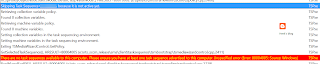
Trick is, you need to change deployment scheduling on the task sequence (or other deployment). In my case I changed date/time in "Schedule when this deployment will become available" one day earlier. For it seems the time(zone) used by ConfigMgr is not the same as used on systems during deployment? After changing deployment scheduling everything was working fine again!

Having a look at smsts.log again the following message is seen now: Found mandatory deployment & Using mandatory deployment. Happy that Windows 10 deployment can continue now! :)

Trick is, you need to change deployment scheduling on the task sequence (or other deployment). In my case I changed date/time in "Schedule when this deployment will become available" one day earlier. For it seems the time(zone) used by ConfigMgr is not the same as used on systems during deployment? After changing deployment scheduling everything was working fine again!

Having a look at smsts.log again the following message is seen now: Found mandatory deployment & Using mandatory deployment. Happy that Windows 10 deployment can continue now! :)
Friday, October 23, 2015
Microsoft Lumia 950 vs 950XL comparison
Recently on the Microsoft Windows 10 devices event new Lumia phones are announced. Last year the last Nokia phone (930) was released, which is still loved by many people. Microsoft skipped the 940 version, and is using the 950 and 950XL version now. Devices are called Microsoft Lumia now, with Windows 10 Mobile onboard. With this release, Microsoft wants to make sure this is a major release, kind of new generation. Same thing as for Windows 10 for desktops.
Let's have a look at the 950 and 950XL specs so far:
 When looking for a comparison with the 930 have a look here:

Because of new functionality (Continuum, Windows Hello, Wireless charging, Cortana, Adaptive antenna technology, Octacore & Hexacore processors and Liquid cooling technology) this must be my next phone! Therefore I ordered the Lumia 950 today, which will be my next device in around 6 weeks. Hope to share my personal experience within a few months. Just click on the pictures for a better view :)
Source and photos: OneTechStop.net
Let's have a look at the 950 and 950XL specs so far:


Because of new functionality (Continuum, Windows Hello, Wireless charging, Cortana, Adaptive antenna technology, Octacore & Hexacore processors and Liquid cooling technology) this must be my next phone! Therefore I ordered the Lumia 950 today, which will be my next device in around 6 weeks. Hope to share my personal experience within a few months. Just click on the pictures for a better view :)
Source and photos: OneTechStop.net
Tuesday, October 20, 2015
Microsoft Band 2 vs Apple Watch comparison and specs
Recently Microsoft Band 2 is announced, which has some nice benefits above of the first edition. The first Band was a good start, but design was not what most people want. This time it has a rounder design and offers more functionality. It has a Barometer, Gorilla Glass 3 and Cortana build-in. It has all known features from the first Band: Built-in GPS, UV monitoring, Guided workouts, Sleep & Calorie tracking and Smart notifications. Let's have a look at a nice comparison on the specs! This comparison is based on Band 2 and Apple Watch.
As far as comparing the technical specs of the two devices, here's a breakdown of some of the more pertinent categories.

Band 2 has a few advantages over Apple Watch, most notably better battery life and a greater array of sensors. By adding a curved display, Band 2 also addresses one of the weaknesses of the first-generation model, since that model's flat display made the device sit awkwardly on the wrist. Just great if you ask me!
Just click on the picture for a better view :)
Source: The Motley Fool
As far as comparing the technical specs of the two devices, here's a breakdown of some of the more pertinent categories.

Band 2 has a few advantages over Apple Watch, most notably better battery life and a greater array of sensors. By adding a curved display, Band 2 also addresses one of the weaknesses of the first-generation model, since that model's flat display made the device sit awkwardly on the wrist. Just great if you ask me!
Just click on the picture for a better view :)
Source: The Motley Fool
Thursday, October 15, 2015
October Update for ConfigMgr 2016 (Technical Preview 3) available
Yesterday another update on ConfigMgr 2016 TP3 (Technical Preview 3) is done. This new update brings with it an early view of the new Windows 10 Servicing node, which enables you to view the state of Windows as a service in your environment, create flexible servicing plans to form deployment rings, and view alerts when Windows 10 clients are near end of support for their build of Current Branch or Current Branch for Business.
 To read more about the new Windows 10 servicing dashboard, please refer to the TechNet documentation.
The Windows 10 Servicing dashboard is the latest addition to ConfigMgr’s rich support for Windows 10, including client deployment, upgrade, and management. You can find additional guidance for Windows 10 servicing and deployment on the Windows for IT Pros blog.
This update also introduces the ability to natively manage Office 365 desktop client updates using the Configuration Manager Software Update Management (SUM) workflow. You can now manage Office 365 desktop client updates just like you manage any other Microsoft Update.
 In order to enable update 1510 for TP3, have a look here: System Center Configuration Manager Team Blog
Just great to have "ConfigMgr as a service" from now on!
More blogposts on ConfigMgr 2016 TP3:
Installing ConfigMgr 2016 Technical Preview 3
My experience with ConfigMgr 2016 (Technical Preview 3) so far

The Windows 10 Servicing dashboard is the latest addition to ConfigMgr’s rich support for Windows 10, including client deployment, upgrade, and management. You can find additional guidance for Windows 10 servicing and deployment on the Windows for IT Pros blog.
This update also introduces the ability to natively manage Office 365 desktop client updates using the Configuration Manager Software Update Management (SUM) workflow. You can now manage Office 365 desktop client updates just like you manage any other Microsoft Update.

Just great to have "ConfigMgr as a service" from now on!
More blogposts on ConfigMgr 2016 TP3:
Installing ConfigMgr 2016 Technical Preview 3
My experience with ConfigMgr 2016 (Technical Preview 3) so far
Wednesday, October 14, 2015
Microsoft Ignite moved from Chicago to Atlanta now!
Last year I attended Microsoft Ignite in Chicago (IL). With 23.000 attendees the event was SOLD OUT and hugh! Instead of TechEd and Management Summit (MMS) before, Microsoft want to bring all IT Pro's to one single event. My personal pro's and con's on the event are available here: Microsoft Ignite 2015 (Event) recap. It was told that Ignite 2016 should be done in Chicago again, on May 9-13, 2016 this time. That is however NOT the case anymore ;)
 Lucky me (I couldn't make it in May 2016) the event is scheduled now for September 26-30, in Atlanta (GA). Hope this time there will be better possibilities on networking. This because last time attendees where divided on more then 60 hotels around the conference center. With the new date and location I may give it another try! Hope the old MMS feeling will come back to the event too. Microsoft is doing a good job again, and hope the event will be even better this time.
 Pre-register now and Microsoft will contact you with more details when it's time to complete your registration.
More items on Microsoft Ignite:
Henk's blog: Microsoft Ignite 2015 (Event) recap
Microsoft Ignite Canceled for Chicago - Rescheduled
Pre-registering for Ignite Gets You on a List for a Discount


More items on Microsoft Ignite:
Henk's blog: Microsoft Ignite 2015 (Event) recap
Microsoft Ignite Canceled for Chicago - Rescheduled
Pre-registering for Ignite Gets You on a List for a Discount
Tuesday, October 13, 2015
BGB http proxy - Installation operation failed (Internal Error 25001, 80070057)
During a Distribution point and Management point installation on a ConfigMgr site server, I received the following errors in BgbisapiMSI.log and BgbSetup.log
-BGB http proxy - Installation operation failed
-Installation success or error status: 1603
-BGB http proxy - Internal Error 25001, 80070057
-Internal Error 25001, 80070057
-CustomAction CcmRegisterPerfCounters returned actual error code 1603
-Fatal MSI Error - bgbisapi.msi could not be installed


Trick is, you need to have Background Intelligent Transfer Service (BITS) installed on the site server. It is required, otherwise you will see those 25001 errors. After installing BITS and restart SMS_SITE_COMPONENT_MANAGER installation went fine after all. Next time, make sure BITS is installed before starting :-)


Hope it helps!
Source: Microsoft Technet Forums
-BGB http proxy - Installation operation failed
-Installation success or error status: 1603
-BGB http proxy - Internal Error 25001, 80070057
-Internal Error 25001, 80070057
-CustomAction CcmRegisterPerfCounters returned actual error code 1603
-Fatal MSI Error - bgbisapi.msi could not be installed



Trick is, you need to have Background Intelligent Transfer Service (BITS) installed on the site server. It is required, otherwise you will see those 25001 errors. After installing BITS and restart SMS_SITE_COMPONENT_MANAGER installation went fine after all. Next time, make sure BITS is installed before starting :-)


Hope it helps!
Source: Microsoft Technet Forums
Friday, October 9, 2015
Some clients not updating, reporting 8007000E error in WindowsUpdate.log
At customer location workstations doesn't install any updates anymore. This because of the following error in windowsupdate.log: COMAPI WARNING: ISusInternal::GetUpdateMetadata2 failed, hr=8007000E. For it seems this we be only the case on Windows 7 x86 systems. Installing a new hotfix must do the trick. Let's have a look at that one.
 The issue is discussed on Microsoft TechNet too:
Some Clients Not Updating. Reporting "Compliant." hr=8007000E Error in WindowsUpdate.log
For it seems there is an issue in which the Windows Update Client displays an out-of-memory error during the scan operation (0x8007000E) on systems that have small amounts of physical RAM. Therefore a hotfix is needed.
The hotfix (KB3050265) can be download here:
New Windows Update Client for Microsoft Windows 7 Available
After installation (and a required reboot) there was still an error however. Therefore we started the following commands (in an elevated command prompt) to make it functional again:
Net stop wuauserv
Sc config wuauserv type= own
Net start wuauserv
After that everything started to work again! :)
Update 23-11: (by Trevor Jones)
Just FYI, KB3050265 has been superseded by several updates. The latest WU client is http://support.microsoft.com/en-us/kb/3102810 and fixes the same plus additional issues :)

Some Clients Not Updating. Reporting "Compliant." hr=8007000E Error in WindowsUpdate.log
For it seems there is an issue in which the Windows Update Client displays an out-of-memory error during the scan operation (0x8007000E) on systems that have small amounts of physical RAM. Therefore a hotfix is needed.
The hotfix (KB3050265) can be download here:
New Windows Update Client for Microsoft Windows 7 Available
After installation (and a required reboot) there was still an error however. Therefore we started the following commands (in an elevated command prompt) to make it functional again:
Net stop wuauserv
Sc config wuauserv type= own
Net start wuauserv
After that everything started to work again! :)
Update 23-11: (by Trevor Jones)
Just FYI, KB3050265 has been superseded by several updates. The latest WU client is http://support.microsoft.com/en-us/kb/3102810 and fixes the same plus additional issues :)
Wednesday, October 7, 2015
Highlights from the Microsoft Windows 10 devices event
During the Microsoft October 2015 event today (October 6th) Microsoft made the following announcements. It's full of great hardware and even greater functionality running on Windows 10. Microsoft is back in business again with both great hardware AND software. Microsoft will be loved again, that's for sure :)
It's all about #Windows10 and #Windows10devices now!
Windows 10
-Running on 110 million devices worldwide within eight weeks
-1.25 billion store visits worldwide within 10 weeks
-Running on Xbox One and mobile devices soon
Xbox One
-This holiday a great line-up games running on Xbox One and Pc
-New games are: Rise of the Tomb Raider, Halo 5, Gears of War 4, Forza Motorsport 6, and many more
-New Xbox One Limited Edition consoles with 1TB storage (multiple editions) with a new game enclosed
Hololens
-With Project X-ray you can play games in your own environment (mixed reality)
-The Hololens development edition kit will be available Q1 2016 for $3,000
-Expect more holographic games soon!
 Band 2
-Has a rounder design and offers more functionality. It has a Barometer, Gorilla Glass 3 and Cortana build-in
-Has all known features from the first Band: Built-in GPS, UV monitoring, Guided workouts, Sleep & Calorie tracking and Smart notifications
-Note: Still no Endomondo support, which I'm using for running :(
-Pre-order today and available October 30th for $249
 Lumia 950 and 950XL
-Best mobile phone ever. It has Adaptive antenna technology, Octacore & Hexacore processors and Liquid cooling technology
-Lumia 950 specs: Hexacore-chip, 5,2 inch OLED screen, 564 PPI, 20MP sensor, Triple LED, and many more
-Lumia 950XL specs: Octacore-chip, 5,7 inch OLED screen, 518 PPI, 20MP sensor, Triple LED, and many more
-4k video with hardware button, saving on Cloud-storage, 32GB local storage and 2TB (maximum) on SD-cards
-Support for Continuum (with Microsoft Display Dock) and Windows Hello (works with iris scanners) on both phones
-Multitasking on multiple screens possible, keyboard/mouse and USB-drive support (Full Pc experience)
-Available November for $549 (Lumia 950) and $649 (Lumia 950XL) and Lumia 550 (budget-phone) available December for $139
 Surface Pro 4
-Note: 98% of people using Surface Pro 3 recommend it, I too :)
-Bigger screen, using 12,3 inch now (no 14 inch as rumoured) and thinner/lighter (from 9.1 to 8.4 mm)
-The screen has 267 PPI and 5 million pixels, which is 20% more then Surface Pro 3
-Maximum configuration available is 1TB local storage, 16GB memory (finally) and Gorilla Glass 4
-Pen storage when/where you need it (magnetic) in multiple colors available (better then Surface Pro 3)
-Surface Pro 4 is 30% faster then Surface Pro 3 and 50% faster then MacBook Air :)
-New type cover with fingerprint reader, better keyset (scissor design) and precision glass trackpad in multiple colors available
-New docking station with 4x USB 3.0 ports, 2x 4k display ports, Gigabit Ethernet and more (for Surface Pro 3 also)
-Pre-order October 7th and available October 26th for $899 (at minimum)
 Surface Book
-The 14 inch Surface (as mentioned earlier) has become a 13,5 inch laptop called Surface Book :)
-This is the first laptop ever made by Microsoft, and the fastest laptop anywhere on any planet ever (!)
-The screen has 267 PPI and 6 million pixels, it has touch and pen support same as Surface
-Has a perfect typing experience (quiet, stable and comfortable) a precision glass and 5-point multi-touch trackpad
-Onboard are a new Intel Skylake CPU, nVidia Geforce GPU and high-speed GDDR5 memory
-Surface Book is 50% faster then MacBook Pro, has 12 hour battery life and works with new docking station also
-Has a screen which can be detached from the keyboard, it's a laptop and a clipboard in one (!)
-It's the most powerful and ultimate laptop on the planet :)
-Pre-order October 7th and available October 26th for $1,499 (at minimum)
I'm really thrilled and excited about all the new stuff coming. Hope to have a Band 2, Lumia 950 and Surface Book soon :)
Watch the recorded session on: http://www.microsoft.com/october2015event/en-us/live-event
It's all about #Windows10 and #Windows10devices now!
Windows 10
-Running on 110 million devices worldwide within eight weeks
-1.25 billion store visits worldwide within 10 weeks
-Running on Xbox One and mobile devices soon
Xbox One
-This holiday a great line-up games running on Xbox One and Pc
-New games are: Rise of the Tomb Raider, Halo 5, Gears of War 4, Forza Motorsport 6, and many more
-New Xbox One Limited Edition consoles with 1TB storage (multiple editions) with a new game enclosed
Hololens
-With Project X-ray you can play games in your own environment (mixed reality)
-The Hololens development edition kit will be available Q1 2016 for $3,000
-Expect more holographic games soon!

-Has a rounder design and offers more functionality. It has a Barometer, Gorilla Glass 3 and Cortana build-in
-Has all known features from the first Band: Built-in GPS, UV monitoring, Guided workouts, Sleep & Calorie tracking and Smart notifications
-Note: Still no Endomondo support, which I'm using for running :(
-Pre-order today and available October 30th for $249

-Best mobile phone ever. It has Adaptive antenna technology, Octacore & Hexacore processors and Liquid cooling technology
-Lumia 950 specs: Hexacore-chip, 5,2 inch OLED screen, 564 PPI, 20MP sensor, Triple LED, and many more
-Lumia 950XL specs: Octacore-chip, 5,7 inch OLED screen, 518 PPI, 20MP sensor, Triple LED, and many more
-4k video with hardware button, saving on Cloud-storage, 32GB local storage and 2TB (maximum) on SD-cards
-Support for Continuum (with Microsoft Display Dock) and Windows Hello (works with iris scanners) on both phones
-Multitasking on multiple screens possible, keyboard/mouse and USB-drive support (Full Pc experience)
-Available November for $549 (Lumia 950) and $649 (Lumia 950XL) and Lumia 550 (budget-phone) available December for $139

-Note: 98% of people using Surface Pro 3 recommend it, I too :)
-Bigger screen, using 12,3 inch now (no 14 inch as rumoured) and thinner/lighter (from 9.1 to 8.4 mm)
-The screen has 267 PPI and 5 million pixels, which is 20% more then Surface Pro 3
-Maximum configuration available is 1TB local storage, 16GB memory (finally) and Gorilla Glass 4
-Pen storage when/where you need it (magnetic) in multiple colors available (better then Surface Pro 3)
-Surface Pro 4 is 30% faster then Surface Pro 3 and 50% faster then MacBook Air :)
-New type cover with fingerprint reader, better keyset (scissor design) and precision glass trackpad in multiple colors available
-New docking station with 4x USB 3.0 ports, 2x 4k display ports, Gigabit Ethernet and more (for Surface Pro 3 also)
-Pre-order October 7th and available October 26th for $899 (at minimum)

-The 14 inch Surface (as mentioned earlier) has become a 13,5 inch laptop called Surface Book :)
-This is the first laptop ever made by Microsoft, and the fastest laptop anywhere on any planet ever (!)
-The screen has 267 PPI and 6 million pixels, it has touch and pen support same as Surface
-Has a perfect typing experience (quiet, stable and comfortable) a precision glass and 5-point multi-touch trackpad
-Onboard are a new Intel Skylake CPU, nVidia Geforce GPU and high-speed GDDR5 memory
-Surface Book is 50% faster then MacBook Pro, has 12 hour battery life and works with new docking station also
-Has a screen which can be detached from the keyboard, it's a laptop and a clipboard in one (!)
-It's the most powerful and ultimate laptop on the planet :)
-Pre-order October 7th and available October 26th for $1,499 (at minimum)
I'm really thrilled and excited about all the new stuff coming. Hope to have a Band 2, Lumia 950 and Surface Book soon :)
Watch the recorded session on: http://www.microsoft.com/october2015event/en-us/live-event
Tuesday, October 6, 2015
My experience with ConfigMgr 2016 (Technical Preview 3) so far
Last weeks I did a lot on ConfigMgr 2016 (Technical Preview 3). When installing the product (I used SQL 2014 and ADK 10 for this) and starting the console, no changes seems to be made. Thing is, most changes are not visible right away. You must use the product to see changes between the 2012 and 2016 release. The biggest one is under the hood. Let's have a look at my experience so far.
Because ConfigMgr 2016 is another x64 release, an in-place migration is possible from 2012 (when the product is final!). Only thing is, you need to update ADK (remove ADK 8.x and install ADK 10). It's possible to update SQL as well, but that's not a required thing. ConfigMgr 2016 can be installed as a servicepack (maybe it is off the record). You feel comfortable with it right away, which is quite nice. Just great to have a new release for the next coming years :)
Most important changes are:
 Service connection point (connects ConfigMgr to Microsoft cloud services, it is used for Microsoft Intune subscription, and to update and service your ConfigMgr installation). You can choose between Online (persistent connection), which is recommended, and Offline (on-demand connection). Beneath Cloud Services (Administration tab) "Updates and Servicing" is added. Beneath that Features can be added by Microsoft dynamically. I installed "(Pre-Release) Version 1509 for Technical Preview" myself that way. With that you have "ConfigMgr as a service" from now on.
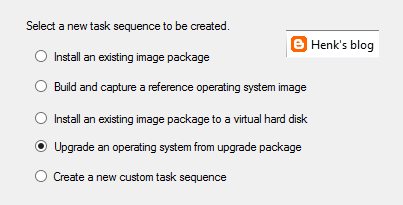
 New task sequence: "Upgrade an operating system from upgrade package". This task sequence is used specially for Windows 10 upgrades. It contains a few steps only, but it does what it says: upgrade to Windows 10 in-place in just a few clicks. I did a Windows 8.1 to 10 upgrade within an hour with it.
 Automatic Deployment Rules (ADR) can be connected to multiple collections now, without the need to set whole configuration again. Just click on the ADR and select "Add Deployment" to connect an existing ADR to another collection. When choosing properties on an existing ADR there is more overview, because of less tabs showing. Very nice there is improvement here!
 Software Center and Application Catalog are (almost) merged now. Applications are showed in Software Center by default now, but approval still needs to be done in Application Catalog. Hope it will be merged totally in future soon. Software Center has a new look and feel, and can be used for (un)installing applications, software packages, and task sequence too. I use my for showing the Windows 10 upgrade task sequences available. Pity is still no e-mail notification is there by default. Other minus is that after approval the end user doesn't get an message that the application can be installed. Still some space for improvement if you ask me!
 There will be full compatibility with existing features for Windows 10 (Windows as a service) in this release. And there will be a new hybrid option to manage Windows 10 devices via MDM with on-premises infrastructure. For this no ConfigMgr client is needed on the device. A workplace join (and company portal) is enough to show the device in ConfigMgr and push applications and policies. Just great isn't it?!
Hope to have my first ConfigMgr 2016 implementation and/or migration soon. This in combination with Microsoft Intune and Windows 10 for modern management. Microsoft is (still) the way to go! :) I'm very happy with the new possibilities till now.
More posts about ConfigMgr 2016:
New Microsoft System Center and Windows versions coming!
Installing ConfigMgr 2016 Technical Preview 3
Because ConfigMgr 2016 is another x64 release, an in-place migration is possible from 2012 (when the product is final!). Only thing is, you need to update ADK (remove ADK 8.x and install ADK 10). It's possible to update SQL as well, but that's not a required thing. ConfigMgr 2016 can be installed as a servicepack (maybe it is off the record). You feel comfortable with it right away, which is quite nice. Just great to have a new release for the next coming years :)
Most important changes are:



Hope to have my first ConfigMgr 2016 implementation and/or migration soon. This in combination with Microsoft Intune and Windows 10 for modern management. Microsoft is (still) the way to go! :) I'm very happy with the new possibilities till now.
More posts about ConfigMgr 2016:
New Microsoft System Center and Windows versions coming!
Installing ConfigMgr 2016 Technical Preview 3
Thursday, October 1, 2015
HP Client Integration Kit for ConfigMgr 2012 R2 (update 2)
To import driver packages easily I like to use additional Dell and/or HP tools to import driver packages. This time the HP Client Integration Kit for ConfigMgr 2012 R2 has another update on 9/8/2015 with the following changes:
- Added support of Windows 10 working with ConfigMgr 2012 SP2 and R2 SP1.
- Implemented new signed version of BCU 4.0.13.1 that fixes the TPM issue.
- Updated CIK installer to comply with HP name change.
- Picked up HPQPswd 1.1.19.1.
- Improved the download and import driver process.
Strange this is that after installing the update, no downloads for Windows 10 are available. When looking on HP driver packs (32-bit/64-bit) no Windows 10 packages are available either. Seems that HP is a little late with creating the packs. Download additional drivers (one-by-one) for specific types/models is the only option available. Seems that Dell did a better job this time :)
Download HP CIK right away!
More blogposts about importing driver packs:
HP Client Integration Kit for ConfigMgr 2012 R2 (update)
Download Driver packages for Dell, HP and Lenovo systems HP Client Integration Kit for ConfigMgr 2012 R2
- Added support of Windows 10 working with ConfigMgr 2012 SP2 and R2 SP1.
- Implemented new signed version of BCU 4.0.13.1 that fixes the TPM issue.
- Updated CIK installer to comply with HP name change.
- Picked up HPQPswd 1.1.19.1.
- Improved the download and import driver process.
Strange this is that after installing the update, no downloads for Windows 10 are available. When looking on HP driver packs (32-bit/64-bit) no Windows 10 packages are available either. Seems that HP is a little late with creating the packs. Download additional drivers (one-by-one) for specific types/models is the only option available. Seems that Dell did a better job this time :)
Download HP CIK right away!
More blogposts about importing driver packs:
HP Client Integration Kit for ConfigMgr 2012 R2 (update)
Download Driver packages for Dell, HP and Lenovo systems HP Client Integration Kit for ConfigMgr 2012 R2
Tuesday, September 29, 2015
Apple iPad Pro vs Microsoft Surface Pro 3 specs
Recently the iPad Pro is announced, which is a Surface Pro 3 look-a-like. The new iPad Pro can be used with keyboard and stylus too. For me the Surface Pro 3 is still a great device, this after using it for almost a year now. With Windows 10 running for a few months the device is even better. The fan noise is less and overall experience is way better. Let's have a look at a nice comparison on the specs!

Just click on the picture for a better view :)
Source: Neowin
Additional sources:
Want to use Office on your new iPad Pro? Then you’ll need an Office 365 subscription
The iPad Pro is too big to get Office apps for free, says Microsoft

Just click on the picture for a better view :)
Source: Neowin
Additional sources:
Want to use Office on your new iPad Pro? Then you’ll need an Office 365 subscription
The iPad Pro is too big to get Office apps for free, says Microsoft
Friday, September 25, 2015
Xian NM 2012 SP4 has been released! - Jalasoft
Sponsor post
Introducing Service Pack 4 for Xian NM 2012. We’re proud to announce the release of our brand new Service Pack which comprises drastic improvements and enhancements, especially when talking about our brand new Topology Diagram feature, new Dashboards feature and improved Flow monitoring. Our solution keeps evolving and continues to answer the needs of customers looking to monitor their networks in a deep and efficient manner.
 Please read below for further information.
Xian NM 2012 SP4 What's new / Press Release
Or: Download now
Introducing Service Pack 4 for Xian NM 2012. We’re proud to announce the release of our brand new Service Pack which comprises drastic improvements and enhancements, especially when talking about our brand new Topology Diagram feature, new Dashboards feature and improved Flow monitoring. Our solution keeps evolving and continues to answer the needs of customers looking to monitor their networks in a deep and efficient manner.

Xian NM 2012 SP4 What's new / Press Release
Or: Download now
Wednesday, September 23, 2015
Cannot edit the object, which is in use by User at Site XYZ
During Edit Membership on Software Updates I get the following error message: Cannot edit the object, which is in use by User at Site XYZ. This because the ConfigMgr console was crashing while editing the object.
 The following must be done to free the object again. The query for this is: select * from SEDO_LockState where LockStateID <> 0 (where SEDO stands for Serialized Editing of Data Objects)
 Use the appropriate information to remove the record related to the object. The query for this is: DELETE from SEDO_LockState where LockID = ‘<LockID of the record identified in the previous query>’
Once the record is removed, you should be able to modify the object again. Hope it helps!


Once the record is removed, you should be able to modify the object again. Hope it helps!
You must have local Administrator permissions to install this software
When upgrading ConfigMgr 2012 SP2 to 2012 R2 SP1, the following message is displayed: "You must have local Administrator permissions to install this software".
Trick is, you must be start splash.hta with Administrator permissions. When right-click on the file this isn't possible.
Solution: Just start an Elevated Command Prompt (Run as Administrator) and execute splash.hta from there.
Then it will install fine after all :-)
Hope it helps!
Trick is, you must be start splash.hta with Administrator permissions. When right-click on the file this isn't possible.
 |
| Dutch error message |
Then it will install fine after all :-)
Hope it helps!
Monday, September 21, 2015
How to delete multiple driver categories in ConfigMgr at once?
When using Dell Client Configuration Toolkit (CCTK) within ConfigMgr you can import drivers automatically, assign driver categories and create driver packages. Sounds easy isn't it? Recently I had a ConfigMgr environment at customer location with hundreds of driver categories. They all were named the same and they are a administrative nightmare for sure. The categories from Dell known were E7250_7250 and E7450_7450. You cannot delete all these categories at once unfortunately.
 When you go to Manage Categories, select them all (which must be done one by one) and choose delete, it only deletes the first one selected. For it seems the multiple selection functions only to assign drivers, not to delete or rename them. Doing it one by one will take an entire day of clicking for sure. Therefore I used the following PowerShell command, which does the job in seconds..
 Get-WmiObject -Namespace "root\sms\site_xxx" -Class "SMS_CategoryInstance" | ? { $_.CategoryTypeName -eq "DriverCategories" -and $_.LocalizedCategoryInstanceName -like "yyy" } | % { Write-Host "Deleting category $($_.LocalizedCategoryInstanceName)..."; $_.Delete() }
Just make sure to rename the site code "xxx" in the WMI namespace and "yyy" with "E7250_7250" or another model. After that the ConfigMgr database will be clean and clear again :-)
Source: Delete multiple driver admin categories?


Just make sure to rename the site code "xxx" in the WMI namespace and "yyy" with "E7250_7250" or another model. After that the ConfigMgr database will be clean and clear again :-)
Source: Delete multiple driver admin categories?
Thursday, September 17, 2015
My experience with ConfigMgr 2012 R2 SP1 and Intune in Hybrid scenario
Last months I did multiple ConfigMgr implementations in Hybrid scenario. That means that a Microsoft Intune (SAAS) subscription is connected, and ConfigMgr is set as Management Authority. Combining both solutions has a great benefit; managing all devices (desktops, notebooks, servers, Mac-clients and mobile devices) from a single management console. I did multiple blogposts on that as well, which are included in the end of this post. Let's have a closer look.
 When the Microsoft Intune subscription is connected, configuration is needed for the different (mobile) platforms. They are not hard to configure, but needs different certificates for management. Let's have a look for the options available:
When enrolling Android devices no certificate is needed. Enrollment is done by installing the company portal. Downside is there's less to manage on this operating system. Both compliance policy and configuration items (less settings) can be configured. Not the best experience on this one for me. Depends on the device maybe?
 When enrolling iOS devices an Apple Push Notification (APN) certificate is needed. This one is free and valid for 12 months. I like to enroll IPad's because of fast communication and great screen. Enrollment is done by installing the company portal. Optionally you can choose for DEP (Device Enrollment Program) and VPP (Volume Purchase Program) programs. That way you have over-the-air zero touch enrollment, and applications can be quickly installed without the need to have manually actions everytime. This because when doing required app deployment you must approve them one by one. With these programs this isn't needed anymore. Both compliance policy and configuration items (many settings) can be configured. Best experience for me so far.
 When enrolling Windows Phone (WP) devices an Symantec certificate is needed (most of times). Enrollment is done by using workplace join and installing the company portal. For WP 8.1 devices the Symantec certificate is needed only for signing line-of-business apps. Enrollment is quick and easy, but I prefer the iOS way myself. When enrolling Windows 10 (Mobile) the behavior is same. Just by using workplace join, device management becomes available in ConfigMgr. Hope this experience becomes better in ConfigMgr 2016 (available soon) with Windows 10 (Mobile). That way Microsoft has the best solution available for device management. For some customers I like to use DEP and VPP for easy enrollment and app deploy. This because of over-the-air zero touch enrollment, and easy app installation.
 On multiple operating systems I have almost same behavior for now. Enrollment and compliance settings are quick and easy. Configuration items however are slow and unstable. You can choose to deploy them to user/device collections (or both, depends on the setting?), but sometimes they work, sometimes not..
Example: I did an enrollment on an IPad, have the compliance policy in 1/2 minutes and the configuration baseline in 10/15 minutes. I installed some apps and they will be available on screen. After that I unenrolled the device. Apps are gone, configuration baseline is gone, compliance policy is not required anymore. Just great. Then I did another enrollment on the device. Have the compliance policy in 1/2 minutes again, did install the apps again. But the configuration baseline never come back again. That's sad and not reliable.
Hope this part will be better (and quicker) in a next release. For now I hope to do way more on Hybrid scenario :) Stay tuned for more!
Other blogposts about this topic:
How to reset your MDM authority in Microsoft Intune
Note: Most captures in Dutch, sorry for that :)

When enrolling Android devices no certificate is needed. Enrollment is done by installing the company portal. Downside is there's less to manage on this operating system. Both compliance policy and configuration items (less settings) can be configured. Not the best experience on this one for me. Depends on the device maybe?


Example: I did an enrollment on an IPad, have the compliance policy in 1/2 minutes and the configuration baseline in 10/15 minutes. I installed some apps and they will be available on screen. After that I unenrolled the device. Apps are gone, configuration baseline is gone, compliance policy is not required anymore. Just great. Then I did another enrollment on the device. Have the compliance policy in 1/2 minutes again, did install the apps again. But the configuration baseline never come back again. That's sad and not reliable.
Hope this part will be better (and quicker) in a next release. For now I hope to do way more on Hybrid scenario :) Stay tuned for more!
Other blogposts about this topic:
How to reset your MDM authority in Microsoft Intune
Note: Most captures in Dutch, sorry for that :)
Tuesday, September 15, 2015
Update ConfigMgr 2012 R2 SP1 with Windows 10 boot images
When installing ConfigMgr 2012 R2 SP1, Windows 8.1 ADK is needed as a prerequisite. You can however upgrade to Windows 10 ADK after installation. Let's have a look. Let's download Windows 10 ADK first on Download kits and tools for Windows 10. At the bottom of the page you will find the Download button. When using ConfigMgr 2016 (Technical Preview), Windows 10 ADK can be used at start already.
Before this can be installed, it's needed to uninstall Windows 8.1 ADK first. After that start adksetup.exe for Windows 10. During setup multiple components must be selected, three of them are the same as in Windows 8.1 ADK. Imaging and Configuration Designer (ICD) is a new one, which is needed to configure Windows 10 settings.
 Just select this four items and choose to install them. After installation however, boot images are still on Windows 6.3 (which is Windows 8.1). This because it's needed to update boot images manually. You can choose to change existing boot images or create new ones.
 Here are the paths to both boot images:
-x86: C:\Program Files (x86)\Windows Kits\10\Assessment and Deployment Kit\Windows Preinstallation Environment\x86\en-us\winpe.wim
-x64: C:\Program Files (x86)\Windows Kits\10\Assessment and Deployment Kit\Windows Preinstallation Environment\amd64\en-us\winpe.wim
 Just copy (and rename) them to the <ConfigMgr folder>\OSD\Boot\i386 and x64 folders. Within the Boot images properties change the Data source location for both files or create new Boot images to the location. Just make sure to select -Distribute Content- and -Deploy this boot image from the PXE-enabled distribution point- (properties) as well. After that both boot images will be on v10.0.10240.16384 which is fine.
Note: As mentioned on TechNet Blogs, don't forget to reboot after ADK installation. Otherwise boot images won't get updated on the DP.
Source: How to switch to Windows 10 ADK on ConfigMgr 2012 R2 SP1
Hope it helps!
Before this can be installed, it's needed to uninstall Windows 8.1 ADK first. After that start adksetup.exe for Windows 10. During setup multiple components must be selected, three of them are the same as in Windows 8.1 ADK. Imaging and Configuration Designer (ICD) is a new one, which is needed to configure Windows 10 settings.


-x86: C:\Program Files (x86)\Windows Kits\10\Assessment and Deployment Kit\Windows Preinstallation Environment\x86\en-us\winpe.wim
-x64: C:\Program Files (x86)\Windows Kits\10\Assessment and Deployment Kit\Windows Preinstallation Environment\amd64\en-us\winpe.wim

Note: As mentioned on TechNet Blogs, don't forget to reboot after ADK installation. Otherwise boot images won't get updated on the DP.
Source: How to switch to Windows 10 ADK on ConfigMgr 2012 R2 SP1
Hope it helps!
Friday, September 11, 2015
Using ConfigMgr 2012 R2 SP1 and Microsoft Intune in a Hybrid configuration
Within my daily job I'm doing Configuration Manager (ConfigMgr) and Endpoint Protection (SCEP) consultancy and training a lot. ConfigMgr is a great product for managing on-premises devices, like servers, desktops and notebooks. With Microsoft Intune, Mobile Device and Application Management on tablets and smartphones can be done. This is a standalone Software as a service (SAAS) solution which exists for multiple years now. When integrating both solutions, you have a Hybrid configuration in-place.
 Benefit of using a Hybrid configuration is integration! You can manage both Windows, Mac and Mobile devices within a single management console. Just make sure to set the management authority (which can be set on Office 365, Intune or Configuration Manager) on the right one. When it's set on Configuration Manager no management has to be done in the SAAS console anymore. Just use collections, applications and policies which are in ConfigMgr by default, to manage mobile devices as well. On the different clients, a Intune Company Portal needs to be installed for management.
 Last years Microsoft has done a good job to improve speed on client communication and policies. That way you can enroll a mobile device in a few minutes, publish policies and applications, and set an unenrollment (when needed) all within approx. 15/20 minutes. When forcing a Reset passcode (new passcode must be entered) or Remote lock (device is locked and passcode needs to be set again), it will be active in approx. 1/2 minutes. During unenrollment all configuration and apps are removed also. Reasons enough to stay enrolled.
 With Windows 10 Mobile coming, the richest set on policies can be configured. When creating policies (configuration items), you will see the difference on Android, iOS and Windows (Phone) platforms. Hope that will be better and easier in the future. It's possible also to deploy applications (from the different app stores) and weblinks to mobile devices. You can choose to open them in a web browser or install them. During installation a shortcut is created in Apps, so no need to open the Intune Company Portal again.
 Hope to have some real experience on Windows 10 (Mobile) soon. It looks like the choice is really easy now! Just use Windows 10, Azure Active Directory (AAD), Enterprise Mobility Suite (EMS/Intune) and ConfigMgr from now on. That way Microsoft can convince you on the new generation available, which is Mobile first, Cloud first. Windows as a service, ConfigMgr as a service (2016) and Software as a service! I'm very excited about this, hope you are too?!
The following can be found on the "In the cloud" blog:
While there have been many improvements to the MDM capabilities, not every management capability exists – yet. To solve for this, we have effectively built a “bridge” between the ConfigMgr agent and the MDM agent which enables the agents to co-exist and expose all the existing manageability that you know today – as well as the new functionality that is being exposed via MDM to be manageable from the ConfigMgr console. No one else (traditional PC management or EMM vendor) has done any work like this. This is another HUGE reason that ConfigMgr + EMS is your best solution for deploying and managing Windows 10.
Just great if you ask me :-)


The following can be found on the "In the cloud" blog:
While there have been many improvements to the MDM capabilities, not every management capability exists – yet. To solve for this, we have effectively built a “bridge” between the ConfigMgr agent and the MDM agent which enables the agents to co-exist and expose all the existing manageability that you know today – as well as the new functionality that is being exposed via MDM to be manageable from the ConfigMgr console. No one else (traditional PC management or EMM vendor) has done any work like this. This is another HUGE reason that ConfigMgr + EMS is your best solution for deploying and managing Windows 10.
Just great if you ask me :-)
Subscribe to:
Posts (Atom)